Get Fabric or SQL Certified for Free.
Get certified for free when you join Fabric Data Days 2026 and dive into Fabric, Power BI, SQL, AI, and other essential data skills.
Join now- Power BI forums
- Get Help with Power BI
- Desktop
- Service
- Report Server
- Power Query
- Mobile Apps
- Developer
- DAX Commands and Tips
- Custom Visuals Development Discussion
- Health and Life Sciences
- Power BI Spanish forums
- Translated Spanish Desktop
- Training and Consulting
- Instructor Led Training
- Dashboard in a Day for Women, by Women
- Galleries
- Data Stories Gallery
- Themes Gallery
- Contests Gallery
- QuickViz Gallery
- Quick Measures Gallery
- Visual Calculations Gallery
- Notebook Gallery
- Translytical Task Flow Gallery
- TMDL Gallery
- R Script Showcase
- Webinars and Video Gallery
- Ideas
- Custom Visuals Ideas (read-only)
- Issues
- Issues
- Events
- Upcoming Events
Try your skills in the Power BI Dataviz World Championship! Round one ends June 26. Join now
- Power BI forums
- Forums
- Get Help with Power BI
- Desktop
- How to include null values in filter visualization...
- Subscribe to RSS Feed
- Mark Topic as New
- Mark Topic as Read
- Float this Topic for Current User
- Bookmark
- Subscribe
- Printer Friendly Page

- Mark as New
- Bookmark
- Subscribe
- Mute
- Subscribe to RSS Feed
- Permalink
- Report Inappropriate Content
How to include null values in filter visualization?
Hi,
I have a simple graph that i am filtering with a date slicer.
However I want the null values to show when i click on certain dates?
This is when I there is no filtering on the graph.

When I select a specific month, I want all the type of category on the x axis, even if theres no data to show this.
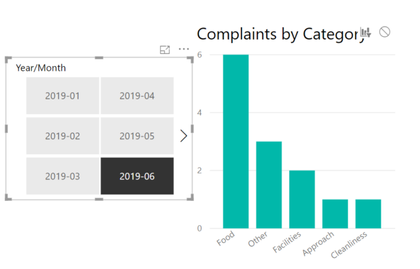
Is there a way we can do this on Power BI?
Solved! Go to Solution.


- Mark as New
- Bookmark
- Subscribe
- Mute
- Subscribe to RSS Feed
- Permalink
- Report Inappropriate Content
Hi @ajames95
Leave main data table and calendar table no relationship
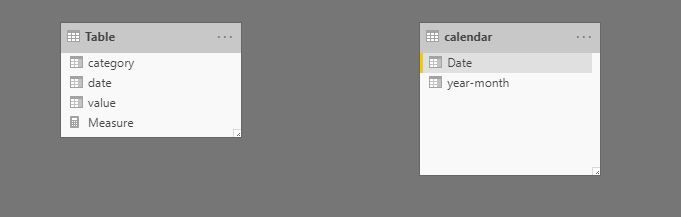
Create a measure
Measure =
VAR slectedmo =
    SELECTEDVALUE ( 'calendar'[year-month] )
VAR y_m =
    FORMAT ( MAX ( 'Table'[date] ), "yyyy-mm" )
RETURN
    CALCULATE ( SUM ( 'Table'[value] ), FILTER ( 'Table', slectedmo = y_m ) )

Best Regards
Maggie
Community Support Team _ Maggie Li
If this post helps, then please consider Accept it as the solution to help the other members find it more quickly.
- Mark as New
- Bookmark
- Subscribe
- Mute
- Subscribe to RSS Feed
- Permalink
- Report Inappropriate Content
Hi @ajames95
Leave main data table and calendar table no relationship
Create a measure
Measure =
VAR slectedmo =
    SELECTEDVALUE ( 'calendar'[year-month] )
VAR y_m =
    FORMAT ( MAX ( 'Table'[date] ), "yyyy-mm" )
RETURN
    CALCULATE ( SUM ( 'Table'[value] ), FILTER ( 'Table', slectedmo = y_m ) )
Best Regards
Maggie
Community Support Team _ Maggie Li
If this post helps, then please consider Accept it as the solution to help the other members find it more quickly.
- Mark as New
- Bookmark
- Subscribe
- Mute
- Subscribe to RSS Feed
- Permalink
- Report Inappropriate Content
Hi Maggie,
I only have one table -
1 Year/Month = FORMAT('Table'[Logged Date],"YYYY-MM")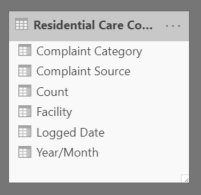
- Mark as New
- Bookmark
- Subscribe
- Mute
- Subscribe to RSS Feed
- Permalink
- Report Inappropriate Content
Hi @ajames95
There is no direct way to slove your problem, so i provide a workaround.
Please create a calendar table:
New Table-> enter this formula
calendar = ADDCOLUMNS(CALENDARAUTO(),"year-month",FORMAT([Date],"yyyy-mm"))
Then follow my methods in the previous post.
Best Regards
Maggie
Community Support Team _ Maggie Li
If this post helps, then please consider Accept it as the solution to help the other members find it more quickly.


- Mark as New
- Bookmark
- Subscribe
- Mute
- Subscribe to RSS Feed
- Permalink
- Report Inappropriate Content
Hello @ajames95
Under Axis on the category line pick the down arrow and select 'Show items with no data"
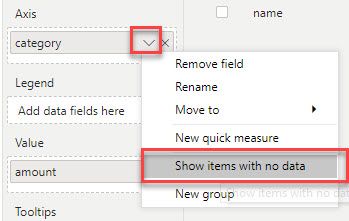
- Mark as New
- Bookmark
- Subscribe
- Mute
- Subscribe to RSS Feed
- Permalink
- Report Inappropriate Content
- Mark as New
- Bookmark
- Subscribe
- Mute
- Subscribe to RSS Feed
- Permalink
- Report Inappropriate Content
Can you share your .pbix file?

Helpful resources

Data Days 2026
Don't miss out on Data Days, June 15 through August 7. Learn Fabric, Power BI, SQL, AI and more.

Power BI Monthly Update - May 2026
Check out the May 2026 Power BI update to learn about new features.

Power BI DataViz World Championships - June 2026
A new Power BI DataViz World Championship is coming this June! Don't miss out on submitting your entry.

| User | Count |
|---|---|
| 24 | |
| 21 | |
| 20 | |
| 17 | |
| 12 |


| User | Count |
|---|---|
| 64 | |
| 55 | |
| 42 | |
| 38 | |
| 30 |


