cancel
Showing results for 
Search instead for 
Did you mean: 

Learn from the best! Meet the four finalists headed to the FINALS of the Power BI Dataviz World Championships! Register now

Reply
Anonymous
Not applicable

How to ignore RLS only

Hello.


I am stuck on a measure that ignores RLS on only one of my measures which calculates share of customers. I did research on this but could not really find something similar to mine. 


My tables are something like this:

SalesAuth from Teams:

BrandSalesRepSupervisorManager
abc11a@abc.comab@abc.comabc@abc.com
abc11b@abc.comab@abc.comabc@abc.com
abc22C@abc.comab@abc.comabc@abc.com
abc22d@abc.comcd@abc.comabc@abc.com
abc33e@abc.comcd@abc.comabc@abc.com


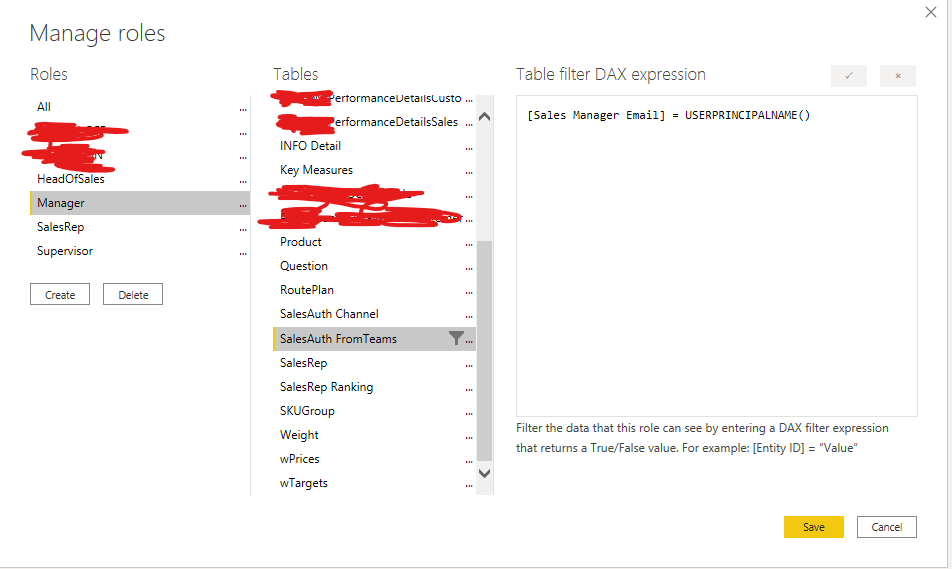
RLS is set up like this:

RLS 20210309.png


The RLS is working just fine except for one of my measures. Which calculates the total shares of a brand on customers. 

We have multiple brands all of them are showing 100% percent because the RLS is blocking the values of other brands. 

the measure is something like this: if I want to  ShareMeasure = (BrandName)/(abc11+abc22+abc33) and it is working fine without any RLS. 


What I want to do is just to ignore RLS. While being able to see each customer's subtotals of shares in a table format with this measure. 


Please let me know if you have any questions. 


P.S. This is the current exact measure:

DIVIDE(
CALCULATE([Total Actual], Answer[Question BrandID] IN {"abc11", "abc22"}),
CALCULATE([Total Actual], ALL(Answer[Question BrandID], Answer[Activity])),
0)


1 ACCEPTED SOLUTION
negi007
Community Champion
Community Champion

@Anonymous In this case you may think of creating a seperate column with no RLS and use this table to calculate share. I am not sure if there is any way you can override RLS in your data. The only way to do is to have a table or column which has no RLS restrictions and use that column or table for calculation in your dax/measure


let me know if this helps you


you can refer to below link for help as well

https://forum.enterprisedna.co/t/dax-to-ignore-row-level-security/805/6


Did I answer your question? Mark my post as a solution!
Appreciate your Kudos


Proud to be a Super User!


Follow me on linkedin

View solution in original post

1 REPLY 1
negi007
Community Champion
Community Champion

@Anonymous In this case you may think of creating a seperate column with no RLS and use this table to calculate share. I am not sure if there is any way you can override RLS in your data. The only way to do is to have a table or column which has no RLS restrictions and use that column or table for calculation in your dax/measure


let me know if this helps you


you can refer to below link for help as well

https://forum.enterprisedna.co/t/dax-to-ignore-row-level-security/805/6


Did I answer your question? Mark my post as a solution!
Appreciate your Kudos


Proud to be a Super User!


Follow me on linkedin

Helpful resources

Announcements
Power BI DataViz World Championships carousel

Power BI DataViz World Championships - June 2026

A new Power BI DataViz World Championship is coming this June! Don't miss out on submitting your entry.

Join our Fabric User Panel

Join our Fabric User Panel

Share feedback directly with Fabric product managers, participate in targeted research studies and influence the Fabric roadmap.

March Power BI Update Carousel

Power BI Community Update - March 2026

Check out the March 2026 Power BI update to learn about new features.