- Power BI forums
- Updates
- News & Announcements
- Get Help with Power BI
- Desktop
- Service
- Report Server
- Power Query
- Mobile Apps
- Developer
- DAX Commands and Tips
- Custom Visuals Development Discussion
- Health and Life Sciences
- Power BI Spanish forums
- Translated Spanish Desktop
- Power Platform Integration - Better Together!
- Power Platform Integrations (Read-only)
- Power Platform and Dynamics 365 Integrations (Read-only)
- Training and Consulting
- Instructor Led Training
- Dashboard in a Day for Women, by Women
- Galleries
- Community Connections & How-To Videos
- COVID-19 Data Stories Gallery
- Themes Gallery
- Data Stories Gallery
- R Script Showcase
- Webinars and Video Gallery
- Quick Measures Gallery
- 2021 MSBizAppsSummit Gallery
- 2020 MSBizAppsSummit Gallery
- 2019 MSBizAppsSummit Gallery
- Events
- Ideas
- Custom Visuals Ideas
- Issues
- Issues
- Events
- Upcoming Events
- Community Blog
- Power BI Community Blog
- Custom Visuals Community Blog
- Community Support
- Community Accounts & Registration
- Using the Community
- Community Feedback
Register now to learn Fabric in free live sessions led by the best Microsoft experts. From Apr 16 to May 9, in English and Spanish.
- Power BI forums
- Forums
- Get Help with Power BI
- Desktop
- Re: How to identify new and Old Txn based on Previ...
- Subscribe to RSS Feed
- Mark Topic as New
- Mark Topic as Read
- Float this Topic for Current User
- Bookmark
- Subscribe
- Printer Friendly Page


- Mark as New
- Bookmark
- Subscribe
- Mute
- Subscribe to RSS Feed
- Permalink
- Report Inappropriate Content
How to identify new and Old Txn based on Previous year data ?
Hi
I need your help to create a calculated column.
Refer to the below sample data I have year-wise txn I want to categorize all txn based on condition. if any ref no exists in last year txn then mark it as "OLD" Else "NEW" in the Status field . (refer to desired results )
| Ref No_ | FY | Status (desired results) |
| 011872 | FY-20 | NEW |
| 006104 | FY-20 | NEW |
| 146318 | FY-20 | NEW |
| 002702 | FY-20 | NEW |
| 001449 | FY-21 | NEW |
| 014478 | FY-21 | NEW |
| 006104 | FY-21 | OLD |
| 016876 | FY-21 | NEW |
| 002702 | FY-21 | OLD |
| 134890 | FY-21 | NEW |
| 000143 | FY-21 | NEW |
| 008019 | FY-21 | NEW |
| 106009 | FY-22 | NEW |
| 083291 | FY-22 | NEW |
| 000143 | FY-22 | OLD |
| 002906 | FY-22 | NEW |
| 000292 | FY-22 | NEW |
| 001449 | FY-22 | OLD |
| 006817 | FY-22 | NEW |
| 014478 | FY-22 | OLD |
Solved! Go to Solution.


- Mark as New
- Bookmark
- Subscribe
- Mute
- Subscribe to RSS Feed
- Permalink
- Report Inappropriate Content
You didn't specify if you wanted a measure or a calculated column. Here is a calculated column.
Status =
var r = 'Table'[Ref  No_]
var f = 'Table'[FY]
var c = CALCULATE(COUNTROWS('Table'),All('Table'),'Table'[Ref  No_]=r,'Table'[FY]<f)
return if(c=0,"New","Old")
- Mark as New
- Bookmark
- Subscribe
- Mute
- Subscribe to RSS Feed
- Permalink
- Report Inappropriate Content
Hi,
This calculated column formula works
=if(CALCULATE(COUNTROWS(Data),FILTER(data,Data[Ref No_]=EARLIER(Data[Ref No_])&&Data[FY]<EARLIER(Data[FY])))=1,"Old","New")Hope this helps.
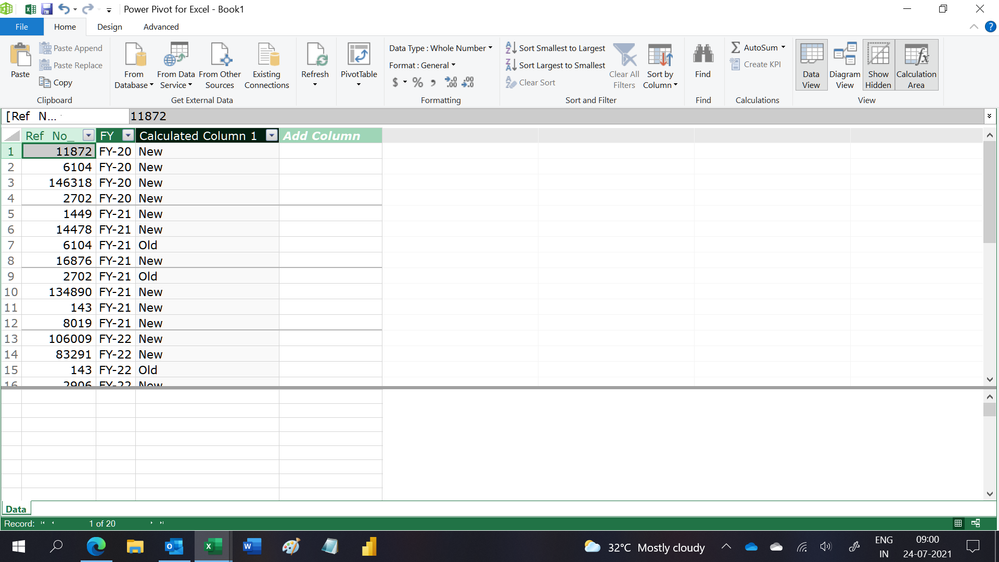
Regards,
Ashish Mathur
http://www.ashishmathur.com
https://www.linkedin.com/in/excelenthusiasts/
- Mark as New
- Bookmark
- Subscribe
- Mute
- Subscribe to RSS Feed
- Permalink
- Report Inappropriate Content
Hi,
This calculated column formula works
=if(CALCULATE(COUNTROWS(Data),FILTER(data,Data[Ref No_]=EARLIER(Data[Ref No_])&&Data[FY]<EARLIER(Data[FY])))=1,"Old","New")Hope this helps.
Regards,
Ashish Mathur
http://www.ashishmathur.com
https://www.linkedin.com/in/excelenthusiasts/
- Mark as New
- Bookmark
- Subscribe
- Mute
- Subscribe to RSS Feed
- Permalink
- Report Inappropriate Content
What if there is more than one previous row?
- Mark as New
- Bookmark
- Subscribe
- Mute
- Subscribe to RSS Feed
- Permalink
- Report Inappropriate Content
Change =1 to >=1
Regards,
Ashish Mathur
http://www.ashishmathur.com
https://www.linkedin.com/in/excelenthusiasts/


- Mark as New
- Bookmark
- Subscribe
- Mute
- Subscribe to RSS Feed
- Permalink
- Report Inappropriate Content
Hi @lavdeepk ,
if you need a measure you can do it like this:

Status =
VAR _Min =
    CALCULATE ( MIN ( 'Table'[FY] ), ALLEXCEPT ( 'Table', 'Table'[Ref  No_] ) )
RETURN
    IF ( MIN ( 'Table'[FY] ) = _Min, "New", "Old" )
With kind regards from the town where the legend of the 'Pied Piper of Hamelin' is at home
FrankAT (Proud to be a Datanaut)
- Mark as New
- Bookmark
- Subscribe
- Mute
- Subscribe to RSS Feed
- Permalink
- Report Inappropriate Content
You didn't specify if you wanted a measure or a calculated column. Here is a calculated column.
Status =
var r = 'Table'[Ref  No_]
var f = 'Table'[FY]
var c = CALCULATE(COUNTROWS('Table'),All('Table'),'Table'[Ref  No_]=r,'Table'[FY]<f)
return if(c=0,"New","Old")
Helpful resources

Microsoft Fabric Learn Together
Covering the world! 9:00-10:30 AM Sydney, 4:00-5:30 PM CET (Paris/Berlin), 7:00-8:30 PM Mexico City

Power BI Monthly Update - April 2024
Check out the April 2024 Power BI update to learn about new features.

Fabric Community Update - April 2024
Find out what's new and trending in the Fabric Community.

| User | Count |
|---|---|
| 106 | |
| 105 | |
| 80 | |
| 68 | |
| 61 |


| User | Count |
|---|---|
| 143 | |
| 104 | |
| 103 | |
| 82 | |
| 70 |


