cancel
Showing results for 
Search instead for 
Did you mean: 

Get Fabric Certified for FREE during Fabric Data Days. Don't miss your chance! Request now

Reply
admin11
Memorable Member
Memorable Member

How to globally set permission for access sharepoint folder ?

Hi All

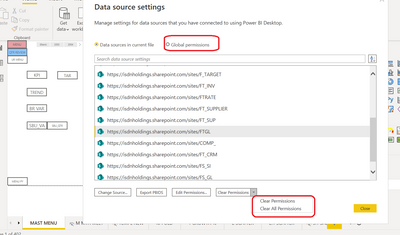
I have more then 20 sharepoint folder need to access in PBI , I need to gobally set all permission access for sharepoint folder data , instead of set one by one . using microsofte email and PW. 

Hope some one can share with me how to do it at one go. 

admin11_1-1646444189651.png

As i after set to use particular ID , i unable to know.


Paul

1 ACCEPTED SOLUTION
amitchandak
Super User
Super User

@admin11 , You have already created different sources, I think you need to change them one by one

Share with Power BI Enthusiasts: Full Power BI Video (20 Hours) YouTube
Microsoft Fabric Series 60+ Videos YouTube
Microsoft Fabric Hindi End to End YouTube

View solution in original post

3 REPLIES 3
amitchandak
Super User
Super User

@admin11 , You have already created different sources, I think you need to change them one by one

Share with Power BI Enthusiasts: Full Power BI Video (20 Hours) YouTube
Microsoft Fabric Series 60+ Videos YouTube
Microsoft Fabric Hindi End to End YouTube

@amitchandak 

https://community.powerbi.com/t5/Desktop/My-PBI-unable-refresh-what-else-I-should-try/m-p/2376958#M8...

I am very happy that , i just manage to figure out to solve my refresh issue.

Paul

@amitchandak 

Thankk you 

Helpful resources

Announcements
Fabric Data Days Carousel

Fabric Data Days

Advance your Data & AI career with 50 days of live learning, contests, hands-on challenges, study groups & certifications and more!

October Power BI Update Carousel

Power BI Monthly Update - October 2025

Check out the October 2025 Power BI update to learn about new features.

FabCon Atlanta 2026 carousel

FabCon Atlanta 2026

Join us at FabCon Atlanta, March 16-20, for the ultimate Fabric, Power BI, AI and SQL community-led event. Save $200 with code FABCOMM.

Top Solution Authors