cancel
Showing results for 
Search instead for 
Did you mean: 

The Power BI Data Visualization World Championships is back! Get ahead of the game and start preparing now! Learn more

Reply
Anonymous
Not applicable

How to get the relative date this year and a year ago

Hi everyone,

Hope you are all well.

I used the following two calculations to get my Date Numbered column:


MaxDate = CALCULATE(MAX('Table'[Date]),ALL('Table'[Date]))
 
DateNumbered = CALCULATE(DATEDIFF(SELECTEDVALUE('Table'[Date]),[MaxDate],DAY)+1)
 
It worked fine when I just had 2020 dates but now I have 2020 & 2019.
 
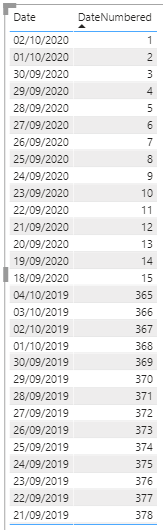
I need the table below to do 1-15 for 2019 and 2020 does anyone have any ideas?
 
Thanks in advance!
 
Lauren.


Untitled.png

1 ACCEPTED SOLUTION
DataZoe
Microsoft Employee
Microsoft Employee

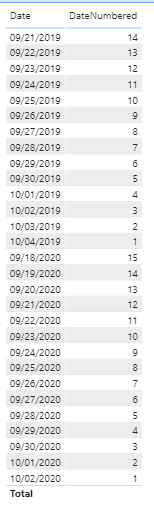
@Anonymous I think this measure may give you the correct result (edited to change the switch year to SELECTEDVALUE() instead of MIN())


DateNumbered =
VAR _maxDate_2020 =
    CALCULATE (
        MAX ( 'Table'[Date] ),
        ALL ( 'Table'[Date] ),
        YEAR ( 'Table'[Date] ) = 2020
    )
VAR _maxDate_2019 =
    CALCULATE (
        MAX ( 'Table'[Date] ),
        ALL ( 'Table'[Date] ),
        YEAR ( 'Table'[Date] ) = 2019
    )
VAR _dayspast =
    SWITCH (
        YEAR ( SELECTEDVALUE ( 'Table'[Date] ) ),
        2020,
            CALCULATE (
                DATEDIFF ( SELECTEDVALUE ( 'Table'[Date] )_maxDate_2020DAY ) + 1
            ),
        2019,
            CALCULATE (
                DATEDIFF ( SELECTEDVALUE ( 'Table'[Date] )_maxDate_2019DAY ) + 1
            ),
        BLANK ()
    )
RETURN
    _dayspast


DataZoe_0-1601924767867.png


Respectfully,
Zoe Douglas (DataZoe)


Follow me on LinkedIn at https://www.linkedin.com/in/zoedouglas-data
See my reports and blog at https://www.datazoepowerbi.com/

View solution in original post

4 REPLIES 4
DataZoe
Microsoft Employee
Microsoft Employee

@Anonymous I think this measure may give you the correct result (edited to change the switch year to SELECTEDVALUE() instead of MIN())


DateNumbered =
VAR _maxDate_2020 =
    CALCULATE (
        MAX ( 'Table'[Date] ),
        ALL ( 'Table'[Date] ),
        YEAR ( 'Table'[Date] ) = 2020
    )
VAR _maxDate_2019 =
    CALCULATE (
        MAX ( 'Table'[Date] ),
        ALL ( 'Table'[Date] ),
        YEAR ( 'Table'[Date] ) = 2019
    )
VAR _dayspast =
    SWITCH (
        YEAR ( SELECTEDVALUE ( 'Table'[Date] ) ),
        2020,
            CALCULATE (
                DATEDIFF ( SELECTEDVALUE ( 'Table'[Date] )_maxDate_2020DAY ) + 1
            ),
        2019,
            CALCULATE (
                DATEDIFF ( SELECTEDVALUE ( 'Table'[Date] )_maxDate_2019DAY ) + 1
            ),
        BLANK ()
    )
RETURN
    _dayspast


DataZoe_0-1601924767867.png


Respectfully,
Zoe Douglas (DataZoe)


Follow me on LinkedIn at https://www.linkedin.com/in/zoedouglas-data
See my reports and blog at https://www.datazoepowerbi.com/

Anonymous
Not applicable

@DataZoe that has worked perfectly thank you!

amitchandak
Super User
Super User

@Anonymous , Not very clear, Try like


MaxDate =
var _max CALCULATE(MAX('Table'[Date]),ALL('Table'[Date]))
return
date(year(_max)-1,month(_max), day(_max))

DateNumbered = CALCULATE(DATEDIFF(SELECTEDVALUE('Table'[Date]),[MaxDate],DAY)+1)

Share with Power BI Enthusiasts: Full Power BI Video (20 Hours) YouTube
Microsoft Fabric Series 60+ Videos YouTube
Microsoft Fabric Hindi End to End YouTube
Anonymous
Not applicable

Hello @amitchandak ,

Thank you for your quick response and your help.

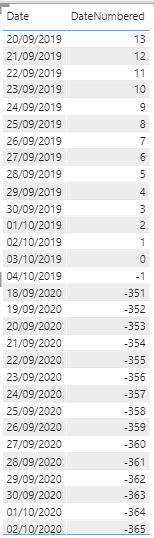
I am now getting the following:

Untitled2.png

Helpful resources

Announcements
November Power BI Update Carousel

Power BI Monthly Update - November 2025

Check out the November 2025 Power BI update to learn about new features.

Fabric Data Days Carousel

Fabric Data Days

Advance your Data & AI career with 50 days of live learning, contests, hands-on challenges, study groups & certifications and more!

FabCon Atlanta 2026 carousel

FabCon Atlanta 2026

Join us at FabCon Atlanta, March 16-20, for the ultimate Fabric, Power BI, AI and SQL community-led event. Save $200 with code FABCOMM.

Top Kudoed Authors