Join us at FabCon Atlanta from March 16 - 20, 2026, for the ultimate Fabric, Power BI, AI and SQL community-led event. Save $200 with code FABCOMM.
Register now!The Power BI Data Visualization World Championships is back! Get ahead of the game and start preparing now! Learn more
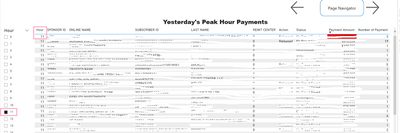
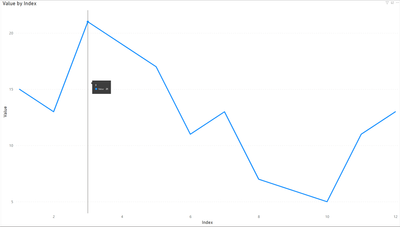
I have the following 2 pages in my report. The 1st page has 2 line charts for Payments by hour but my focus is on 2nd line chart. The 2nd page is a table to list data plus an hour slicer on left. My question is, how may I select target data at 11 in page 2 as shown in 2nd screenshot after double click at 11am in 2nd line chart at page 1? It must be some kind of drill-through or drill-down.
Thanks.
Hi @bergen288 ,
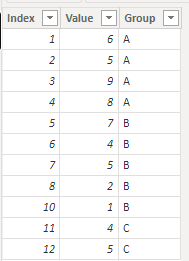
I created some data:
Here are the steps you can follow:
1. Create measure.
Value_Measure =
SUMX(ALLSELECTED('Table'),'Table'[Value])
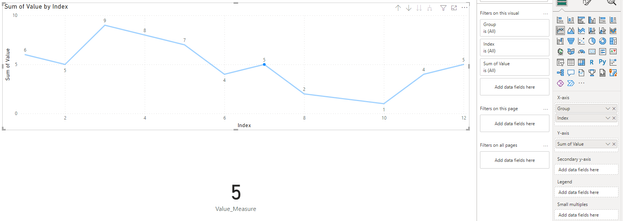
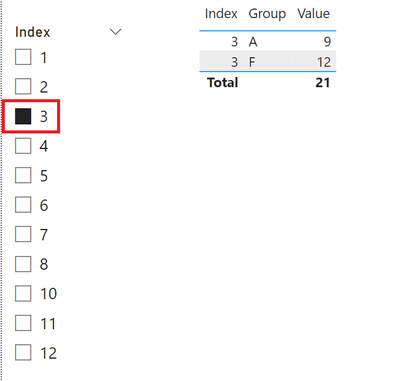
2. Result:
Click the value of Visual, click which point to display the corresponding data back, will not be affected by the hierarchy:
Best Regards,
Liu Yang
If this post helps, then please consider Accept it as the solution to help the other members find it more quickly
Check out the November 2025 Power BI update to learn about new features.
Advance your Data & AI career with 50 days of live learning, contests, hands-on challenges, study groups & certifications and more!