Join us at FabCon Atlanta from March 16 - 20, 2026, for the ultimate Fabric, Power BI, AI and SQL community-led event. Save $200 with code FABCOMM.
Register now!The Power BI Data Visualization World Championships is back! Get ahead of the game and start preparing now! Learn more
Hi,
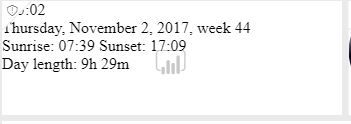
I made this dashboard and I'm using some html widgets (like a clock). But the tile is still showing the power bi logo (and the clock is not nicely centered). Does anyone know how to get this nice?
html code:
<a href="https://time.is/Amsterdam" id="time_is_link" rel="nofollow" style="font-size:24px">:</a>
<span id="Amsterdam_z700" style="font-size:24px"></span>
<script src="//widget.time.is/en.js"></script>
<script>
time_is_widget.init({Amsterdam_z700:{template:"TIME<br>DATE<br>SUN", time_format:"hours:minutes", date_format:"dayname, monthname dnum, year, week", sun_format:"Sunrise: srhour:srminute Sunset: sshour:ssminute<br>Day length: dlhoursh dlminutesm", coords:"52.3740300,4.8896900"}});
</script>
Solved! Go to Solution.
@Anonymous
Well, anyhow I don't see the water mark in my test, I just copy the HTML to the web content tile, is this the same with your case?
As to "not nicely centered", the web content tile is just a <iframe> element, the reason is that the text in the embedded html is not nicely centered, Power BI can not fix this.
@Anonymous
Well, anyhow I don't see the water mark in my test, I just copy the HTML to the web content tile, is this the same with your case?
As to "not nicely centered", the web content tile is just a <iframe> element, the reason is that the text in the embedded html is not nicely centered, Power BI can not fix this.
The Power BI Data Visualization World Championships is back! Get ahead of the game and start preparing now!
| User | Count |
|---|---|
| 38 | |
| 38 | |
| 37 | |
| 28 | |
| 28 |
| User | Count |
|---|---|
| 124 | |
| 89 | |
| 73 | |
| 66 | |
| 65 |