Join us at FabCon Atlanta from March 16 - 20, 2026, for the ultimate Fabric, Power BI, AI and SQL community-led event. Save $200 with code FABCOMM.
Register now!The Power BI Data Visualization World Championships is back! Get ahead of the game and start preparing now! Learn more
I'm in a bit of a pickle. I saved a dummy PBIX as reference in https://1drv.ms/u/s!Auva6_FSOsP03BrdzUVDIFr-KvJy?e=z3bh5K
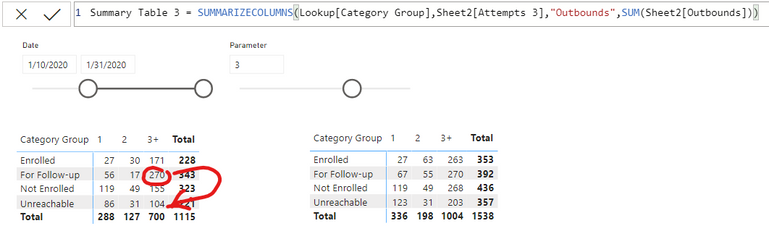
In the report page, you'll see 3 tables. Top half shows 2 tables when the parameter is a 3. Let's focus there. Now on to my image...
I'd like to have the "270" (which is follow-up calls with call attempts of 3+), be taken out of that cell, and be added to the "Unreachable" row instead. I figured I can just create a new table, and then just do my manipulations from there, my problem is that, I can't figure out how to make filters relevant on the source tables before they get summarized. Any nudge in the right direction would be appreciated.
TLDR: how to make page view filters affect your SUMMARIZECOLUMNS function?
Solved! Go to Solution.
Add this calculated column to Sheet2
For Summary =
IF (
RELATED ( Lookup[Category Group] ) = "For Follow-up"
&& Sheet2[Attempts 3] = "3+",
"Unreachable",
RELATED ( Lookup[Category Group] )
)
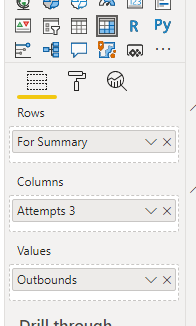
Then switch out the axis label in your matrix from Category Group - to "For Summary" (or what ever you want to call it)
You don't need the summarized tables.
You 'could' create another Category Group reference table and create a relationship to the "For Summary" column. You would get the same result.
Add this calculated column to Sheet2
For Summary =
IF (
RELATED ( Lookup[Category Group] ) = "For Follow-up"
&& Sheet2[Attempts 3] = "3+",
"Unreachable",
RELATED ( Lookup[Category Group] )
)
Then switch out the axis label in your matrix from Category Group - to "For Summary" (or what ever you want to call it)
You don't need the summarized tables.
You 'could' create another Category Group reference table and create a relationship to the "For Summary" column. You would get the same result.
Wow. Thank you so much for the simple solution. I swear I spent an embrassing amount of time trying to resolve this on my own yesterday. Appreciate the assistance!
Here's some pseudo code.
IF(SELECTEDVALUE([Parameter])=3 && SELECTEDVALUE([CategoryGroup])="3+",<do one thing>,<do the other thing>)
Note that this will mess with your totals, so you may have to employ HASONEVALUE() as needed.
The Power BI Data Visualization World Championships is back! Get ahead of the game and start preparing now!
Check out the November 2025 Power BI update to learn about new features.
| User | Count |
|---|---|
| 59 | |
| 43 | |
| 42 | |
| 23 | |
| 17 |
| User | Count |
|---|---|
| 190 | |
| 122 | |
| 96 | |
| 66 | |
| 47 |