Join us at FabCon Atlanta from March 16 - 20, 2026, for the ultimate Fabric, Power BI, AI and SQL community-led event. Save $200 with code FABCOMM.
Register now!View all the Fabric Data Days sessions on demand. View schedule
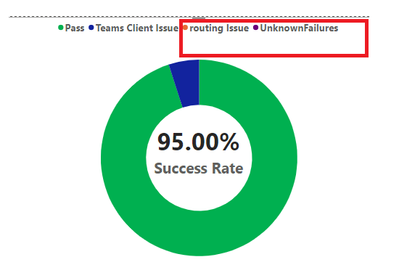
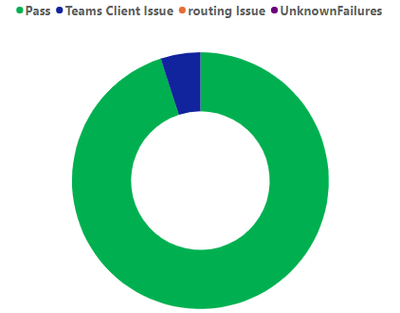
I have generated below donut visual. But it showing for No data fields also. I want to show legends only for available Donut slicec.
Please help me to do it.
Solved! Go to Solution.
Here is a workaround you can try:
First in Power Query Editor, select all four columns and click on Unpivot Columns. Change column data types. Apply the change to Power BI Desktop.
Then create a Donut chart. Put Attribute column in legend and Value (Sum aggregation) in values. Then filter Sum of Value to show items when the value is greater than 0.
Best Regards,
Community Support Team _ Jing
If this post helps, please Accept it as Solution to help other members find it. Highly appreciate your Kudos!
Can you share sample data and sample output in table format? Or a sample pbix after removing sensitive data.
@Mahesh0016 Below is sample data
| pass | unknownFailure | clientIssues | routingIssues |
| 20 | 0 | 4 | 0 |
Donut should visualize above 4 column values and as legend all column names displayed if all on Donut if values non-zero.
In below donut, only pass and clien issue have values and displayed on donut.
No values for unknownFailure and routingIssues So not displayed on donut but shown in legends. Also should not display in legends.
Thank you!
Here is a workaround you can try:
First in Power Query Editor, select all four columns and click on Unpivot Columns. Change column data types. Apply the change to Power BI Desktop.
Then create a Donut chart. Put Attribute column in legend and Value (Sum aggregation) in values. Then filter Sum of Value to show items when the value is greater than 0.
Best Regards,
Community Support Team _ Jing
If this post helps, please Accept it as Solution to help other members find it. Highly appreciate your Kudos!
Hello @balajiratnala6 ,
Legeng Column uncheck show item with no data.
if it is helpful for you accepted as a solutions.
Thank you!
Check out the November 2025 Power BI update to learn about new features.
Advance your Data & AI career with 50 days of live learning, contests, hands-on challenges, study groups & certifications and more!