cancel
Showing results for 
Search instead for 
Did you mean: 

We've captured the moments from FabCon & SQLCon that everyone is talking about, and we are bringing them to the community, live and on-demand. Starts on April 14th. Register now

Reply
almagir
Regular Visitor

How to enter a parameter into the sql statement

Hi,

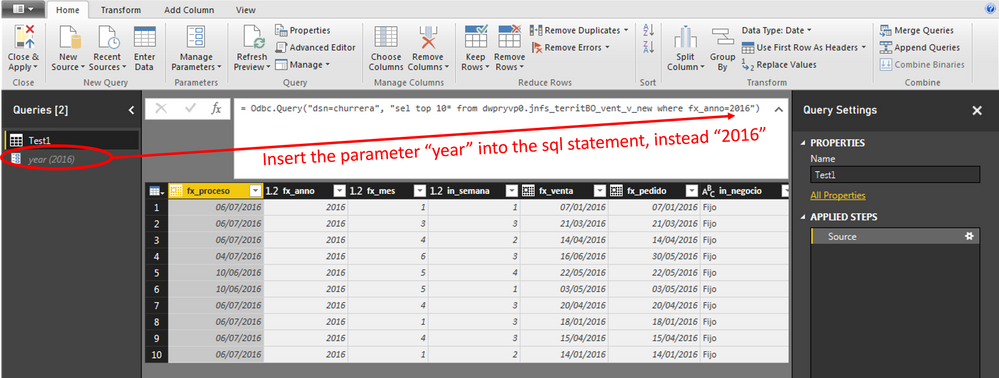
I've this query with an sql statement:
= Odbc.Query("dsn=churrera", "sel top 10* from dwpryvp0.jnfs_territBO_vent_v_new where fx_anno=2016")

I would like to insert the year (2016) through a parameter.

I've created the parameter "year(2016)" but I don't know how to define it in the sql statement.


Imagen2.png


Thanks in advance

1 ACCEPTED SOLUTION
radpir
Resolver II
Resolver II

hi almagir,


try the following:

= Odbc.Query("dsn=churrera", "sel top 10* from dwpryvp0.jnfs_territBO_vent_v_new where fx_anno=" & year)


regards,

konrad

View solution in original post

2 REPLIES 2
radpir
Resolver II
Resolver II

hi almagir,


try the following:

= Odbc.Query("dsn=churrera", "sel top 10* from dwpryvp0.jnfs_territBO_vent_v_new where fx_anno=" & year)


regards,

konrad

Hi Konrad,


It has worked as you told me.


I've had to convert the number 2016 to text.


Thanks for your help.


Regards

Helpful resources

Announcements
New to Fabric survey Carousel

New to Fabric Survey

If you have recently started exploring Fabric, we'd love to hear how it's going. Your feedback can help with product improvements.

Power BI DataViz World Championships carousel

Power BI DataViz World Championships - June 2026

A new Power BI DataViz World Championship is coming this June! Don't miss out on submitting your entry.

Join our Fabric User Panel

Join our Fabric User Panel

Share feedback directly with Fabric product managers, participate in targeted research studies and influence the Fabric roadmap.

March Power BI Update Carousel

Power BI Community Update - March 2026

Check out the March 2026 Power BI update to learn about new features.