Join us at FabCon Atlanta from March 16 - 20, 2026, for the ultimate Fabric, Power BI, AI and SQL community-led event. Save $200 with code FABCOMM.
Register now!The Power BI Data Visualization World Championships is back! Get ahead of the game and start preparing now! Learn more
I am trying to use the Group feature on PBI desktop; however, the icon is disabled. How do I enable it?
Thank you
Hi @EZgrafton,
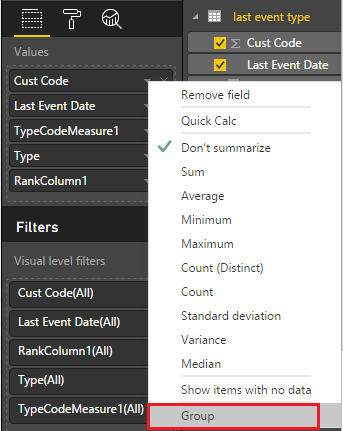
Do you mean the Group feature as below image shows?
If so, this feature is supported after Oct update. And this Group selection is only available for columns without any aggregation (don't summarize). If I have something misunderstood, please describe more clearly about what is the Group feature that you want.
Reference: Column Grouping In PowerBI
Thanks,
Yuliana Gu
Can you describe more about the issue u face.
Send also the sample dataset which u r using
The Power BI Data Visualization World Championships is back! Get ahead of the game and start preparing now!
| User | Count |
|---|---|
| 38 | |
| 38 | |
| 37 | |
| 28 | |
| 28 |
| User | Count |
|---|---|
| 124 | |
| 89 | |
| 73 | |
| 66 | |
| 65 |