Join us at FabCon Atlanta from March 16 - 20, 2026, for the ultimate Fabric, Power BI, AI and SQL community-led event. Save $200 with code FABCOMM.
Register now!Get Fabric Certified for FREE during Fabric Data Days. Don't miss your chance! Request now
Hello,
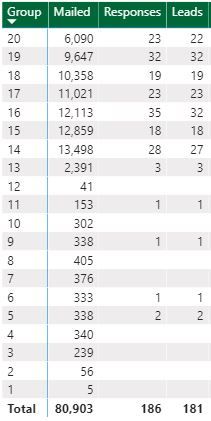
I have a matrix with 20 rows, each row representing a different group of people I've mailed. The mailed column is simply the total number of people mailed in each group. At the bottom of the matrix is the total number of mailed items. I know I can create a simple visual filter using the Mailed column and specify something like "Show items when the value is greater than 5000". However, I don't want to filter based on a constant. I want to display rows if the number of items mailed is greater than a percentage of the TOTAL because sometimes I mail 50,000 units to the 20 groups, and sometimes I might mail 400,000 units.
So my question is in two parts:
Thank you.
Table with 20 rows
Solved! Go to Solution.
Finally here is the M code for the Percent Filter Table (just a table with .00 to .99):
let
Source = Table.FromRows(Json.Document(Binary.Decompress(Binary.FromText("i45WMlSK1YlWMgKTxmDSBEyagkkzMGkOJi3ApCWYNDRQio0FAA==", BinaryEncoding.Base64), Compression.Deflate)), let _t = ((type nullable text) meta [Serialized.Text = true]) in type table [Column1 = _t]),
#"Changed Type" = Table.TransformColumnTypes(Source,{{"Column1", Int64.Type}}),
#"Divided Column" = Table.TransformColumns(#"Changed Type", {{"Column1", each _ / 10, type number}}),
#"Added Custom" = Table.AddColumn(#"Divided Column", "Custom", each 10),
#"Added Custom1" = Table.AddColumn(#"Added Custom", "Custom.1", each List.Repeat( {[Column1] }, [Custom])),
#"Expanded Custom.1" = Table.ExpandListColumn(#"Added Custom1", "Custom.1"),
#"Added Index" = Table.AddIndexColumn(#"Expanded Custom.1", "Index", 0, 1, Int64.Type),
#"Divided Column1" = Table.TransformColumns(#"Added Index", {{"Index", each _ / 100, type number}}),
#"Removed Columns" = Table.RemoveColumns(#"Divided Column1",{"Column1", "Custom", "Custom.1"}),
#"Duplicated Column" = Table.DuplicateColumn(#"Removed Columns", "Index", "Index - Copy"),
#"Changed Type1" = Table.TransformColumnTypes(#"Duplicated Column",{{"Index - Copy", type text}})
in
#"Changed Type1"
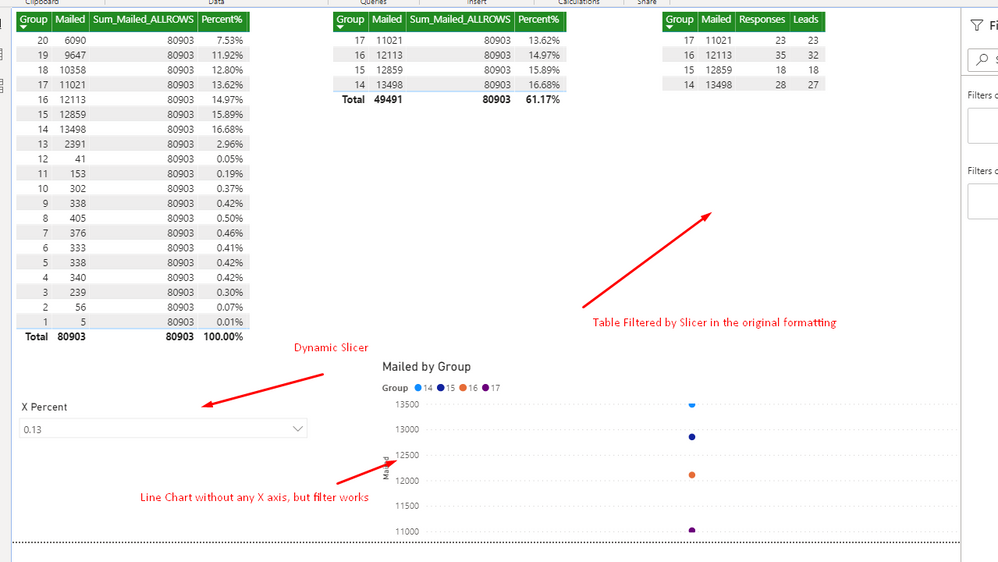
With the above table, you can add a slicer that is searchable using the text version of the column and dynamically changes how the table is filtered based on any decimal value(or percent if you change the column type)within the table.
Picture of finished product:
Hope this helps.
Kudos to @AlB for the SQLBI resource great stuff and very similiar to my proposed solution.
Finally here is the M code for the Percent Filter Table (just a table with .00 to .99):
let
Source = Table.FromRows(Json.Document(Binary.Decompress(Binary.FromText("i45WMlSK1YlWMgKTxmDSBEyagkkzMGkOJi3ApCWYNDRQio0FAA==", BinaryEncoding.Base64), Compression.Deflate)), let _t = ((type nullable text) meta [Serialized.Text = true]) in type table [Column1 = _t]),
#"Changed Type" = Table.TransformColumnTypes(Source,{{"Column1", Int64.Type}}),
#"Divided Column" = Table.TransformColumns(#"Changed Type", {{"Column1", each _ / 10, type number}}),
#"Added Custom" = Table.AddColumn(#"Divided Column", "Custom", each 10),
#"Added Custom1" = Table.AddColumn(#"Added Custom", "Custom.1", each List.Repeat( {[Column1] }, [Custom])),
#"Expanded Custom.1" = Table.ExpandListColumn(#"Added Custom1", "Custom.1"),
#"Added Index" = Table.AddIndexColumn(#"Expanded Custom.1", "Index", 0, 1, Int64.Type),
#"Divided Column1" = Table.TransformColumns(#"Added Index", {{"Index", each _ / 100, type number}}),
#"Removed Columns" = Table.RemoveColumns(#"Divided Column1",{"Column1", "Custom", "Custom.1"}),
#"Duplicated Column" = Table.DuplicateColumn(#"Removed Columns", "Index", "Index - Copy"),
#"Changed Type1" = Table.TransformColumnTypes(#"Duplicated Column",{{"Index - Copy", type text}})
in
#"Changed Type1"
With the above table, you can add a slicer that is searchable using the text version of the column and dynamically changes how the table is filtered based on any decimal value(or percent if you change the column type)within the table.
Picture of finished product:
Hope this helps.
Kudos to @AlB for the SQLBI resource great stuff and very similiar to my proposed solution.
Hi @Anonymous
You can create a measure that returns for instance a 1 when the row is to be shown and a 0 when it's not. Then use that measure as filter for both visuals. Check this out:
https://www.sqlbi.com/articles/applying-a-measure-filter-in-power-bi/
Please mark the question solved when done and consider giving kudos if posts are helpful.
Contact me privately for support with any larger-scale BI needs, tutoring, etc.
Cheers
Check out the November 2025 Power BI update to learn about new features.
Advance your Data & AI career with 50 days of live learning, contests, hands-on challenges, study groups & certifications and more!