cancel
Showing results for 
Search instead for 
Did you mean: 

The Power BI Data Visualization World Championships is back! Get ahead of the game and start preparing now! Learn more

Reply
Anonymous
Not applicable

How to display rolling 12 weeks in order, e.g. week 42- 1?

Need current stacked column chart to display week 42 - 1, week 43-2, etc.  a rolling week display.  X axis is week. 


Data set is:

Week  Year    Expected TAT day    % On Time

42        2018      1                               95.00%

43        2018      1

44

...

1          2019       1

1 ACCEPTED SOLUTION
ryan_mayu
Super User
Super User

@Anonymous 


Do you have a datetime table? If you have, I think you can use dateadd formula to find out 12 weeks ago or 12 weeks later's value. Then you can get table like below. Then you can drag two values and week 1 is next to week 42, week 2 is next to 43.


Thanks


weeksvalue12 weeks later value
4214
4325
4436


Did I answer your question? Mark my post as a solution!

Proud to be a Super User!


View solution in original post

2 REPLIES 2
v-yulgu-msft
Microsoft Employee
Microsoft Employee

Hi @Anonymous,


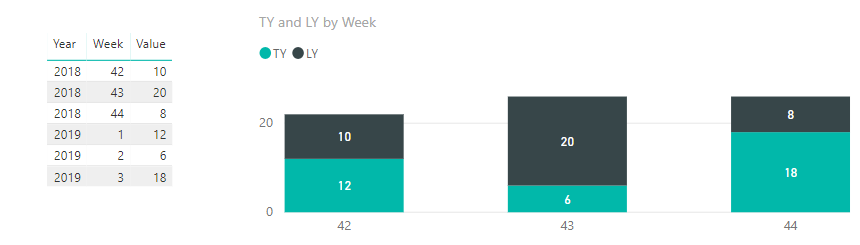
If below image is what you want, then, please refer to the measures. If not, please show us your desired output, as mentioned in this link.


1.PNG

TY =
CALCULATE (
    SUM ( 'Week Value'[Value] ),
    FILTER (
        ALLSELECTED ( 'Week Value' ),
        'Week Value'[Year]
            = SELECTEDVALUE ( 'Week Value'[Year] ) + 1
            && 'Week Value'[Week]
                = SELECTEDVALUE ( 'Week Value'[Week] ) - 41
    )
)

LY =
CALCULATE (
    SUM ( 'Week Value'[Value] ),
    FILTER (
        ALLEXCEPT ( 'Week Value', 'Week Value'[Week] ),
        'Week Value'[Year]
            = YEAR ( TODAY () ) - 1
    )
)

Best regards,

Yuliana Gu

Community Support Team _ Yuliana Gu
If this post helps, then please consider Accept it as the solution to help the other members find it more quickly.
ryan_mayu
Super User
Super User

@Anonymous 


Do you have a datetime table? If you have, I think you can use dateadd formula to find out 12 weeks ago or 12 weeks later's value. Then you can get table like below. Then you can drag two values and week 1 is next to week 42, week 2 is next to 43.


Thanks


weeksvalue12 weeks later value
4214
4325
4436


Did I answer your question? Mark my post as a solution!

Proud to be a Super User!


Helpful resources

Announcements
Power BI DataViz World Championships

Power BI Dataviz World Championships

The Power BI Data Visualization World Championships is back! Get ahead of the game and start preparing now!

November Power BI Update Carousel

Power BI Monthly Update - November 2025

Check out the November 2025 Power BI update to learn about new features.

FabCon Atlanta 2026 carousel

FabCon Atlanta 2026

Join us at FabCon Atlanta, March 16-20, for the ultimate Fabric, Power BI, AI and SQL community-led event. Save $200 with code FABCOMM.