Hi,
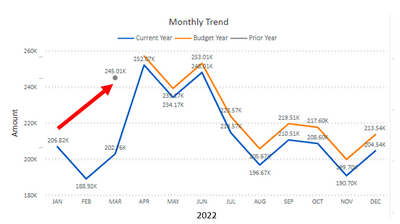
I am trying to plot a line on this line chart for Prior Year (same month previous year). But it doesn’t work on this chart. I just get 1 dot for the filter i choose. It is suppost to exclude the month filter and give the whole year plot. My Expense & Budget data is aggregated monthly, i do not have daily data.
If I use table, i should get the whole list but i didn't.
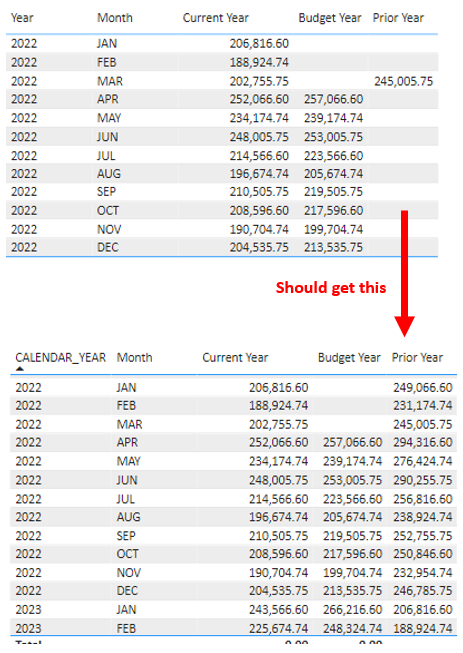
My formula are chart are
- Current Year = CALCULATE([Expenses MTD],REMOVEFILTERS('BIDWH BC_DIM_BFIN_FISCAL_PERIOD'[PERIOD_NAME_SHORT]))
- Budget Year = CALCULATE([Budget MTD],REMOVEFILTERS('BIDWH BC_DIM_BFIN_FISCAL_PERIOD'[PERIOD_NAME_SHORT]))
- Prior Year = CALCULATE([Expenses MTD], PARALLELPERIOD('BIDWH BC_DIM_DATE'[DATE],-12,MONTH), REMOVEFILTERS('BIDWH BC_DIM_BFIN_FISCAL_PERIOD'[PERIOD_NAME_SHORT]), 'BIDWH BC_DIM_BFIN_FISCAL_PERIOD'[FISCAL_YEAR] = SELECTEDVALUE('BIDWH BC_DIM_BFIN_FISCAL_PERIOD'[FISCAL_YEAR]) - 1)
Other related formula are
- Expenses = SUM('BIDWH BFIN_FACT_GL_ACCOUNT'[ACCOUNT_AMOUNT])
- Expenses MTD = TOTALMTD([Expenses],'BIDWH BC_DIM_DATE'[DATE])
- Budget = SUM('BIDWH BFIN_FACT_GL_ACCOUNT'[BUDGET_AMOUNT])
- Budget MTD = TOTALMTD([Budget],'BIDWH BC_DIM_DATE'[DATE])
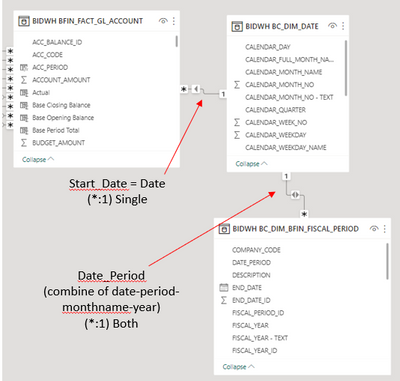
This is the design of the data model
Thank you.


