cancel
Showing results for 
Search instead for 
Did you mean: 

The Power BI Data Visualization World Championships is back! Get ahead of the game and start preparing now! Learn more

Reply
Anonymous
Not applicable

How to create rolling averages over non-consecutive dates?

Hi community,
I 'm relatively new to power BI and I 'm stuck with rolling averages.
I would like to create a 3-month rolling average starting from month-1 until month+1.
the built-in quick measure works fine, BUT it includes ALL months in my calendar.
My purpose would be to "skip" months for which I don't have data in my main table.

Rolling average quick measure:

WB rolling average =
IF(
ISFILTERED('Calendar CMP'[Date]),
ERROR("Time intelligence quick measures can only be grouped or filtered by the Power BI-provided date hierarchy or primary date column."),
VAR __LAST_DATE = ENDOFMONTH('Calendar CMP'[Date].[Date])
VAR __DATE_PERIOD =
DATESBETWEEN(
'Calendar CMP'[Date].[Date],
STARTOFMONTH(DATEADD(__LAST_DATE, -1, MONTH)),
ENDOFMONTH(DATEADD(__LAST_DATE, 1, MONTH))
)
RETURN
AVERAGEX(
CALCULATETABLE(
SUMMARIZE(
VALUES('Calendar CMP'),
'Calendar CMP'[Date].[Year],
'Calendar CMP'[Date].[QuarterNo],
'Calendar CMP'[Date].[Quarter],
'Calendar CMP'[Date].[MonthNo],
'Calendar CMP'[Date].[Month]
),
__DATE_PERIOD
),
CALCULATE(SUM('Global'[WB]), ALL('Calendar CMP'[Date].[Day]))
)
)


PBI output:


REGIONYearQuarterMonthWBWB rolling average
BXL2018Qtr 1January 39
BXL2018Qtr 1February3939
BXL2018Qtr 1March 83
BXL2018Qtr 2April126201
BXL2018Qtr 2May276201
BXL2018Qtr 2June 276
BXL2018Qtr 3August 18
BXL2018Qtr 3September1818
BXL2018Qtr 4October 18
BXL2019Qtr 3September 13
BXL2019Qtr 4October1313
BXL2019Qtr 4November 28
BXL2019Qtr 4December4343
BXL2020Qtr 1January 43
BXL2020Qtr 2April 45
BXL2020Qtr 2May4526
BXL2020Qtr 2June727
BXL2020Qtr 3July2814
BXL2020Qtr 3August617
BXL2020Qtr 3September 6


Desired:

REGIONYearQuarterMonthWBWB rolling average
BXL2018Qtr 1February3983
BXL2018Qtr 2April126147
BXL2018Qtr 2May276140
BXL2018Qtr 3September18102
BXL2019Qtr 4October1325
BXL2019Qtr 4December4334
BXL2020Qtr 2May4532
BXL2020Qtr 2June727
BXL2020Qtr 3July2814
BXL2020Qtr 3August617


Much appreciated.

KR,

A.

1 ACCEPTED SOLUTION
Anonymous
Not applicable

Hi @Anonymous ,

I just updated my sample pbix file, please check whether that is what you want. According to your reply, it seems that you don't want to create additional calculated columns to achieve it, so I create another new measure to get the rolling average for non-consecutive dates without creating any other measure or calculated column:

New_WB rolling average = 
VAR _mindate =
    CALCULATE ( MIN ( 'Global'[Date] ), ALL ( 'Global' ) )
VAR _maxdate =
    CALCULATE ( MAX ( 'Global'[Date] ), ALL ( 'Global' ) )
VAR _curmonth =
    CONCATENATE (
        YEAR ( MAX ( 'Global'[Date] ) ),
        FORMAT ( MAX ( 'Global'[Date] ), "mm" )
    )
VAR _premdate =
    CALCULATE (
        MAX ( 'Global'[Date] ),
        FILTER (
            ALL ( 'Global' ),
            CONCATENATE ( YEAR ( 'Global'[Date] ), FORMAT ( 'Global'[Date], "mm" ) ) < _curmonth
        )
    )
VAR _premonth =
    CONCATENATE ( YEAR ( _premdate ), FORMAT ( _premdate, "mm" ) )
VAR _nextmdate =
    CALCULATE (
        MIN ( 'Global'[Date] ),
        FILTER (
            ALL ( 'Global' ),
            CONCATENATE ( YEAR ( 'Global'[Date] ), FORMAT ( 'Global'[Date], "mm" ) ) > _curmonth
        )
    )
VAR _nextmonth =
    CONCATENATE ( YEAR ( _nextmdate ), FORMAT ( _nextmdate, "mm" ) )
VAR _sumofWB =
    CALCULATE (
        SUM ( 'Global'[WB] ),
        FILTER (
            ALL ( 'Global' ),
            CONCATENATE ( YEAR ( 'Global'[Date] ), FORMAT ( 'Global'[Date], "mm" ) ) >= _premonth
                && CONCATENATE ( YEAR ( 'Global'[Date] ), FORMAT ( 'Global'[Date], "mm" ) )
                    <= IF (
                        _nextmonth = "",
                        CONCATENATE ( YEAR ( _maxdate ), FORMAT ( _maxdate, "mm" ) ),
                        _nextmonth
                    )
        )
    )
RETURN
    DIVIDE (
        _sumofWB,
        IF (
            _curmonth = CONCATENATE ( YEAR ( _mindate ), FORMAT ( _mindate, "mm" ) )
                || _curmonth = CONCATENATE ( YEAR ( _maxdate ), FORMAT ( _maxdate, "mm" ) ),
            2,
            3
        ),
        0
    )

Best Regards

Rena

View solution in original post

3 REPLIES 3
Anonymous
Not applicable

Hi @Anonymous ,

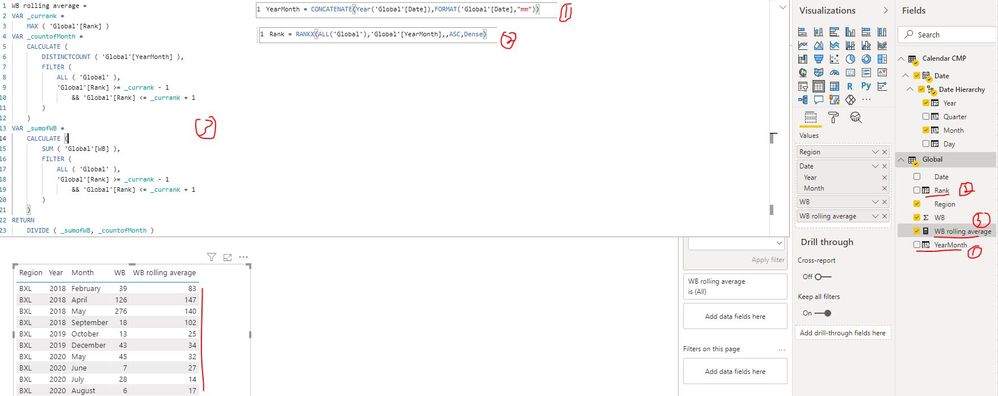
I created a sample pbix file for you, you can get it from this link. The implementation steps are as follows:

1. Create a calculated column to get YearMonth

YearMonth = CONCATENATE(Year('Global'[Date]),FORMAT('Global'[Date],"mm"))

2. Create a calculated column to rank the data by YearMonth

Rank = RANKX(ALL('Global'),'Global'[YearMonth],,ASC,Dense)

3. Create a measure as below to get the rolling averages

WB rolling average = 
VAR _currank =
    MAX ( 'Global'[Rank] )
VAR _countofMonth =
    CALCULATE (
        DISTINCTCOUNT ( 'Global'[YearMonth] ),
        FILTER (
            ALL ( 'Global' ),
            'Global'[Rank] >= _currank - 1
                && 'Global'[Rank] <= _currank + 1
        )
    )
VAR _sumofWB =
    CALCULATE (
        SUM ( 'Global'[WB] ),
        FILTER (
            ALL ( 'Global' ),
            'Global'[Rank] >= _currank - 1
                && 'Global'[Rank] <= _currank + 1
        )
    )
RETURN
    DIVIDE ( _sumofWB, _countofMonth )

create rolling averages over non-consecutive dates..JPG

Best Regards

Rena

Anonymous
Not applicable

Hi @Anonymous 

Thanks for you reply.

Unfortunately, it doesn't render me the output I expected.
Instead of ranking all yearmonths in the 'Global' Table, I would like to have more something like this, so I can calculate the rolling overages over non-consecutive months:

REGIONYearQuarterMonthWBYearMonthRank
BXL2018Qtr 1February392018021
BXL2018Qtr 2April1262018042
BXL2018Qtr 2May2762018053
BXL2018Qtr 3September182018094
BXL2019Qtr 4October132019105
BXL2019Qtr 4December432019126
BXL2020Qtr 2May452020057
BXL2020Qtr 2June72020068
BXL2020Qtr 3July282020079
BXL2020Qtr 3August620200810


Is that possible?

Thanks a lot.

KR,
A.

Anonymous
Not applicable

Hi @Anonymous ,

I just updated my sample pbix file, please check whether that is what you want. According to your reply, it seems that you don't want to create additional calculated columns to achieve it, so I create another new measure to get the rolling average for non-consecutive dates without creating any other measure or calculated column:

New_WB rolling average = 
VAR _mindate =
    CALCULATE ( MIN ( 'Global'[Date] ), ALL ( 'Global' ) )
VAR _maxdate =
    CALCULATE ( MAX ( 'Global'[Date] ), ALL ( 'Global' ) )
VAR _curmonth =
    CONCATENATE (
        YEAR ( MAX ( 'Global'[Date] ) ),
        FORMAT ( MAX ( 'Global'[Date] ), "mm" )
    )
VAR _premdate =
    CALCULATE (
        MAX ( 'Global'[Date] ),
        FILTER (
            ALL ( 'Global' ),
            CONCATENATE ( YEAR ( 'Global'[Date] ), FORMAT ( 'Global'[Date], "mm" ) ) < _curmonth
        )
    )
VAR _premonth =
    CONCATENATE ( YEAR ( _premdate ), FORMAT ( _premdate, "mm" ) )
VAR _nextmdate =
    CALCULATE (
        MIN ( 'Global'[Date] ),
        FILTER (
            ALL ( 'Global' ),
            CONCATENATE ( YEAR ( 'Global'[Date] ), FORMAT ( 'Global'[Date], "mm" ) ) > _curmonth
        )
    )
VAR _nextmonth =
    CONCATENATE ( YEAR ( _nextmdate ), FORMAT ( _nextmdate, "mm" ) )
VAR _sumofWB =
    CALCULATE (
        SUM ( 'Global'[WB] ),
        FILTER (
            ALL ( 'Global' ),
            CONCATENATE ( YEAR ( 'Global'[Date] ), FORMAT ( 'Global'[Date], "mm" ) ) >= _premonth
                && CONCATENATE ( YEAR ( 'Global'[Date] ), FORMAT ( 'Global'[Date], "mm" ) )
                    <= IF (
                        _nextmonth = "",
                        CONCATENATE ( YEAR ( _maxdate ), FORMAT ( _maxdate, "mm" ) ),
                        _nextmonth
                    )
        )
    )
RETURN
    DIVIDE (
        _sumofWB,
        IF (
            _curmonth = CONCATENATE ( YEAR ( _mindate ), FORMAT ( _mindate, "mm" ) )
                || _curmonth = CONCATENATE ( YEAR ( _maxdate ), FORMAT ( _maxdate, "mm" ) ),
            2,
            3
        ),
        0
    )

Best Regards

Rena
Helpful resources

Announcements
November Power BI Update Carousel

Power BI Monthly Update - November 2025

Check out the November 2025 Power BI update to learn about new features.

Fabric Data Days Carousel

Fabric Data Days

Advance your Data & AI career with 50 days of live learning, contests, hands-on challenges, study groups & certifications and more!

FabCon Atlanta 2026 carousel

FabCon Atlanta 2026

Join us at FabCon Atlanta, March 16-20, for the ultimate Fabric, Power BI, AI and SQL community-led event. Save $200 with code FABCOMM.