This time we’re going bigger than ever. Fabric, Power BI, SQL, AI and more. We're covering it all. You won't want to miss it.
Learn moreGet Fabric Certified for FREE during AI Skills Fest. This week only. Secure your voucher now.
I need to create a report showing the ID and detail, also need to show how many details for this ID .
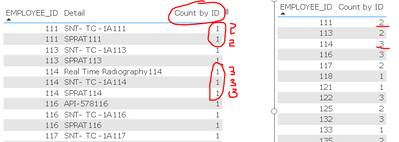
when I show a report without detailed information, it will show the right count.
when I show detailed information, the count will show 1,
I need to create a measure to let this count always show the total without a detail filter,
Do you have any idea? Thank you ,
like under the screenshot example, I need count by ID column for 111 always show 2, count for 114 always show 3.
count by ID number should match with right table example.
Hi,
Drag this measure
Measure = calculate(countrows(Data),all(Data[Detail]))
Hope this helps.
Check out the May 2026 Power BI update to learn about new features.
Sign up to receive a private message when registration opens and key events begin.
If you have recently started exploring Fabric, we'd love to hear how it's going. Your feedback can help with product improvements.
| User | Count |
|---|---|
| 23 | |
| 21 | |
| 21 | |
| 21 | |
| 16 |
| User | Count |
|---|---|
| 55 | |
| 53 | |
| 45 | |
| 26 | |
| 24 |