
Join us at FabCon Atlanta from March 16 - 20, 2026, for the ultimate Fabric, Power BI, AI and SQL community-led event. Save $200 with code FABCOMM.
Register now!The Power BI Data Visualization World Championships is back! Get ahead of the game and start preparing now! Learn more
Good day community, I need help to make a count on customers who have received 1 service, 2 services and more.
I have 1 table with the columns: date, clientID and services. A customer can receive 1 or even 5 services, and I want to count how many customers receive service1 and service2, service1 and service3, and so on. I've tried in different ways and I can't succeed. Please ask for help. Here is a sample of the test data.
| Date | Client ID | Services |
| 20/4/2022 | 274 | S1 |
| 21/4/2022 | 274 | S3 |
| 21/3/2022 | 275 | S2 |
| 17/3/2022 | 275 | S2 |
| 17/3/2022 | 275 | S3 |
| 16/2/2022 | 276 | S1 |
| 16/2/2022 | 276 | S3 |
| 2/2/2022 | 276 | S4 |
| 26/2/2022 | 143 | S1 |
| 24/2/2022 | 143 | S3 |
| 2/3/2022 | 143 | S4 |
| 6/4/2022 | 144 | S1 |
| 6/4/2022 | 144 | S3 |
| 28/2/2022 | 145 | S1 |
| 25/2/2022 | 145 | S3 |
| 2/3/2022 | 145 | S4 |
| 25/4/2022 | 146 | S1 |
| 25/4/2022 | 146 | S3 |
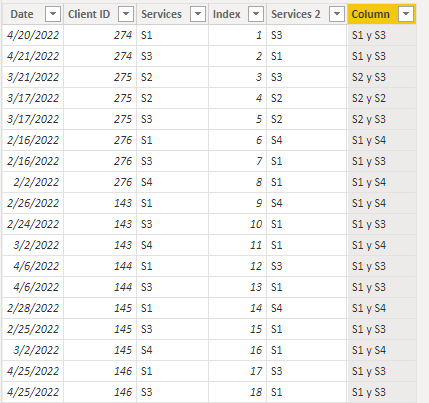
This is what I want to achieve.
Solved! Go to Solution.
Hi, @Syndicate_Admin
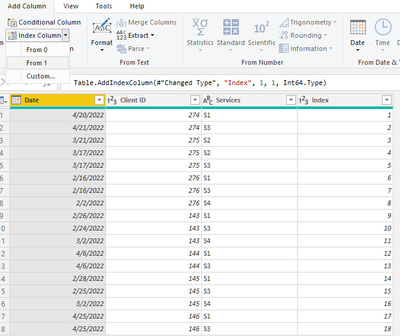
You can try the following methods. You need to add a column of index in Power Query.
Column:
Services 2 =
Var _N1=MINX(FILTER('Table',[Client ID]=EARLIER('Table'[Client ID])&&[Index]<EARLIER('Table'[Index])),[Services])
Var _N2=MAXX(FILTER('Table',[Client ID]=EARLIER('Table'[Client ID])&&[Index]>EARLIER('Table'[Index])),[Services])
Return
IF(_N1=BLANK(),_N2,_N1)Column =
Var _a= [Services]&" y "&[Services 2]
Var _b=[Services 2]&" y "&[Services]
Return
IF([Services]<[Services 2],_a,_b)
Hope that can help you.
Best Regards,
Community Support Team _Charlotte
If this post helps, then please consider Accept it as the solution to help the other members find it more quickly.
Hi, @Syndicate_Admin
You can try the following methods. You need to add a column of index in Power Query.
Column:
Services 2 =
Var _N1=MINX(FILTER('Table',[Client ID]=EARLIER('Table'[Client ID])&&[Index]<EARLIER('Table'[Index])),[Services])
Var _N2=MAXX(FILTER('Table',[Client ID]=EARLIER('Table'[Client ID])&&[Index]>EARLIER('Table'[Index])),[Services])
Return
IF(_N1=BLANK(),_N2,_N1)Column =
Var _a= [Services]&" y "&[Services 2]
Var _b=[Services 2]&" y "&[Services]
Return
IF([Services]<[Services 2],_a,_b)
Hope that can help you.
Best Regards,
Community Support Team _Charlotte
If this post helps, then please consider Accept it as the solution to help the other members find it more quickly.
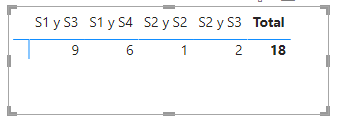
Hello, my apologies for the delay in answering, yes it worked. In order to do the single count of combined services, I created a matrix with a different count of Client ID. Thank you for your prompt help.
Check out the November 2025 Power BI update to learn about new features.
Advance your Data & AI career with 50 days of live learning, contests, hands-on challenges, study groups & certifications and more!
| User | Count |
|---|---|
| 57 | |
| 43 | |
| 40 | |
| 21 | |
| 17 |
| User | Count |
|---|---|
| 171 | |
| 104 | |
| 90 | |
| 44 | |
| 44 |