FabCon is coming to Atlanta
Join us at FabCon Atlanta from March 16 - 20, 2026, for the ultimate Fabric, Power BI, AI and SQL community-led event. Save $200 with code FABCOMM.
Register now!- Power BI forums
- Get Help with Power BI
- Desktop
- Service
- Report Server
- Power Query
- Mobile Apps
- Developer
- DAX Commands and Tips
- Custom Visuals Development Discussion
- Health and Life Sciences
- Power BI Spanish forums
- Translated Spanish Desktop
- Training and Consulting
- Instructor Led Training
- Dashboard in a Day for Women, by Women
- Galleries
- Data Stories Gallery
- Themes Gallery
- Contests Gallery
- QuickViz Gallery
- Quick Measures Gallery
- Visual Calculations Gallery
- Notebook Gallery
- Translytical Task Flow Gallery
- TMDL Gallery
- R Script Showcase
- Webinars and Video Gallery
- Ideas
- Custom Visuals Ideas (read-only)
- Issues
- Issues
- Events
- Upcoming Events
The Power BI Data Visualization World Championships is back! Get ahead of the game and start preparing now! Learn more
- Power BI forums
- Forums
- Get Help with Power BI
- Desktop
- How to count columns with particular values
- Subscribe to RSS Feed
- Mark Topic as New
- Mark Topic as Read
- Float this Topic for Current User
- Bookmark
- Subscribe
- Printer Friendly Page

- Mark as New
- Bookmark
- Subscribe
- Mute
- Subscribe to RSS Feed
- Permalink
- Report Inappropriate Content
How to count columns with particular values
Hi,
I am trying to count difference coulms with 0 value in it.
output column name is Count 0.
Count 0 = COUNTIF([#"A - B"] = 0,[#"C - D"] = 0,[#"E - F"] = 0)
It doen't work. Please suugest some function.

Solved! Go to Solution.


- Mark as New
- Bookmark
- Subscribe
- Mute
- Subscribe to RSS Feed
- Permalink
- Report Inappropriate Content
Hi @jaydesai28,
You may try to achieve this requirement via Power Query.
let
    Source = Excel.Workbook(File.Contents("C:\Users\xxxx\Desktop\Sample Data.xlsx"), null, true),
    #"Test data_Sheet" = Source{[Item="Test data",Kind="Sheet"]}[Data],
    #"Promoted Headers" = Table.PromoteHeaders(#"Test data_Sheet", [PromoteAllScalars=true]),
    #"Changed Type" = Table.TransformColumnTypes(#"Promoted Headers",{{"Id", Int64.Type}, {"A", Int64.Type}, {"B", Int64.Type}, {"A-B", Int64.Type}, {"C", Int64.Type}, {"D", Int64.Type}, {"C-D", Int64.Type}, {"E", Int64.Type}, {"F", Int64.Type}, {"E-F", Int64.Type}}),
    #"Unpivoted Columns" = Table.UnpivotOtherColumns(#"Changed Type", {"Id", "A", "B", "C", "D", "E", "F"}, "Attribute", "Value"),
    #"Added Custom" = Table.AddColumn(#"Unpivoted Columns", "Custom", each if [Value]=0 then 1 else 0),
    #"Added Custom2" = Table.AddColumn(#"Added Custom", "TotalCount", (This) => List.Sum(Table.SelectRows(#"Added Custom",each [Id] = This[Id])[Custom])),
    #"Removed Columns" = Table.RemoveColumns(#"Added Custom2",{"Custom"}),
    #"Pivoted Column" = Table.Pivot(#"Removed Columns", List.Distinct(#"Removed Columns"[Attribute]), "Attribute", "Value", List.Sum)
in
    #"Pivoted Column"
I have uploaded the test .pbix file for your reference. Please check the "Applied Steps" in Query Editor mode.
Best regards,
Yuliana Gu
If this post helps, then please consider Accept it as the solution to help the other members find it more quickly.

- Mark as New
- Bookmark
- Subscribe
- Mute
- Subscribe to RSS Feed
- Permalink
- Report Inappropriate Content
Hi @jaydesai28
If your DAX table looks exactly like the image and your column names are [A - B] etc, then you can try
Measure = CALCULATE(
            COUNTROWS('Table'),
            ALLSELECTED('Table'),
            'Table'[A - B] = 0,
            'Table'[C - D] = 0 ,
            'Table'[E - F] = 0
            )
- Mark as New
- Bookmark
- Subscribe
- Mute
- Subscribe to RSS Feed
- Permalink
- Report Inappropriate Content

- Mark as New
- Bookmark
- Subscribe
- Mute
- Subscribe to RSS Feed
- Permalink
- Report Inappropriate Content
Hi @jaydesai28
The code I suggested was for a calculated measure.
If you'd like it as a calculated column then please try this
Column= if(

            'Table'[A - B] = 0 &&
            'Table'[C - D] = 0 &&
            'Table'[E - F] = 0 , 1, ,0
            )
- Mark as New
- Bookmark
- Subscribe
- Mute
- Subscribe to RSS Feed
- Permalink
- Report Inappropriate Content
It's only checking whether coulums have 0 or not. I have to count the zeros.
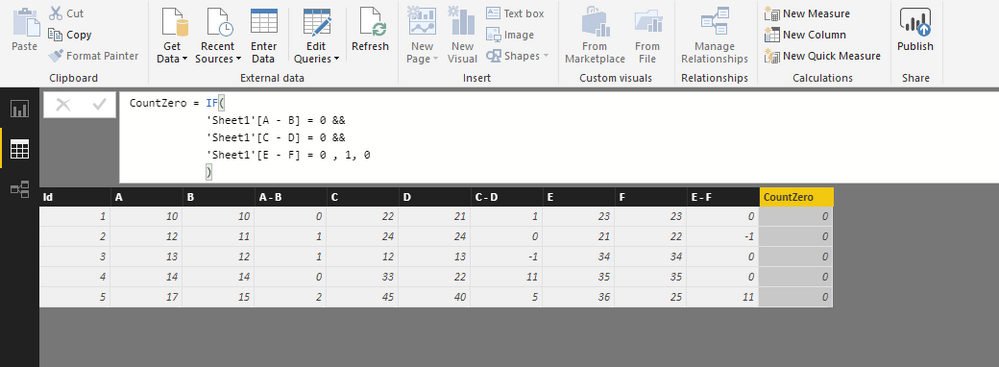
The ouput should be like as below:

- Mark as New
- Bookmark
- Subscribe
- Mute
- Subscribe to RSS Feed
- Permalink
- Report Inappropriate Content
Hi @jaydesai28,
You may try to achieve this requirement via Power Query.
let
    Source = Excel.Workbook(File.Contents("C:\Users\xxxx\Desktop\Sample Data.xlsx"), null, true),
    #"Test data_Sheet" = Source{[Item="Test data",Kind="Sheet"]}[Data],
    #"Promoted Headers" = Table.PromoteHeaders(#"Test data_Sheet", [PromoteAllScalars=true]),
    #"Changed Type" = Table.TransformColumnTypes(#"Promoted Headers",{{"Id", Int64.Type}, {"A", Int64.Type}, {"B", Int64.Type}, {"A-B", Int64.Type}, {"C", Int64.Type}, {"D", Int64.Type}, {"C-D", Int64.Type}, {"E", Int64.Type}, {"F", Int64.Type}, {"E-F", Int64.Type}}),
    #"Unpivoted Columns" = Table.UnpivotOtherColumns(#"Changed Type", {"Id", "A", "B", "C", "D", "E", "F"}, "Attribute", "Value"),
    #"Added Custom" = Table.AddColumn(#"Unpivoted Columns", "Custom", each if [Value]=0 then 1 else 0),
    #"Added Custom2" = Table.AddColumn(#"Added Custom", "TotalCount", (This) => List.Sum(Table.SelectRows(#"Added Custom",each [Id] = This[Id])[Custom])),
    #"Removed Columns" = Table.RemoveColumns(#"Added Custom2",{"Custom"}),
    #"Pivoted Column" = Table.Pivot(#"Removed Columns", List.Distinct(#"Removed Columns"[Attribute]), "Attribute", "Value", List.Sum)
in
    #"Pivoted Column"
I have uploaded the test .pbix file for your reference. Please check the "Applied Steps" in Query Editor mode.
Best regards,
Yuliana Gu
If this post helps, then please consider Accept it as the solution to help the other members find it more quickly.
- Mark as New
- Bookmark
- Subscribe
- Mute
- Subscribe to RSS Feed
- Permalink
- Report Inappropriate Content
Thanks for contributing to this post. I tried this strategy for a similar data set and was successful with the counting procedure, but I am getting duplicates in my data set after the Pivot step. I believe the List.Distinct fuction is supposed to take care of that, so I must have something entered wrong. My code is below, do you have any insight into how I can fix this? I removed columns names from the first few steps for brevity.
let
    Source = Excel.Workbook(Web.Contents(Path & File, [Timeout=#duration(0, 0, 2, 0)]), null, true),
    Worksheet2 = Source{[Name="Worksheet1"]}[Data],
    #"Promoted Headers" = Table.PromoteHeaders(Worksheet2, [PromoteAllScalars=true]),
    #"Changed Type" = Table.TransformColumnTypes(#"Promoted Headers"),
    #"Renamed Columns" = Table.RenameColumns(#"Changed Type"),
    #"Removed Columns" = Table.RemoveColumns(#"Renamed Columns"),
    #"Unpivoted Columns" = Table.UnpivotOtherColumns(#"Removed Columns", {"Name"}, "Attribute", "Value"),

    #"Added Custom" = Table.AddColumn(#"Unpivoted Columns", "L1Yes", each if [Value] = "Yes" and Text.Contains([Attribute], "L1") then 1 else 0 ),
    #"Added Custom2" = Table.AddColumn(#"Added Custom", "L1No", each if [Value] = "No" and Text.Contains([Attribute], "L1") then 1 else 0 ),
    #"Added Custom3" = Table.AddColumn(#"Added Custom2", "L1NA", each if [Value] = "N/A" and Text.Contains([Attribute], "L1") then 1 else 0 ),
    #"Added Custom4" = Table.AddColumn(#"Added Custom3", "CountL1Yes", (This) => List.Sum(Table.SelectRows(#"Added Custom3",each [Name] = This[Name])[L1Yes])),
    #"Added Custom5" = Table.AddColumn(#"Added Custom4", "CountL1No", (This) => List.Sum(Table.SelectRows(#"Added Custom4",each [Name] = This[Name])[L1No])),
    #"Added Custom6" = Table.AddColumn(#"Added Custom5", "CountL1NA", (This) => List.Sum(Table.SelectRows(#"Added Custom5",each [Name] = This[Name])[L1NA])),

    #"Pivoted Column" = Table.Pivot(#Added Custom6", List.Distinct(#"Removed Columns2"[Attribute]), "Attribute", "Value", List.Sum),
    #"Removed Columns1" = Table.RemoveColumns(#"Pivoted Column",{"L1.1", "L2.1", "L2.2", "L2.3", "L2.4", "L2.5", "L2.6", "L2.7", "L2.8", "L2.9", "L2.10", "L2.11", "L3.1", "L3.2", "L3.3", "L3.4", "L3.5", "L3.6", "L3.7", "L3.8", "L3.9", "L3.10", "L3.11", "L4.1"}),

    #"Added Custom1" = Table.AddColumn(#"Removed Columns1", "L1PercentComplete", each [CountL1Yes]/([CountL1Yes]+[CountL1No])),

in
    #"Added Custom1"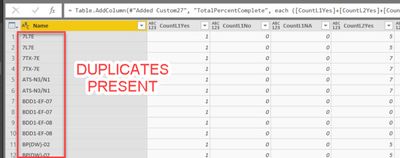

Helpful resources

Power BI Dataviz World Championships
The Power BI Data Visualization World Championships is back! Get ahead of the game and start preparing now!

Power BI Monthly Update - December 2025
Check out the December 2025 Power BI Holiday Recap!

FabCon Atlanta 2026
Join us at FabCon Atlanta, March 16-20, for the ultimate Fabric, Power BI, AI and SQL community-led event. Save $200 with code FABCOMM.

| User | Count |
|---|---|
| 60 | |
| 43 | |
| 40 | |
| 36 | |
| 21 |


| User | Count |
|---|---|
| 178 | |
| 127 | |
| 115 | |
| 77 | |
| 54 |


