Don't miss your chance to take the Fabric Data Engineer (DP-600) exam for FREE! Find out how by attending the DP-600 session on April 23rd (pacific time), live or on-demand.
Learn moreNext up in the FabCon + SQLCon recap series: The roadmap for Microsoft SQL and Maximizing Developer experiences in Fabric. All sessions are available on-demand after the live show. Register now
Hi i have a data column Gender
I need to count Male and Female and the average percentage will be 50%
Solved! Go to Solution.
Hi @blockobito ,
If you want to calculate the percentage of males and females in the total, you can try this code.
Percentage =
VAR _Total =
CALCULATE ( COUNT ( 'Table'[User] ), ALL ( 'Table' ) )
VAR _Each_Gender =
CALCULATE ( COUNT ( 'Table'[User] ) )
RETURN
DIVIDE ( _Each_Gender, _Total )
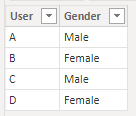
My Sample:
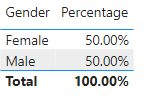
Result is as below.
Best Regards,
Rico Zhou
If this post helps, then please consider Accept it as the solution to help the other members find it more quickly.
Hi @blockobito ,
If you want to calculate the percentage of males and females in the total, you can try this code.
Percentage =
VAR _Total =
CALCULATE ( COUNT ( 'Table'[User] ), ALL ( 'Table' ) )
VAR _Each_Gender =
CALCULATE ( COUNT ( 'Table'[User] ) )
RETURN
DIVIDE ( _Each_Gender, _Total )
My Sample:
Result is as below.
Best Regards,
Rico Zhou
If this post helps, then please consider Accept it as the solution to help the other members find it more quickly.
Measure = CountRows(table)
Then place a visual with the gender and the Measure as the column. Can be added twice and use second as % of total.
If you need to split it up into separate records...
Measure Male =
If you have recently started exploring Fabric, we'd love to hear how it's going. Your feedback can help with product improvements.
A new Power BI DataViz World Championship is coming this June! Don't miss out on submitting your entry.
| User | Count |
|---|---|
| 45 | |
| 43 | |
| 39 | |
| 19 | |
| 15 |
| User | Count |
|---|---|
| 68 | |
| 65 | |
| 31 | |
| 28 | |
| 24 |