cancel
Showing results for 
Search instead for 
Did you mean: 

Get Fabric Certified for FREE during Fabric Data Days. Don't miss your chance! Request now

Reply
Anonymous
Not applicable

How to configure row level security

Hi,


I need to restrict data access in my power bi report. Following are the categories that I want to define:

1. Category 1 - Users should be able to access all data (no restrictions to be applied)

        1.1 the user email id is present in my back end dataset

         1.2 the user email id is not present in my back end dataset

       for both 1.1 and 1.2 the users should be able to view all data and access the dashboard

2.Category 2- Users should be able to access data relevant to them


For category 2 I have configures RLS using userprincipalname() dax and it is working fine.

How do I configure for category 1.


Thanks!

1 ACCEPTED SOLUTION
Anonymous
Not applicable

Hi @Anonymous ,


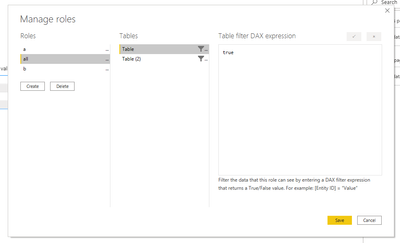
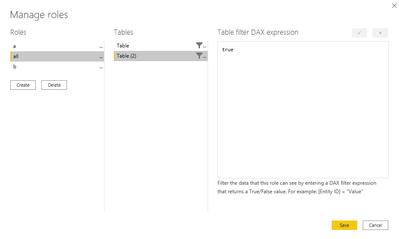
You can create a new role "all" set all table filter dax expression as true. Then set these users as "all" role.

4.PNG5.PNG


Best Regards,

Jay

View solution in original post

5 REPLIES 5
Anonymous
Not applicable

Hi @Anonymous ,


You can create a new role "all" set all table filter dax expression as true. Then set these users as "all" role.

4.PNG5.PNG


Best Regards,

Jay

Anonymous
Not applicable

thanks

@Anonymous ...this worked. Is there any limitation on how many members can be added per role?

Anonymous
Not applicable

Hi @Anonymous ,


As far as i know, there's no such limitation. You can check the offical document about RLS.

https://docs.microsoft.com/en-us/power-bi/admin/service-admin-rls#limitations


Best Regards,

Jay

Greg_Deckler
Community Champion
Community Champion

@Anonymous - I forget exactly if it is necessary but one way I have done this is to create a column in a table that is simply:


Column = 1


Then you set your DAX Role RLS rule to be Column = 1. Presto, people in that role can see everything.


Follow on LinkedIn
@ me in replies or I'll lose your thread!!!
Instead of a Kudo, please vote for this idea
Become an expert!: Enterprise DNA
External Tools: MSHGQM
YouTube Channel!: Microsoft Hates Greg
Latest book!:
DAX For Humans

DAX is easy, CALCULATE makes DAX hard...
Pragati11
Super User
Super User

Hi @Anonymous ,


Kindly refer the following article on how RLS can be used in Power BI:

https://radacad.com/row-level-security-configuration-in-power-bi-desktop


Thanks,

Pragati

Best Regards,

Pragati Jain


MVP logo


LinkedIn | Twitter | Blog YouTube 

Did I answer your question? Mark my post as a solution! This will help others on the forum!

Appreciate your Kudos!!

Proud to be a Super User!!

Helpful resources

Announcements
November Power BI Update Carousel

Power BI Monthly Update - November 2025

Check out the November 2025 Power BI update to learn about new features.

Fabric Data Days Carousel

Fabric Data Days

Advance your Data & AI career with 50 days of live learning, contests, hands-on challenges, study groups & certifications and more!

FabCon Atlanta 2026 carousel

FabCon Atlanta 2026

Join us at FabCon Atlanta, March 16-20, for the ultimate Fabric, Power BI, AI and SQL community-led event. Save $200 with code FABCOMM.

Top Solution Authors
Top Kudoed Authors