cancel
Showing results for 
Search instead for 
Did you mean: 

Get Fabric Certified for FREE during Fabric Data Days. Don't miss your chance! Request now

Reply
StefArroyo
Microsoft Employee
Microsoft Employee

How to collapse a matrix and have values appear blank

Hello!


I am wondering if there is a way to collapse rows in a matrix and have all of the values instead of an aggregation, appear blank or cleared? 

1 ACCEPTED SOLUTION
Anonymous
Not applicable

Hi @StefArroyo   I was actually wanting the same thing and found a solution for this!


Try the following measure and add this as a value in your matrix:

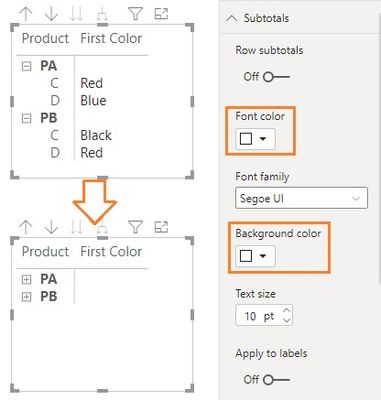
I based this measure formula off of @v-jingzhang  image but you can change it to suit your needs.

Measure = IF (ISINSCOPE(Table[Product]),SELECTEDVALUE(Table[First Color]), BLANK()).

View solution in original post

6 REPLIES 6
Anonymous
Not applicable

Hi @StefArroyo   I was actually wanting the same thing and found a solution for this!


Try the following measure and add this as a value in your matrix:

I based this measure formula off of @v-jingzhang  image but you can change it to suit your needs.

Measure = IF (ISINSCOPE(Table[Product]),SELECTEDVALUE(Table[First Color]), BLANK()).

Anonymous
Not applicable

Hello, I was able to create this measure and add it as a value in my matrix, but how do I get it to apply to my original values that I was wanting to hide? It currently just shows as an extra column next to my other values in the matrix visualization.

Hi @Anonymous 


You need to use @Anonymous 's measure to replace your original value in the matrix. Is your original value a measure or a column field? If it's a measure, you can add this measure. 


New Measure = IF ( ISINSCOPE ( 'Table'[second hierarchy] ), [Original Measure], BLANK () )


If the original value is a column, apply the correct aggregation type to the column in the new measure. I use MAX for example in below DAX. 


New Measure =
IF (
ISINSCOPE ( 'Table'[second hierarchy] ),
MAX ( 'Table'[Original column] ),
BLANK ()
)


Best regards,

Jing

StefArroyo
Microsoft Employee
Microsoft Employee

@amitchandak 

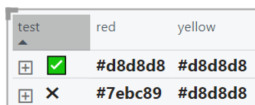
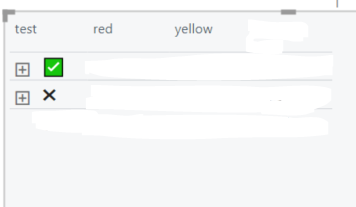
So, this is just a random example, but is there a way to essentially make all of the values of the columns blank while the rows are collapsed?


StefArroyo_2-1611198076819.png


StefArroyo_1-1611198058052.png


Hi @StefArroyo , you can format the subtotals' font color consistent with the background color to hide them.

012201.jpg

Regards,
Community Support Team _ Jing Zhang
If this post helps, please consider Accept it as the solution to help other members find it.

amitchandak
Super User
Super User

@StefArroyo , I am not sure what you want to show here. I doubt you can collapse the last level. means one level would be expanded.


What you want to achieve here.

In case you need to hide show, you can use bookmarks

https://radacad.com/bookmarks-and-buttons-making-power-bi-charts-even-more-interactive

Share with Power BI Enthusiasts: Full Power BI Video (20 Hours) YouTube
Microsoft Fabric Series 60+ Videos YouTube
Microsoft Fabric Hindi End to End YouTube

Helpful resources

Announcements
November Power BI Update Carousel

Power BI Monthly Update - November 2025

Check out the November 2025 Power BI update to learn about new features.

Fabric Data Days Carousel

Fabric Data Days

Advance your Data & AI career with 50 days of live learning, contests, hands-on challenges, study groups & certifications and more!

FabCon Atlanta 2026 carousel

FabCon Atlanta 2026

Join us at FabCon Atlanta, March 16-20, for the ultimate Fabric, Power BI, AI and SQL community-led event. Save $200 with code FABCOMM.

Top Solution Authors
Top Kudoed Authors