Join us at FabCon Atlanta from March 16 - 20, 2026, for the ultimate Fabric, Power BI, AI and SQL community-led event. Save $200 with code FABCOMM.
Register now!Get Fabric Certified for FREE during Fabric Data Days. Don't miss your chance! Request now
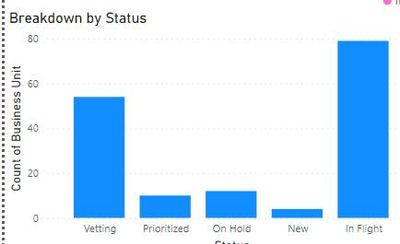
Hi all, As seen below, I currently have a bar chart with the x-axis having different statuses. I want to reorder them as they should go New, Vetting, Prioritized, Inflight, Hold.
Is there a way to reorder it?
Thank you for the help!
Solved! Go to Solution.
You can include a calculated column in your Status table using:
Order =
SWITCH (
StatusTable[Status],
"New", 1,
"Vetting", 2,
"Prioritized", 3,
"Inflight", 4,
5
)
In the table view, select the Status column and select the "Order column by" option in the ribbon as select the order column.
Proud to be a Super User!
Paul on Linkedin.
You can include a calculated column in your Status table using:
Order =
SWITCH (
StatusTable[Status],
"New", 1,
"Vetting", 2,
"Prioritized", 3,
"Inflight", 4,
5
)
In the table view, select the Status column and select the "Order column by" option in the ribbon as select the order column.
Proud to be a Super User!
Paul on Linkedin.
Check out the November 2025 Power BI update to learn about new features.
Advance your Data & AI career with 50 days of live learning, contests, hands-on challenges, study groups & certifications and more!