cancel
Showing results for 
Search instead for 
Did you mean: 

Get Fabric Certified for FREE during Fabric Data Days. Don't miss your chance! Request now

Reply
Anonymous
Not applicable

How to change the display unit of values in y-axis to hundereds

Hi


Is there any way to change the display units of Y-Axis to a hundred? As in the dropdown for display units, I can only see thousands, millions, or trillions only.

If anyone has any idea regarding then please comment.

Thanks


Usinghal_0-1653303100829.png


2 REPLIES 2
v-yalanwu-msft
Community Support
Community Support

Hi, @Anonymous ;

You could add a measure like below:

Measure = 
sum('Table'[Value])/100 & "hundered"
  

BTW, even if you change the display format, the result is also transformed to text.

Or You can submit a feature request in Power BI ideas forum.

https://ideas.powerbi.com/ideas/idea/?ideaid=ebe46bf1-b559-477d-9651-ecad6a614371

https://community.powerbi.com/t5/Desktop/Changing-the-display-units-of-a-kpi-indicator/m-p/496878


Best Regards,
Community Support Team _ Yalan Wu
If this post helps, then please consider Accept it as the solution to help the other members find it more quickly.


AnamPatel
Resolver II
Resolver II

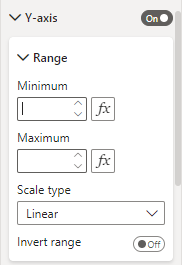
There is not any option available to Select Display Unit as Hundred. You can try to select Display Unit as None and set up the range manually under the Range Menu. You might have to do some trial and error but I believe you can get it done from here.

AnamPatel_0-1653303540816.png


Helpful resources

Announcements
November Power BI Update Carousel

Power BI Monthly Update - November 2025

Check out the November 2025 Power BI update to learn about new features.

Fabric Data Days Carousel

Fabric Data Days

Advance your Data & AI career with 50 days of live learning, contests, hands-on challenges, study groups & certifications and more!

FabCon Atlanta 2026 carousel

FabCon Atlanta 2026

Join us at FabCon Atlanta, March 16-20, for the ultimate Fabric, Power BI, AI and SQL community-led event. Save $200 with code FABCOMM.

Top Solution Authors
Top Kudoed Authors