Huge last-minute discounts for FabCon Vienna from September 15-18, 2025
Supplies are limited. Contact info@espc.tech right away to save your spot before the conference sells out.
Get your discount- Power BI forums
- Get Help with Power BI
- Desktop
- Service
- Report Server
- Power Query
- Mobile Apps
- Developer
- DAX Commands and Tips
- Custom Visuals Development Discussion
- Health and Life Sciences
- Power BI Spanish forums
- Translated Spanish Desktop
- Training and Consulting
- Instructor Led Training
- Dashboard in a Day for Women, by Women
- Galleries
- Data Stories Gallery
- Themes Gallery
- Contests Gallery
- Quick Measures Gallery
- Notebook Gallery
- Translytical Task Flow Gallery
- TMDL Gallery
- R Script Showcase
- Webinars and Video Gallery
- Ideas
- Custom Visuals Ideas (read-only)
- Issues
- Issues
- Events
- Upcoming Events
Score big with last-minute savings on the final tickets to FabCon Vienna. Secure your discount
- Power BI forums
- Forums
- Get Help with Power BI
- Desktop
- How to calculate the combination of two layers sel...
- Subscribe to RSS Feed
- Mark Topic as New
- Mark Topic as Read
- Float this Topic for Current User
- Bookmark
- Subscribe
- Printer Friendly Page


- Mark as New
- Bookmark
- Subscribe
- Mute
- Subscribe to RSS Feed
- Permalink
- Report Inappropriate Content
How to calculate the combination of two layers selection in BI
Hey all,
I have a problem to create 2 layers' hierarchy calculation ( combination of 2 layer selection).
Since we changed the way to calculate the inventory, I have to keep 2 ways calcualated inventorys and related WOS (week of Supply) in the report.
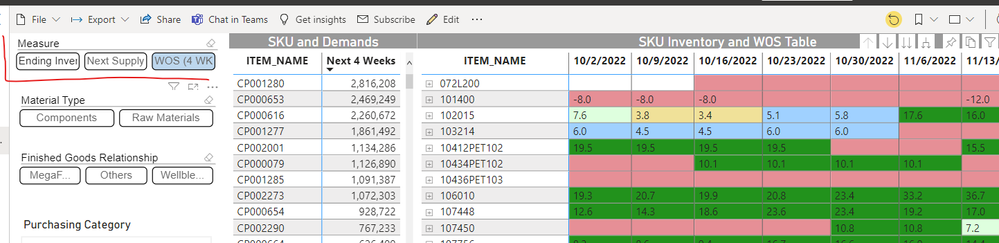
When I create the original repot, I added ' inventory' , 'WOS (week of Supply)', and 'Next Supply' in one selection. And based on the selection, I create the measure. So user can choose whatever they want to see in the table. (see below table in BI and related way how I calculated that)

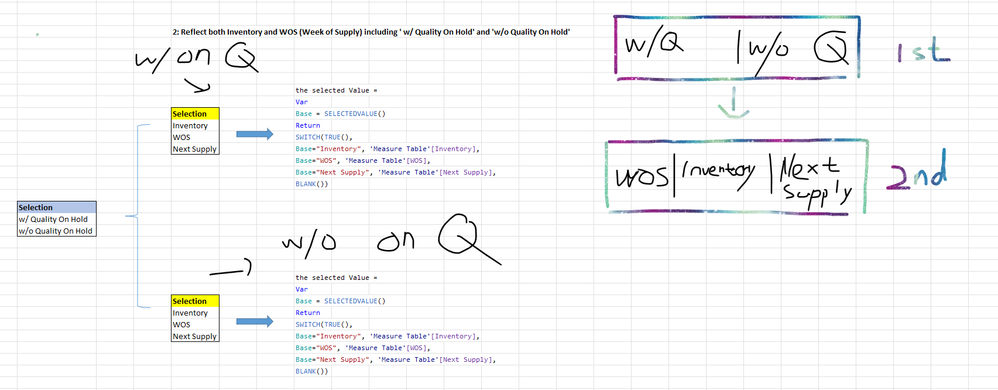
Right now, organization wants to see both inventory w/ Quality on hold volume and w/o Quality on hold volume. Given that, I'm thinking whether I can apply the similar logic to create that table in BI (see below)
Technically, I will have two selections. The calculation should reflect the combination of those two selection('w/o Quality On Hold' ' w/ Quality On Hold assocatied with 'Inventory', 'WOS' and 'Next Supply''. Just like 2 drill down selections. Firstly, we can select 'w/o Quality on Hold' or 'w/ Quality on Hold', and then select 'Inventory', 'WOS' and 'Next Supply'. I'm not sure how I should develop the measure to combine them together with selectvalue dax...or Can I use the other functions to calculate that combination hierarchys. Any thoughts? Thanks!
- Mark as New
- Bookmark
- Subscribe
- Mute
- Subscribe to RSS Feed
- Permalink
- Report Inappropriate Content
@HoangHugo I mean how I can make sure as long as user select both "w/ and W/o" selection and the measure ' WOS, Inventory and Next Supply), then user can see the number based on those combinations. Thanks!
- Mark as New
- Bookmark
- Subscribe
- Mute
- Subscribe to RSS Feed
- Permalink
- Report Inappropriate Content
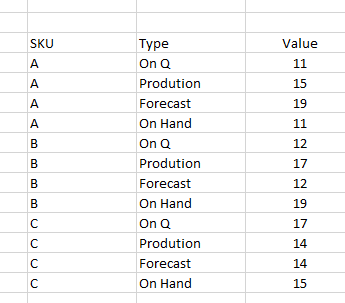
@HoangHugo Sure. See below. That's the sample of part of fact table, where I calculated the On Q.
Originally, my total inventory = On Q + On Hand. But currently, organization wants to see both inventory w/ and w/o On Q. In other words. I need to have two measures to calculate the inventory.
Inventory 1 = On Q + On hand (same as before)
Inventory 2 = On Q
Given that, i will have two differernt value of the same measure of Week of Supply, which is calculated based on the inventory.
When I previously had one measure of Inventory( I just applied selectvalue to show the data whatever user select Week of Supply or Inventory. but now at the beginning I have two different Inventory and WOS. How can I add something in the report but still keep the same 2nd layer selection (Week of Supply & Inventory) for user to select whatever they want to see. In other words, How can I support user to select the combination w/ On Q assoicated with Inventory or Week of Supply and w/o On Q assoicated with Inventory or Week of Supply.


- Mark as New
- Bookmark
- Subscribe
- Mute
- Subscribe to RSS Feed
- Permalink
- Report Inappropriate Content
Ok, Understood
Creating a slection "w and w/o On Q" is required to user can choose.
Modify a bit your mearsure of invetory
Inventory =
var select = SELECTEDVALUE(secltion w and w/o)
return
Inventory = if(select="without On Q", 0, On Q) + On hand
That's it, when user choose "w or w/o ON Q", Invetory will change as well.
- Mark as New
- Bookmark
- Subscribe
- Mute
- Subscribe to RSS Feed
- Permalink
- Report Inappropriate Content
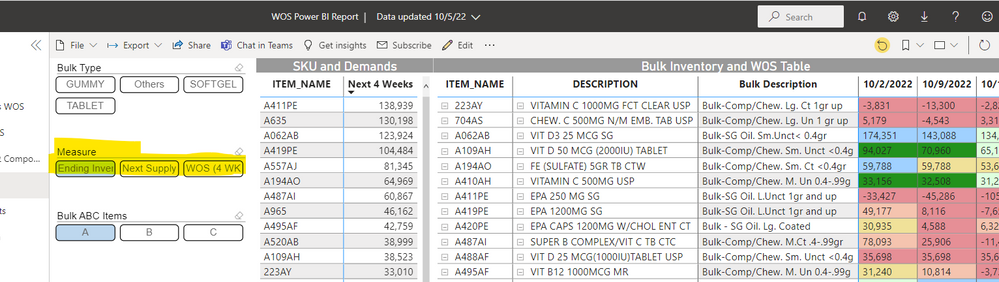
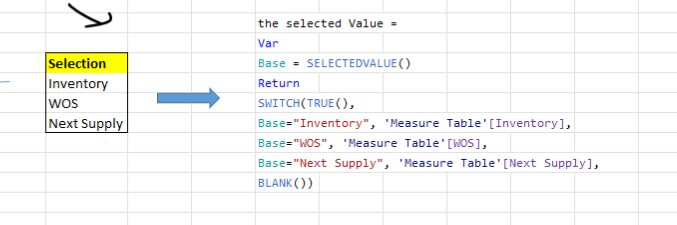
@HoangHugo Thanks for your reply. I know that. Since in overall the report, I want to give the option for the user to see inventory, next supply and week of supply. Given that, I already added one selectvalue dax to catch those 3 measures. (see below). User can select each of those three to reflect the number in the table. Based on what you said, I'm not sure whether I should separete the selectevalue firstly. In other words. set the inventory based on 2 conditions (w/ and w/o On Q)
and then still apply my original dax to have that combination (Inventory w/ or inventory w/o On Q)
- Mark as New
- Bookmark
- Subscribe
- Mute
- Subscribe to RSS Feed
- Permalink
- Report Inappropriate Content
Hi
The attribute "w/Quality on hold" and"w/o Quality on hold" is one column in your data table, right? if so, just create a slicer, and put this column into. You can seet "Select All" in Slicer for user.
- Mark as New
- Bookmark
- Subscribe
- Mute
- Subscribe to RSS Feed
- Permalink
- Report Inappropriate Content
No, that's the part of my measure. That's why I have to create two measures with or without the Quality on Hold volume.
Any thoughts, guys? Thanks!
- Mark as New
- Bookmark
- Subscribe
- Mute
- Subscribe to RSS Feed
- Permalink
- Report Inappropriate Content
Ok, but I cannot see which measures related or used "w/Quality on hold" and"w/o Quality on hold". Or how to defined "w/Quality on hold" and"w/o Quality on hold". Or maybe I can not understand your context. Can you show detail?

Helpful resources

Power BI Monthly Update - August 2025
Check out the August 2025 Power BI update to learn about new features.

Fabric Community Update - August 2025
Find out what's new and trending in the Fabric community.


| User | Count |
|---|---|
| 84 | |
| 74 | |
| 48 | |
| 41 | |
| 40 |


