cancel
Showing results for 
Search instead for 
Did you mean: 

The Power BI Data Visualization World Championships is back! Get ahead of the game and start preparing now! Learn more

Reply
Anonymous
Not applicable

How to calculate roll up average using dax

Hi I have a dataset like this, the date difference between each sprint is 14 days.

 Team       DateBegin   Sprint   Points
   Team1      1/2/2021    Sprint1   30
   Team1      1/16/2021   Sprint2   40
   Team1      1/30/2021   Sprint3   20
   Team1      2/13/2021   Sprint4   70
   Team1      2/27/2021   Sprint5   90
   Team1      3/11/2021   Sprint6   55
   Team1      3/25/2021   Sprint7   40
   Team2      1/2/2021    Sprint1   30
   Team2      1/16/2021   Sprint2   40
   Team2      1/30/2021   Sprint3   20
   Team2      2/13/2021   Sprint4   70
   Team2      2/27/2021   Sprint5   90
   Team2      3/11/2021   Sprint6   55
   Team2      3/25/2021   Sprint7   40

I wanted to calculate the Sum average using the last 3 sprints. for example

for Sprint7- sum(Sprint6+Sprint5+Sprint4)/3
For Sprint6- sum(Sprint5+Sprint4+Sprint3)/3

Something like For each Sprint look up the last 3 sprints and Sum them up and take the average(measure).

I have tried using the below dax and the rollup average works fine with out the "Team" column. How can I use the Team column to as a group by..something like the rollup calculation should start all over again for different teams.


Last3Avg =
VAR ThisSprintStart = SELECTEDVALUE ( Sprints[DateBegin] )
VAR SprintsToDate =
    FILTER ( ALLSELECTED ( Sprints ), Sprints[DateBegin] < ThisSprintStart )
RETURN
    AVERAGEX ( TOPN ( 3, SprintsToDate, Sprints[DateBegin] ), [Points] )


Thanks

1 ACCEPTED SOLUTION

Hi @Anonymous , 


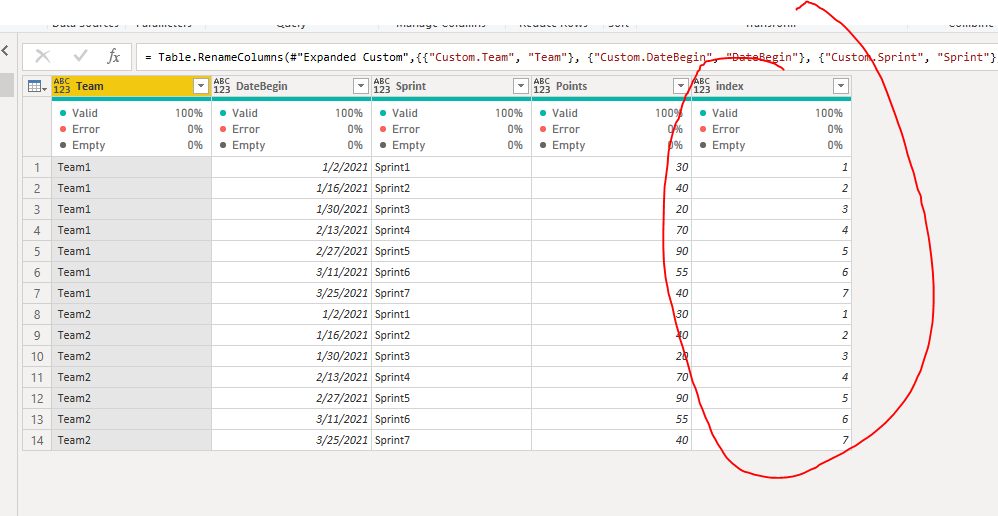
First you need to create index column by group:

  #"Grouped Rows" = Table.Group(#"Removed Columns1", {"Team"}, {{"Count", each _, type table [Team=nullable text, DateBegin=nullable date, Sprint=nullable text, Points=nullable number]}}),
    #"Added Custom" = Table.AddColumn(#"Grouped Rows", "Custom", each Table.AddIndexColumn([Count],"index",1)),
    #"Removed Columns2" = Table.RemoveColumns(#"Added Custom",{"Team", "Count"}),
    #"Expanded Custom" = Table.ExpandTableColumn(#"Removed Columns2", "Custom", {"Team", "DateBegin", "Sprint", "Points", "index"}, {"Custom.Team", "Custom.DateBegin", "Custom.Sprint", "Custom.Points", "Custom.index"}),
    #"Renamed Columns1" = Table.RenameColumns(#"Expanded Custom",{{"Custom.Team", "Team"}, {"Custom.DateBegin", "DateBegin"}, {"Custom.Sprint", "Sprint"}, {"Custom.Points", "Points"}, {"Custom.index", "index"}})
 

Capture7.PNG


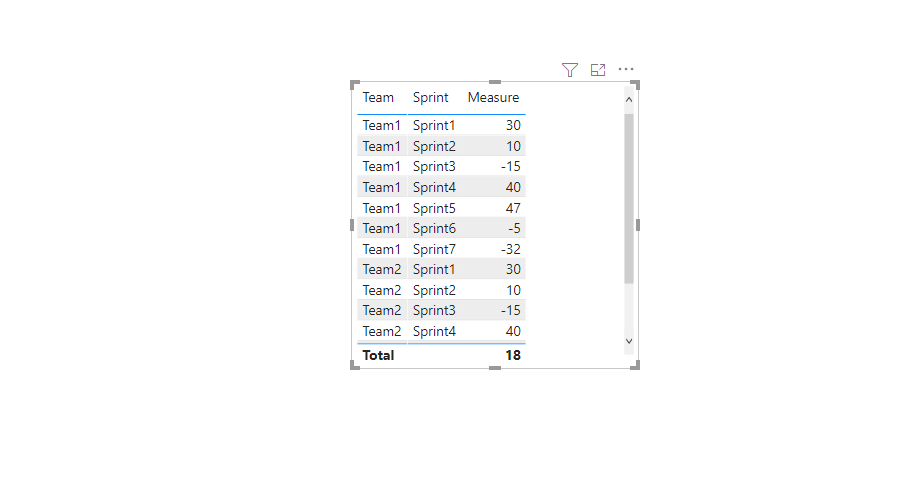
Then you can use the following measure:


Measure = MAX('Table'[Points])- AVERAGEX(TOPN(3,FILTER(ALLEXCEPT('Table','Table'[Team]),'Table'[index] <MAX('Table'[index])),'Table'[index],DESC),'Table'[Points])
Capture8.PNG


Please refer to the pbix file.


If this post helps, then please consider Accept it as the solution to help the other members find it more quickly.


Best Regards,

Dedmon Dai


View solution in original post

4 REPLIES 4
amitchandak
Super User
Super User

@Anonymous , Create a rank on sprint begindate ( create a separate table with sprint  and begin date)


sprint  rank = RANKX(all('sprint  '),'Dsprint  ate'[begindate ],,ASC,Dense)
measures
Last 3 sprint  = CALCULATE(sum('Table'[points]), FILTER(ALL('sprint '),'sprint '[sprint Rank]>=max('sprint '[sprint Rank])-3 && 'sprint '[sprint Rank]<=max('sprint '[sprint Rank])))


Share with Power BI Enthusiasts: Full Power BI Video (20 Hours) YouTube
Microsoft Fabric Series 60+ Videos YouTube
Microsoft Fabric Hindi End to End YouTube
Anonymous
Not applicable

I did try it by correcting the spell errors but it did not bring the right result finally for the last 3 sprints🙂

Hi @Anonymous , 


First you need to create index column by group:

  #"Grouped Rows" = Table.Group(#"Removed Columns1", {"Team"}, {{"Count", each _, type table [Team=nullable text, DateBegin=nullable date, Sprint=nullable text, Points=nullable number]}}),
    #"Added Custom" = Table.AddColumn(#"Grouped Rows", "Custom", each Table.AddIndexColumn([Count],"index",1)),
    #"Removed Columns2" = Table.RemoveColumns(#"Added Custom",{"Team", "Count"}),
    #"Expanded Custom" = Table.ExpandTableColumn(#"Removed Columns2", "Custom", {"Team", "DateBegin", "Sprint", "Points", "index"}, {"Custom.Team", "Custom.DateBegin", "Custom.Sprint", "Custom.Points", "Custom.index"}),
    #"Renamed Columns1" = Table.RenameColumns(#"Expanded Custom",{{"Custom.Team", "Team"}, {"Custom.DateBegin", "DateBegin"}, {"Custom.Sprint", "Sprint"}, {"Custom.Points", "Points"}, {"Custom.index", "index"}})


Capture7.PNG


Then you can use the following measure:


Measure = MAX('Table'[Points])- AVERAGEX(TOPN(3,FILTER(ALLEXCEPT('Table','Table'[Team]),'Table'[index] <MAX('Table'[index])),'Table'[index],DESC),'Table'[Points])

Capture8.PNG


Please refer to the pbix file.


If this post helps, then please consider Accept it as the solution to help the other members find it more quickly.


Best Regards,

Dedmon Dai


Anonymous
Not applicable

Sorry, I do not see my comment so I am just writing back again if my first comment did not went through. Is the Rank formula have spelling errors. Do you mean to write it like this. 
sprint  rank = RANKX(all('sprint  '),'sprint'[begindate ],,ASC,Dense)

Helpful resources

Announcements
Power BI DataViz World Championships

Power BI Dataviz World Championships

The Power BI Data Visualization World Championships is back! Get ahead of the game and start preparing now!

December 2025 Power BI Update Carousel

Power BI Monthly Update - December 2025

Check out the December 2025 Power BI Holiday Recap!

FabCon Atlanta 2026 carousel

FabCon Atlanta 2026

Join us at FabCon Atlanta, March 16-20, for the ultimate Fabric, Power BI, AI and SQL community-led event. Save $200 with code FABCOMM.