cancel
Showing results for 
Search instead for 
Did you mean: 

The Power BI Data Visualization World Championships is back! Get ahead of the game and start preparing now! Learn more

Reply
stfox
Helper I
Helper I

How to calculate Cumulative Total where the value to be Totaled is a measure (rather than a column)


Hi Folks

I am having issues calculating a Cumulative Total variance - the cumulative difference between Sales and Targets

The standard calculation for a cumulative total is outlined below.  


Cumulative_Total =
    CALCULATE (
        SUM ( Table[Column1] ),
        FILTER ( ALL ( Table[Day] ), Table[Day] <= MAX ( ( Table[Day] ) ) )
    )


But this method only accepts a column as the value to be summed (in bold above) . If a measure is used  the following error is produced :


The SUM function only accepts a column reference as the arguement number 1.


I have a situation where I want to calculate Cumulative Total variance between Sales and Targets.  Sales and Targets sit in different tables. Sales are recorded at a more granular level than Targets.  Is there a way to created a Cumulative total variance in this situation? 


Cheers

Steve 

1 ACCEPTED SOLUTION
Anonymous
Not applicable

Hi @stfox,

From your PBIX file, I note that when creating Cumulative Sales, you use the following formula.

Cumulative Sales = CALCULATE (
    SUM ('Sales'[#Sold] ),
    FILTER (
        ALL ( 'DailyTarget2'[Date]),
        'DailyTarget2'[Date] <= MAX ( 'DailyTarget2'[Date])
    )
)


But when creating Test_Cumulative_Variance_Wrong, you use a different formula to represent Cumulative Sales.

CALCULATE (
    SUM ('Sales'[#Sold] ),
    FILTER (
        ALL ( 'DailyTarget2'[DailySalesTarget] ),
        'DailyTarget2'[DailySalesTarget] <= MAX ( 'DailyTarget2'[DailySalesTarget])
    )
)


When you change the formula of Test_Cumulative_Variance_Wrong as follow, does it give your expected result?

Test_Cumulative_Variance_Wrong = (CALCULATE (
    SUM ('Sales'[#Sold] ),
     FILTER (
        ALL ( 'DailyTarget2'[Date]),
        'DailyTarget2'[Date] <= MAX ( 'DailyTarget2'[Date])
    )
))-
 (CALCULATE (
    SUM ('DailyTarget2'[DailySalesTarget]),
    FILTER (
        ALL ( 'DailyTarget2'[Date] ),
        'DailyTarget2'[Date] <= MAX ( 'DailyTarget2'[Date])
    )
))
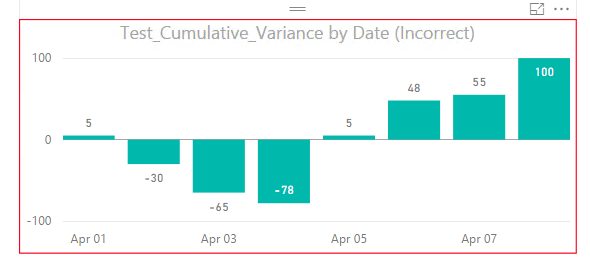

1.png

Thanks,
Lydia Zhang

View solution in original post

3 REPLIES 3
Framet
Resolver II
Resolver II

Hi,


Would is not be the case that the cumulative variance of each row would be the same as the variance between the total sum of sales and sum of targets. Can you do each calculation and simply subtract one from another?

Cumulative_Total =
    CALCULATE (
        SUM ( SalesTable[Sales] ),
        FILTER ( ALL ( Table[Day] ), Table[Day] <= MAX ( ( Table[Day] ) ) )
    )
        - CALCULATE (
            SUM ( TargetsTable[Targets] ),
            FILTER ( ALL ( Table[Day] ), Table[Day] <= MAX ( ( Table[Day] ) ) )
        )


I could be completly missing the point and your data prevents this from making sense. Could you provide a little more on how the tables relate and their structure?

You might find SUMX works for you allowing you to sum a performed a calculation for every row context of the indicated table?

Thanks


Thomas

Thanks Thomas,

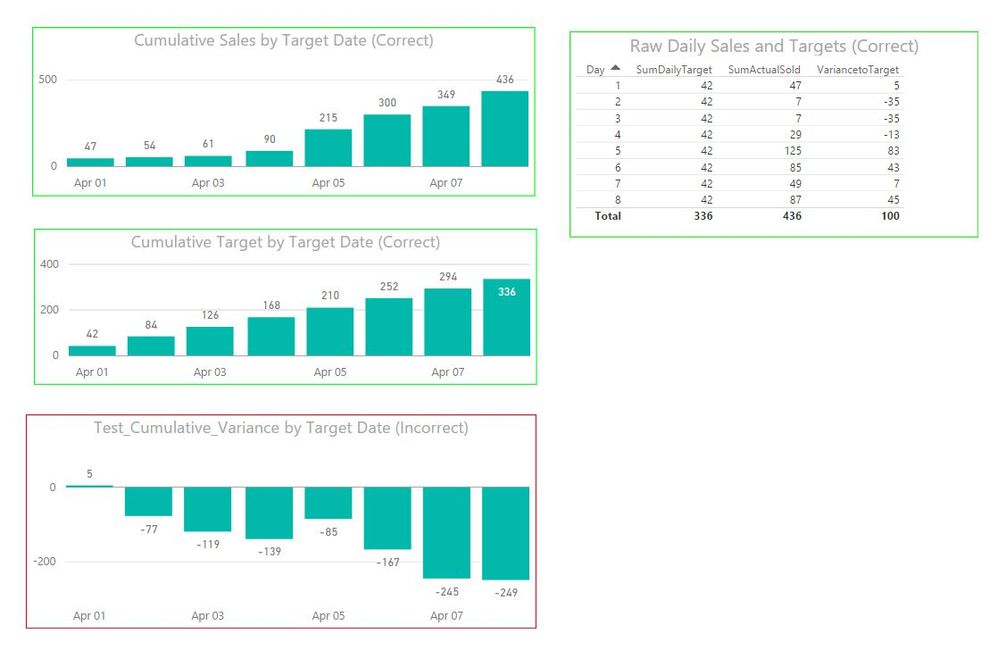
 Subtracting the Cumulative Sales from the Cumulative Targets  totally makes sence. It was my first port of call (I should have mentioned it).  But strangely it doesn't generate the correct result (screenshot below and actual file attached in this link ). I am thinking I am missing something simple . 


I don't understand the changing from SUM to SUMX logic (incidentally I also get an error )- can you elaborate?  

Much appreciated.

Steve


Cumulative Variance screenshot.JPG


Anonymous
Not applicable

Hi @stfox,

From your PBIX file, I note that when creating Cumulative Sales, you use the following formula.

Cumulative Sales = CALCULATE (
    SUM ('Sales'[#Sold] ),
    FILTER (
        ALL ( 'DailyTarget2'[Date]),
        'DailyTarget2'[Date] <= MAX ( 'DailyTarget2'[Date])
    )
)


But when creating Test_Cumulative_Variance_Wrong, you use a different formula to represent Cumulative Sales.

CALCULATE (
    SUM ('Sales'[#Sold] ),
    FILTER (
        ALL ( 'DailyTarget2'[DailySalesTarget] ),
        'DailyTarget2'[DailySalesTarget] <= MAX ( 'DailyTarget2'[DailySalesTarget])
    )
)


When you change the formula of Test_Cumulative_Variance_Wrong as follow, does it give your expected result?

Test_Cumulative_Variance_Wrong = (CALCULATE (
    SUM ('Sales'[#Sold] ),
     FILTER (
        ALL ( 'DailyTarget2'[Date]),
        'DailyTarget2'[Date] <= MAX ( 'DailyTarget2'[Date])
    )
))-
 (CALCULATE (
    SUM ('DailyTarget2'[DailySalesTarget]),
    FILTER (
        ALL ( 'DailyTarget2'[Date] ),
        'DailyTarget2'[Date] <= MAX ( 'DailyTarget2'[Date])
    )
))


1.png

Thanks,
Lydia Zhang

Helpful resources

Announcements
Power BI DataViz World Championships

Power BI Dataviz World Championships

The Power BI Data Visualization World Championships is back! Get ahead of the game and start preparing now!

November Power BI Update Carousel

Power BI Monthly Update - November 2025

Check out the November 2025 Power BI update to learn about new features.

FabCon Atlanta 2026 carousel

FabCon Atlanta 2026

Join us at FabCon Atlanta, March 16-20, for the ultimate Fabric, Power BI, AI and SQL community-led event. Save $200 with code FABCOMM.