Join us at FabCon Atlanta from March 16 - 20, 2026, for the ultimate Fabric, Power BI, AI and SQL community-led event. Save $200 with code FABCOMM.
Register now!The Power BI Data Visualization World Championships is back! Get ahead of the game and start preparing now! Learn more
Hi,
I have a problem, I hope somebody can help me.
I have two tables:
Projects
| ID | Name |
| 1 | Project One |
| 2 | Project Two |
| 3 | Project Three |
Invoice
| ID | ProjectID | Invoice Number | Amount |
| 1 | 1 | 1 | $100 |
| 2 | 2 | 2 | $200 |
| 3 | 3 | 2 | $200 |
As you can see the relationship is 1:*, and there are invoices that correspond to many projects, in the example Invoice number 2. Obviosly The SUM in a Table in the report will be $500 because it is adding all the entries from the Invoice table.
Is there any way to avoid it like grouping by Invoice number, because the correct SUM is only $300 because there is inly two invoices, but one of them is point to several projects.
Thanks in advance.
Thanks.
Solved! Go to Solution.
Thankl you for your help! It doesn't work, but finally I solve it as follows:
@jareyesg , Create a measure like
sumx(summarize(Projects, Projects[ID],Invoice[Invoice Number], "_1", max(Invoice[Amount])),[_1])
I assume Projects and Invoice are joined
Thankl you for your help! It doesn't work, but finally I solve it as follows:
Hi @jareyesg
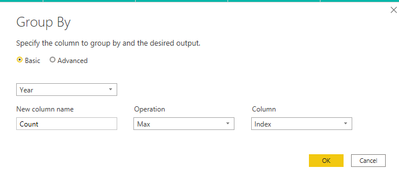
You can create a reference table and group the table based on invoice to show max of invoce.
Power Query Editor --> Transform --> Group By
Did I answer your question? Mark my post as a solution! Appreciate your Kudos!!
Regards,
Pranit
Check out the November 2025 Power BI update to learn about new features.
Advance your Data & AI career with 50 days of live learning, contests, hands-on challenges, study groups & certifications and more!
| User | Count |
|---|---|
| 58 | |
| 45 | |
| 42 | |
| 20 | |
| 18 |
| User | Count |
|---|---|
| 169 | |
| 109 | |
| 91 | |
| 55 | |
| 44 |