

Join us at FabCon Atlanta from March 16 - 20, 2026, for the ultimate Fabric, Power BI, AI and SQL community-led event. Save $200 with code FABCOMM.
Register now!Learn from the best! Meet the four finalists headed to the FINALS of the Power BI Dataviz World Championships! Register now
Hi Friends,
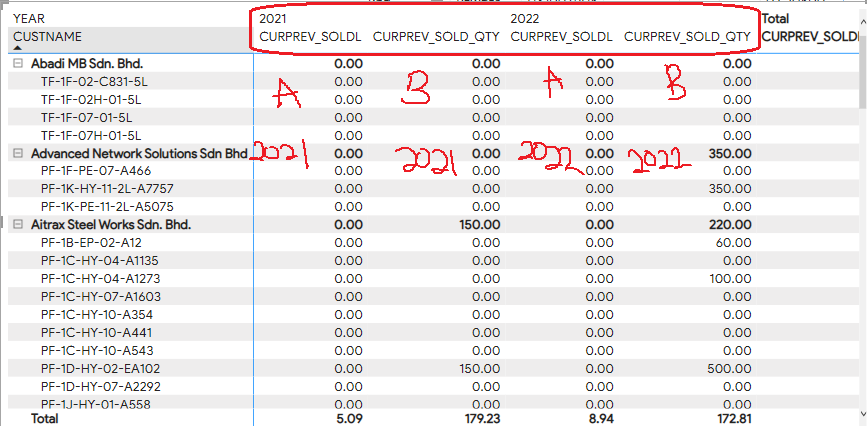
Do you guys have any idea how to arrange the column
Make it as expected output down below.
Expected output:
2021 2022 2021 2022
A A B B
Thanks for reaching out to us.
I just want to confirm if you resolved this issue? If yes, you can accept the answer helpful as the solution or share you method and accept it as solution, thanks for your contribution to improve Power BI.
If you need more help, please let me know.
Best Regards,
Community Support Team _Tang
If this post helps, please consider Accept it as the solution to help the other members find it more quickly.
You have to put A&B column firstly,
for example,
A A | B B
2021 2022 | 2021 2022
Best Regards,
Community Support Team _Tang
If this post helps, please consider Accept it as the solution to help the other members find it more quickly.
@rainchong7401 , You measure above year, You need a calculation group for that
I have discussed few formats here
Calculation Groups- Measure Slicer, Measure Header Grouping, Measure to dimension conversion. Complex Table display : https://youtu.be/qMNv67P8Go0
Share feedback directly with Fabric product managers, participate in targeted research studies and influence the Fabric roadmap.
Check out the February 2026 Power BI update to learn about new features.
| User | Count |
|---|---|
| 52 | |
| 50 | |
| 34 | |
| 15 | |
| 14 |
| User | Count |
|---|---|
| 92 | |
| 77 | |
| 41 | |
| 26 | |
| 25 |