Join us at FabCon Atlanta from March 16 - 20, 2026, for the ultimate Fabric, Power BI, AI and SQL community-led event. Save $200 with code FABCOMM.
Register now!The Power BI Data Visualization World Championships is back! Get ahead of the game and start preparing now! Learn more
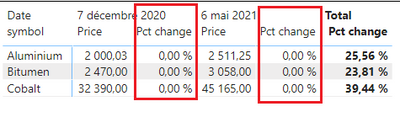
I have a table with a measure that calculates the difference in price between two dates, and I can't figure out how to remove the columns in red.
The measure I'm using:
Pct change =
var _max = maxx(priceTable,priceTable[Date])
var _min = MINX(priceTable,priceTable[Date])
var _latestValue = CALCULATE(SUM(priceTable[Price]),FILTER(ALLEXCEPT ( priceTable, priceTable[symbol]),priceTable[Date]=_max))
var _earliestValue = CALCULATE(SUM(priceTable[Price]),FILTER(ALLEXCEPT ( priceTable, priceTable[symbol]),priceTable[Date]=_min))
return (DIVIDE ( _latestValue - _earliestValue, _earliestValue, 0 ))
One temporary solution I have is to hide the columns filled with 0,00%, but every time I choose new dates, these pesky columns reappear. Ideally, the end user should not see those columns.
Any help is appreciated, thanks!
@charlesLeblanc , You need a Hybrid table
if you are looking for a Hybrid display with Matrix Column and measure
https://community.powerbi.com/t5/Community-Blog/Creating-a-custom-or-hybrid-matrix-in-PowerBI/ba-p/1...
https://community.powerbi.com/t5/Quick-Measures-Gallery/The-New-Hotness-Custom-Matrix-Hierarchy/m-p/...
vote for Hybrid Table
https://ideas.powerbi.com/ideas/idea/?ideaid=9bc32b23-1eb1-4e74-8b34-349887b37ebc
The Power BI Data Visualization World Championships is back! Get ahead of the game and start preparing now!
| User | Count |
|---|---|
| 40 | |
| 38 | |
| 36 | |
| 29 | |
| 28 |
| User | Count |
|---|---|
| 126 | |
| 88 | |
| 78 | |
| 66 | |
| 65 |