We've captured the moments from FabCon & SQLCon that everyone is talking about, and we are bringing them to the community, live and on-demand. Starts on April 14th. Register now
Hi PBI Experts,
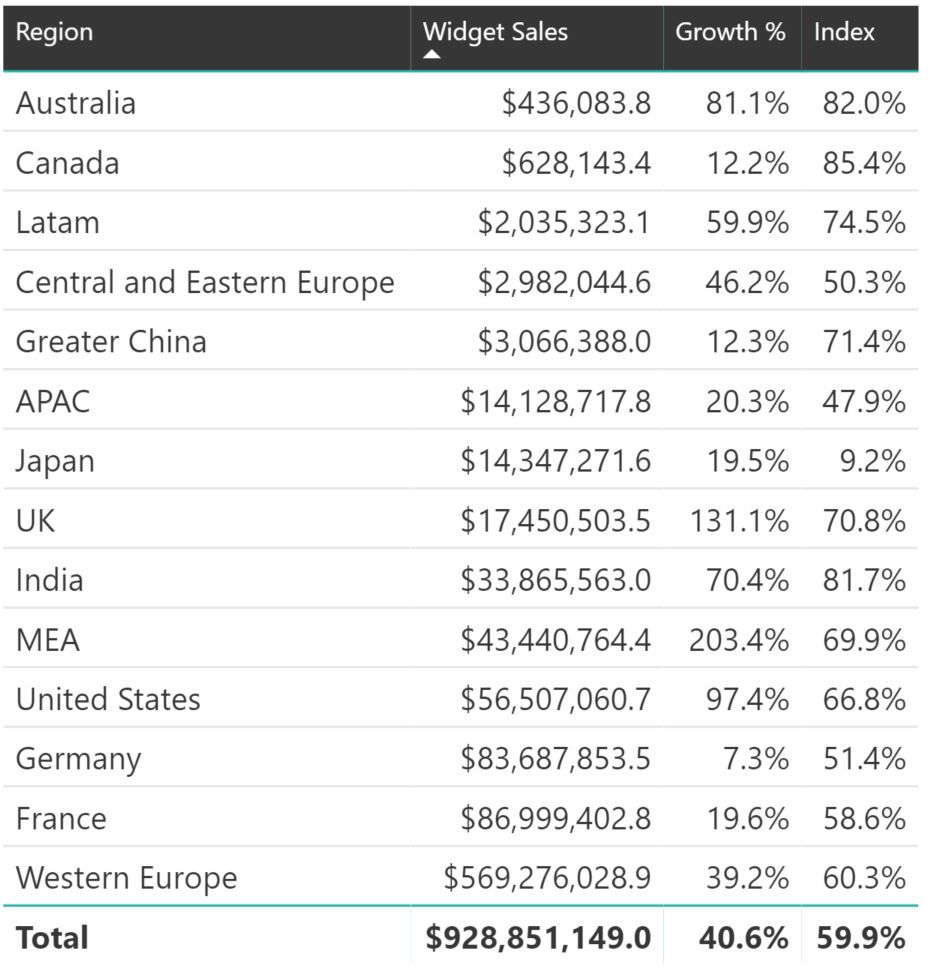
I'm new to PowerBI so appreciate anyone's assistance here. How do I aggregate some selected rows below. E.g. I want to group together Australia, Canada and LATAM into a "Other" summing up its sales revenue since they are not relevant but I don't want to mess up the total at the bottom of the table? I want to preserve the other rows. I'm not sure how this will work with the % values like 'Growth %' and Index %.
But would appreciate guidance on grouping some of the countries below. Thanks!
Solved! Go to Solution.
Ok, try this ![]()
1. In the Menu bar press Modeling
2. Click New Column
3. Paste the code I wrote before, but change the name for the table and if you want to change the name of the column "Region2"
4. Press Enter
5. Select your table and drag and drop the new Region2 to the table
Hi, you could do the grouping by creating a calculated column like:
Region2 = SWITCH(Table1[Region];"Australia";"Other";"Canada";"Other";"Latam";"Other";Table1[Region])
Then you add this column to the table instead of the old one. I guess your percentage would still be right, if not add another screen shot.
Folks, I'm super new to PowerBI. Now even sure how to implement these instructions. I appreciate it though but could someone provide some steps to make this work. Thanks!
Ok, try this ![]()
1. In the Menu bar press Modeling
2. Click New Column
3. Paste the code I wrote before, but change the name for the table and if you want to change the name of the column "Region2"
4. Press Enter
5. Select your table and drag and drop the new Region2 to the table
If you have recently started exploring Fabric, we'd love to hear how it's going. Your feedback can help with product improvements.
A new Power BI DataViz World Championship is coming this June! Don't miss out on submitting your entry.
Share feedback directly with Fabric product managers, participate in targeted research studies and influence the Fabric roadmap.
| User | Count |
|---|---|
| 54 | |
| 37 | |
| 32 | |
| 17 | |
| 15 |
| User | Count |
|---|---|
| 66 | |
| 66 | |
| 39 | |
| 34 | |
| 25 |