Join us at FabCon Atlanta from March 16 - 20, 2026, for the ultimate Fabric, Power BI, AI and SQL community-led event. Save $200 with code FABCOMM.
Register now!The Power BI Data Visualization World Championships is back! Get ahead of the game and start preparing now! Learn more
Hi,
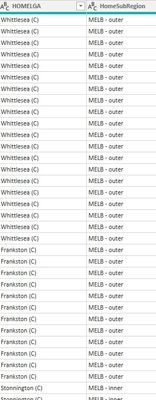
I have the table A with the following cols :
And Table B with following col:
I need to add a new col to table B Home SubRegion. How to match these LGA values to correct homesubregion? please help. Thanks
Solved! Go to Solution.
Hi,
if you want to achieve this using dax:
New colunm = lookupvalue(TableA[HomeSubRegion],TableA[HomeLGA],TableB[OrigLGA])
Cheers,
Sturla
If this post helps, then please consider Accepting it as the solution. Kudos are nice too.
Probably best to do this in Power Query directly, with a simple merge. Paste the two tables above in text-tabular format instead of ona screen cap (so that table contents can be copied) and we'll work it out
|
|
Please accept the solution when done and consider giving a thumbs up if posts are helpful. Contact me privately for support with any larger-scale BI needs, tutoring, etc. |
Hi,
if you want to achieve this using dax:
New colunm = lookupvalue(TableA[HomeSubRegion],TableA[HomeLGA],TableB[OrigLGA])
Cheers,
Sturla
If this post helps, then please consider Accepting it as the solution. Kudos are nice too.
After doing this I get many blanks in the newly created column. Why's that? I cross-checked and the values are not blank on columns of Table A or B. Kindly help.
Probably because there are HomeLGAs with more than 1 HomeSubRegion
Check out the November 2025 Power BI update to learn about new features.
Advance your Data & AI career with 50 days of live learning, contests, hands-on challenges, study groups & certifications and more!