Don't miss your chance to take exam DP-600 or DP-700 on us!
Request nowLearn from the best! Meet the four finalists headed to the FINALS of the Power BI Dataviz World Championships! Register now
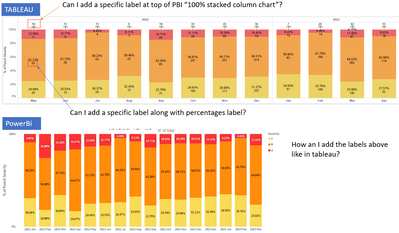
Hi, I have a question, is is posible to add new labels to a 100% stacked bar chart in PBI like in tableau?
Solved! Go to Solution.
Hi @PatCreator ,
Unfortunately the power bi desktop built-in visual object does not allow this functionality.
If you would like to suggest feature improvements, you may vote the idea and comment here to improve this feature. It is a place for customers provide feedback about Microsoft Office products . What’s more, if a feedback is high voted there by other customers, it will be promising that Microsoft Product Team will take it into consideration when designing the next version in the future.
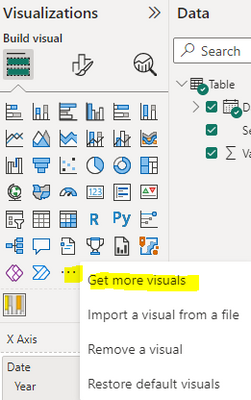
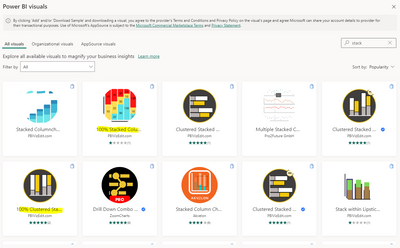
Or you can consider using custom visual objects.
Best Regards,
Neeko Tang
If this post helps, then please consider Accept it as the solution to help the other members find it more quickly.
Hi @PatCreator ,
Unfortunately the power bi desktop built-in visual object does not allow this functionality.
If you would like to suggest feature improvements, you may vote the idea and comment here to improve this feature. It is a place for customers provide feedback about Microsoft Office products . What’s more, if a feedback is high voted there by other customers, it will be promising that Microsoft Product Team will take it into consideration when designing the next version in the future.
Or you can consider using custom visual objects.
Best Regards,
Neeko Tang
If this post helps, then please consider Accept it as the solution to help the other members find it more quickly.
Thanks
not currently possible with the standard stacked column visual. use a custom visual like Deneb, or consider voting for an existing idea or raising a new one at https://ideas.powerbi.com
Share feedback directly with Fabric product managers, participate in targeted research studies and influence the Fabric roadmap.
Check out the February 2026 Power BI update to learn about new features.
| User | Count |
|---|---|
| 51 | |
| 40 | |
| 37 | |
| 14 | |
| 14 |
| User | Count |
|---|---|
| 85 | |
| 69 | |
| 38 | |
| 29 | |
| 27 |