cancel
Showing results for 
Search instead for 
Did you mean: 

The Power BI Data Visualization World Championships is back! Get ahead of the game and start preparing now! Learn more

Reply
Anonymous
Not applicable

How to add a cumulated line char on a bar chart

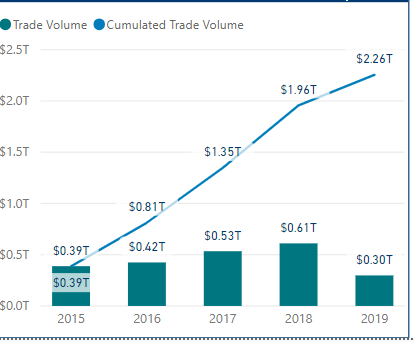
The graph works fine with cumulated total value after adding on the following measures:


Cumulated Trade Volume =
VAR TopDate = MAX ( 'Table'[Trade Date] )
RETURN
CALCULATE(
    SUM ( 'Table'[Trade Volume] ),
    ALLSELECTED( 'Table'),
    'Table'[Trade Date] <= TopDate
)


ccccccccccc.PNG
 
However, with some individual security, it does work well as follows:
 
ddddddddd.PNG I am guessing it is because the volume is too small to show up. How to change the counting units? Thanks
 
 
5 REPLIES 5
Anonymous
Not applicable

Hi @Anonymous ,

You can change visual type to 'line and clustered column chart' to add cumulative measure on line fields.

Regards,

Xiaoxin Sheng

Anonymous
Not applicable

upupupup

Anonymous
Not applicable

Anyone can help me out?Thanks

Anonymous
Not applicable

The line chart is not right which is cumulated value. Can someone help me out? Thanks!

Anonymous
Not applicable

upupup

Helpful resources

Announcements
Power BI DataViz World Championships

Power BI Dataviz World Championships

The Power BI Data Visualization World Championships is back! Get ahead of the game and start preparing now!

November Power BI Update Carousel

Power BI Monthly Update - November 2025

Check out the November 2025 Power BI update to learn about new features.

FabCon Atlanta 2026 carousel

FabCon Atlanta 2026

Join us at FabCon Atlanta, March 16-20, for the ultimate Fabric, Power BI, AI and SQL community-led event. Save $200 with code FABCOMM.