Join us at FabCon Atlanta from March 16 - 20, 2026, for the ultimate Fabric, Power BI, AI and SQL community-led event. Save $200 with code FABCOMM.
Register now!The Power BI Data Visualization World Championships is back! Get ahead of the game and start preparing now! Learn more
Hello,
I have two calculated columns with different expressions in Power Query. I want to calculate the difference between the two columns and return a blank value where the formula returns an error message.
The first column (% Change) is calculated by the difference of = (Projected $ - Cost)/Projected
The second column used the result of the first column and subtracted it from 1. i.e. % Complete = 1-(% Change) value.
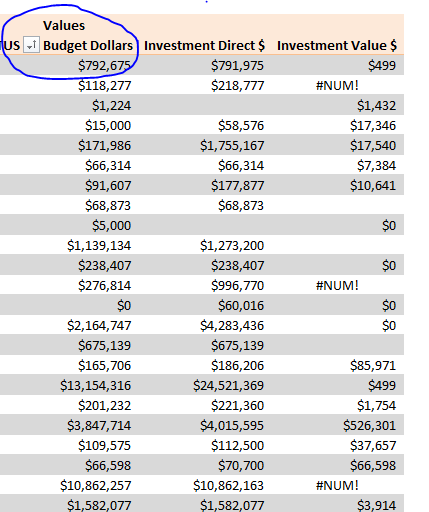
This way when the result is displayed on my power PowerPivot table, the value in the cell remains blank instead of "NA#".Also, if there is a better way to do this calculation, please share your thoughts as well.
Thanks!
Solved! Go to Solution.
Yes, I do suggest you use DAX measures in Power BI Desktop (or Excel if you are using Excel with powerpivot).
Hi @mdrammeh
I think you should not use Power Query but Dax language to perform this kind of calculations.
And because it involves ratios, you should create DAX measures rather than calculated columns - otherwise you'll get wrong figures when analysing your percentages.
Why ? Because a/b + c/d + e/ f is NOT equal to (a + c + e) / (b+d+f)
You should always do "the ratios of the sum rather than the sum of the ratios" (Kimball).
So create these 2 measures:
[Pct Change] = 1 - Sum(Table[Cost]) / Sum (Table[Projected])
[Pct Complete] = 1 - [Pct Change]
Format them as % and use them in any graphs. These measures will automaticcaly adjust to filter context.
Your Pct calculations will be both correct and dynamic.
So are you suggesting I use DAX functions in Excel or Power BI instead of Power Query? Could you share an example from the Query editor?
Yes, I do suggest you use DAX measures in Power BI Desktop (or Excel if you are using Excel with powerpivot).
The Power BI Data Visualization World Championships is back! Get ahead of the game and start preparing now!
Check out the November 2025 Power BI update to learn about new features.
| User | Count |
|---|---|
| 69 | |
| 46 | |
| 44 | |
| 28 | |
| 19 |
| User | Count |
|---|---|
| 199 | |
| 129 | |
| 102 | |
| 69 | |
| 55 |