Join us at FabCon Atlanta from March 16 - 20, 2026, for the ultimate Fabric, Power BI, AI and SQL community-led event. Save $200 with code FABCOMM.
Register now!The Power BI Data Visualization World Championships is back! Get ahead of the game and start preparing now! Learn more
Hi there
I have a user model in Excel:
| Requirement | Vendor 1 | Vendor 2 | Vendor 3 | Vendor 4 |
| T Requirement 1 | 10 | 4 | 4 | 5 |
| T Requirement 2 | 15 | 9 | 16 | 15 |
| T Requirement 3 | 19 | 5 | 21 | 11 |
| T Requirement 4 | 12 | 5 | 14 | 13 |
| T Requirement 5 | 10 | 3 | 6 | 6 |
| T Requirement 6 | 2 | 0 | 4 | 3 |
| T Requirement 7 | 8 | 4 | 16 | 8 |
| T Requirement 8 | 10 | 2 | 8 | 11 |
| Total T Score | 86 | 32 | 89 | 72 |
| Total T Adjusted Score | 48 | 18 | 50 | 40 |
So the Total T Score is just of SUM score for each vendor WHILE Total T Adjusted Score is calculated based on each (Total T Score / Max of Total T Score) * 50 .
For example for Vendor 1: (86 / 89) * 50 = 48
Started to shape this data into Fact/Dims
ScoreFact
| Score Type Key | Requirement Key | Vendor 1 | Vendor 2 | Vendor 3 | Vendor 4 |
| TS-01 | TR-01 | 10 | 4 | 5 | 6 |
| TS-01 | TR-02 | 14 | 8 | 15 | 14 |
| TS-01 | TR-03 | 19 | 5 | 20 | 12 |
| TS-01 | TR-04 | 12 | 4 | 15 | 12 |
| TS-01 | TR-05 | 10 | 3 | 5 | 7 |
| TS-01 | TR-06 | 3 | 1 | 5 | 2 |
| TS-01 | TR-07 | 8 | 4 | 15 | 9 |
| TS-01 | TR-08 | 10 | 3 | 9 | 10 |
| FS-01 | FR-01 | 180000.00 | 80000.00 | 900000.00 | 40000.00 |
| FS-01 | FR-02 | 2000000.00 | 1400000.00 | 1600000.00 | 3800000.00 |
| FS-01 | FR-03 | 280000.00 | 400000.00 | 500000.00 | 190000.00 |
then we pivoting this so the column will be Score Type Key, Requirement Key, Vendor, Score
ScoreTypeDim
| Score Type Key | Name | Ranking Percentage | Order Display |
| TS-01 | T Score | 50% | 1 |
| FS-01 | F Score | 50% | 2 |
RequirementDim
| Requirement Key | Requirement | Order Display |
| TR-01 | T Requirement 1 | 1 |
| TR-02 | T Requirement 2 | 2 |
| TR-03 | T Requirement 3 | 3 |
| TR-04 | T Requirement 4 | 4 |
| TR-05 | T Requirement 5 | 5 |
| TR-06 | T Requirement 6 | 6 |
| TR-07 | T Requirement 7 | 7 |
| TR-08 | T Requirement 8 | 8 |
| FR-01 | F Requirement 1 | 1 |
| FR-02 | F Requirement 2 | 2 |
| FR-03 | F Requirement 3 | 3 |
So back to Excel model, created the Measurement for
| Name | Vendor 1 | Vendor 2 | Vendor 3 | Vendor 4 |
| T Score | 50 | 50 | 50 | 50 |
Solved! Go to Solution.
Hi @DCSupport ,
If I understand your scenario correctly, the first table is your desired output, which you want to achieve in PowerBI. And the ScoreFact, ScoreTypeDim, RequirementDim are the source tables you already have in PowerBI now?
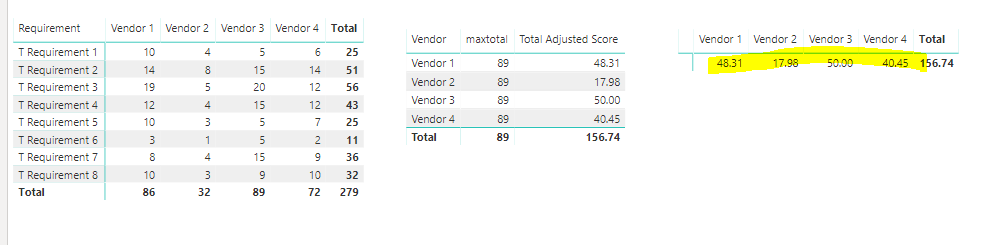
If that’s the case/ If so, I’m afraid you need to create the calculated table first and then create the measure below.
Table = SUMMARIZE (
ScoreFact,
ScoreFact[Vendor],
"Adjusted Score", SUM ( ScoreFact[Value] )
)
maxtotal =
MAXX (
'Table',
MAX( [Adjusted Score])
)
Total Adjusted Score =
VAR a =
CALCULATE (
SUM ( 'ScoreFact'[Value] ),
ALLEXCEPT ( ScoreFact, 'ScoreFact'[Vendor] )
)
RETURN
DIVIDE ( a, [maxtotal] ) * 50
Then you could get the output.
Best Regards,
Cherry
Hi @DCSupport ,
If I understand your scenario correctly, the first table is your desired output, which you want to achieve in PowerBI. And the ScoreFact, ScoreTypeDim, RequirementDim are the source tables you already have in PowerBI now?
If that’s the case/ If so, I’m afraid you need to create the calculated table first and then create the measure below.
Table = SUMMARIZE (
ScoreFact,
ScoreFact[Vendor],
"Adjusted Score", SUM ( ScoreFact[Value] )
)
maxtotal =
MAXX (
'Table',
MAX( [Adjusted Score])
)
Total Adjusted Score =
VAR a =
CALCULATE (
SUM ( 'ScoreFact'[Value] ),
ALLEXCEPT ( ScoreFact, 'ScoreFact'[Vendor] )
)
RETURN
DIVIDE ( a, [maxtotal] ) * 50
Then you could get the output.
Best Regards,
Cherry
The Power BI Data Visualization World Championships is back! Get ahead of the game and start preparing now!
| User | Count |
|---|---|
| 38 | |
| 36 | |
| 33 | |
| 30 | |
| 28 |
| User | Count |
|---|---|
| 128 | |
| 88 | |
| 79 | |
| 67 | |
| 62 |