cancel
Showing results for 
Search instead for 
Did you mean: 

Get Fabric Certified for FREE during Fabric Data Days. Don't miss your chance! Request now

Reply
Harinihemanth06
Microsoft Employee
Microsoft Employee

How to Enable multi select in slicer for dynamic measure change

I have Dataset similar to below


Name Assignment1Assignment2Assignment3Assignment4Assignment5Assignment6Assignment7Assignment8
Suj107108101078
Swe898910799
Har9798109810
Rit101010101010910
Hem56578799


And have created disconnected table with measure names for Dynamic visual change

And have written dax 

Delops =
VAR MySelection =
SELECTEDVALUE( Sheet2[Assignment] )
RETURN
SWITCH (
TRUE (),
MySelection = "Assignment1",SUM(Sheet1[Assignment1]),
:
MySelection = "Assignment8",SUM(Sheet1[Assignment8]),Blank())
With above dax am able to perform only single selection in Slicer if multiple are selected blank is dispalyed.
And if I use multiple measures by using "IF (contains)"to achive multi slicer select I wount be able to drag Legend in to visual.
Need help with it as unpivoting and above solutions are not working.


2 REPLIES 2
Tahreem24
Super User
Super User

HI @Harinihemanth06 ,


I recommend you to unpivot all your assignment 1 to assignment n and then use this into filter with multiple selection. Follow the below step to solve your issue:

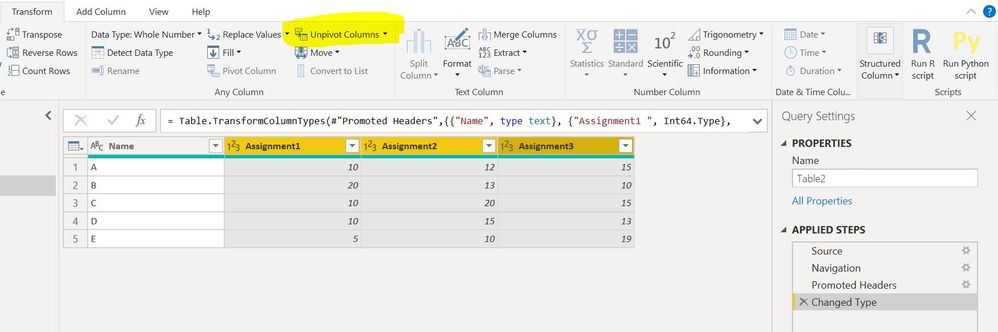
Step 1: Go to Query Editor and select all assignments columns(say 1 to n) --> go to trnasform tab --> select unpivout column (attached screen shot below)

1.JPG

Step 2: Rename the Attribute column to Assignment Name. Close and Apply.

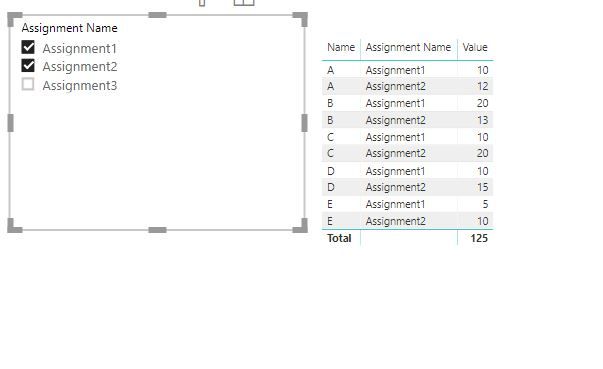
Step 3: Take the Assignment name into Slicer and enable multi select option. (SCreen shot is attached below)

2.JPG


Don't forget to hit THUMBS UP and Accept this as a solution if it helps you!


Don't forget to give thumbs up and accept this as a solution if it helped you!!!

Please take a quick glance at newly created dashboards : Restaurant Management Dashboard , HR Analytics Report , Hotel Management Report, Sales Analysis Report , Fortune 500 Companies Analysis , Revenue Tracking Dashboard

@Tahreem24 Thanks for your valuable input since the data volume is huge un-Pivoting is not a best option.


I have chosen to go with multiple measures for the requirement.

Helpful resources

Announcements
November Power BI Update Carousel

Power BI Monthly Update - November 2025

Check out the November 2025 Power BI update to learn about new features.

Fabric Data Days Carousel

Fabric Data Days

Advance your Data & AI career with 50 days of live learning, contests, hands-on challenges, study groups & certifications and more!

FabCon Atlanta 2026 carousel

FabCon Atlanta 2026

Join us at FabCon Atlanta, March 16-20, for the ultimate Fabric, Power BI, AI and SQL community-led event. Save $200 with code FABCOMM.

Top Solution Authors
Top Kudoed Authors