Join us at FabCon Atlanta from March 16 - 20, 2026, for the ultimate Fabric, Power BI, AI and SQL community-led event. Save $200 with code FABCOMM.
Register now!The Power BI Data Visualization World Championships is back! Get ahead of the game and start preparing now! Learn more
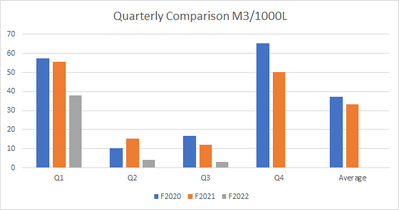
Trying to replicate a basic pivot table from excel.
Data:
| Q1 | Q2 | Q3 | Q4 | Average | |
| F2020 | 57 | 10 | 17 | 65 | 37 |
| F2021 | 56 | 15 | 12 | 50 | 33 |
| F2022 | 38 | 4 | 3 | 0 | 0 |
Pivot table in Excel:
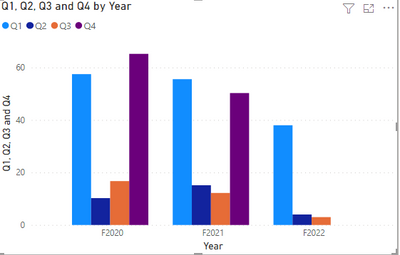
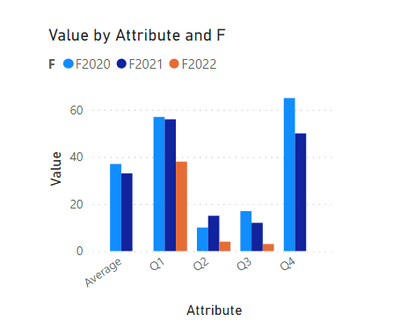
Clustered bar chart in Power BI clusters all the quarters + average in a year together.
I've tried different fields for the Axis, Legend and Values. This format is the closest I can get (Axis is Year, no Legend, Values are Quarters).
What am I missing?
Solved! Go to Solution.
Hi, @Anonymous
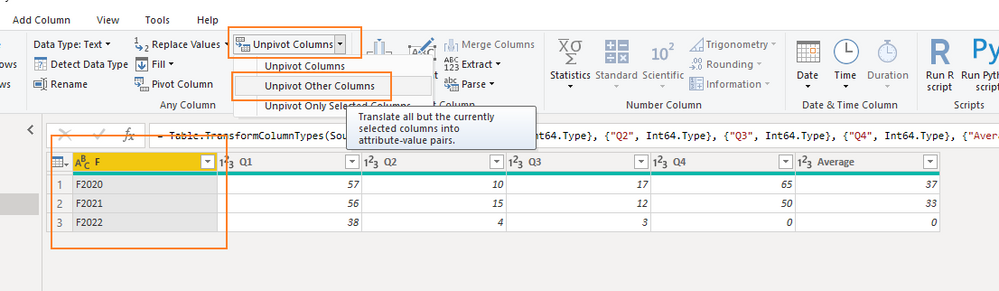
You need to unpivot other columns in Power Query first.
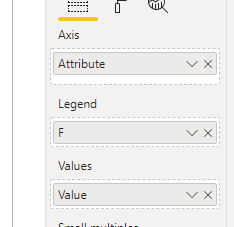
Then use these columns in Clustered bar chart.
Like this:
Did I answer your question ? Please mark my reply as solution. Thank you very much.
If not, please feel free to ask me.
Best Regards,
Community Support Team _ Janey
Hi, @Anonymous
You need to unpivot other columns in Power Query first.
Then use these columns in Clustered bar chart.
Like this:
Did I answer your question ? Please mark my reply as solution. Thank you very much.
If not, please feel free to ask me.
Best Regards,
Community Support Team _ Janey
The Power BI Data Visualization World Championships is back! Get ahead of the game and start preparing now!
| User | Count |
|---|---|
| 38 | |
| 38 | |
| 36 | |
| 28 | |
| 28 |
| User | Count |
|---|---|
| 124 | |
| 89 | |
| 73 | |
| 66 | |
| 65 |