Join us at FabCon Atlanta from March 16 - 20, 2026, for the ultimate Fabric, Power BI, AI and SQL community-led event. Save $200 with code FABCOMM.
Register now!The Power BI Data Visualization World Championships is back! Get ahead of the game and start preparing now! Learn more
Hi,
I have a column(Broker) and a measure(Strike Rate) in my model.
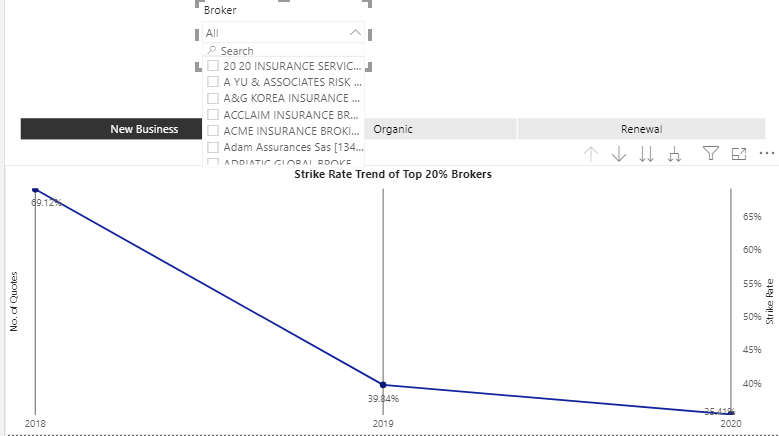
All I want is to display separate Strike Rate lines for each Broker whenever the Brokers are selected from the slicer.
Slicer is multiselect.
Please find below screenshot for better understanding.
As you can see there is only one Strike Rate line for all Brokers but I need separate lines from each Broker selected in above slicer.
Kind Regards
Amit Kumar
Solved! Go to Solution.
Hi, @a4
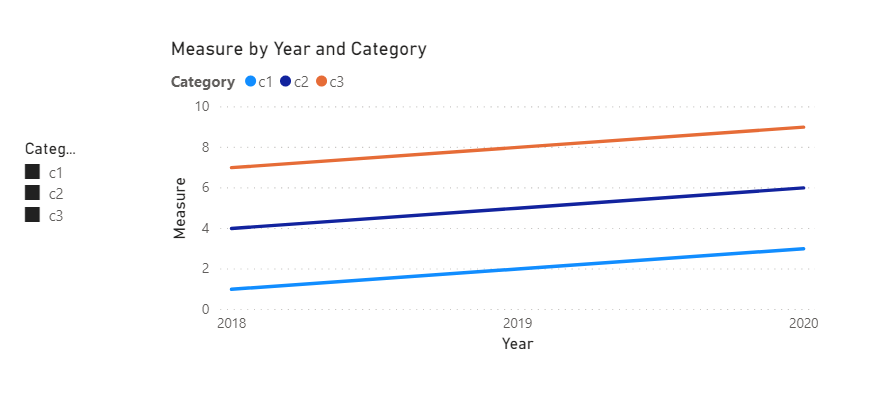
You need to create a category table with a single column,use it as slicer, and then create a measure.
Like this:
Category = DISTINCT('Table'[Category])
Measure =
IF(
ISFILTERED('Category'[Category]),
IF(
SELECTEDVALUE('Table'[Category]) in DISTINCT(Category[Category]),
SUM('Table'[VAlue])
)
)
//[strike rate] in your formula should be a measure,so change 'SUM('Table'[VAlue])' to [strike rate]Here is my sample .pbix file.Hope it helps.
If it doesn’t solve your problem, please feel free to ask me.
Best Regards
Janey Guo
If this post helps, then please consider Accept it as the solution to help the other members find it more quickly.
Hi, @a4
It’s my pleasure to answer for you.
According to your description,It should be no problem to put the legend directly, If there is a problem, it may be related to the formula used in the measure.
Could you mind providing us with some sample data or the formula of the measure,so we can help you soon.
Best Regards
Janey Guo
If this post helps, then please consider Accept it as the solution to help the other members find it more quickly.
Hi @v-janeyg-msft
Please find below the measure.
Hi, @a4
You need to create a category table with a single column,use it as slicer, and then create a measure.
Like this:
Category = DISTINCT('Table'[Category])
Measure =
IF(
ISFILTERED('Category'[Category]),
IF(
SELECTEDVALUE('Table'[Category]) in DISTINCT(Category[Category]),
SUM('Table'[VAlue])
)
)
//[strike rate] in your formula should be a measure,so change 'SUM('Table'[VAlue])' to [strike rate]Here is my sample .pbix file.Hope it helps.
If it doesn’t solve your problem, please feel free to ask me.
Best Regards
Janey Guo
If this post helps, then please consider Accept it as the solution to help the other members find it more quickly.
Hi Amit,
All I want is separate lines of Strike Rate for each Broker Selected in above slicer.
I tried the legend option but it doesn't suits my requirement.
Kind Regards
Amit Kumar
Check out the November 2025 Power BI update to learn about new features.
Advance your Data & AI career with 50 days of live learning, contests, hands-on challenges, study groups & certifications and more!
| User | Count |
|---|---|
| 57 | |
| 43 | |
| 40 | |
| 21 | |
| 17 |