cancel
Showing results for 
Search instead for 
Did you mean: 

The Power BI Data Visualization World Championships is back! Get ahead of the game and start preparing now! Learn more

Reply
Anonymous
Not applicable

How does function FILTERS() work?

Hi,


How can I see if a value is in the return of function FILTERS()? e.g., I have a filter Brand(A, B, C), and I want to know if Brand A is selected to filter the data.


Or there are some other functions I can use to do it if Filters() is not a good choice,


Thanks!

1 ACCEPTED SOLUTION

Hi @Anonymous,


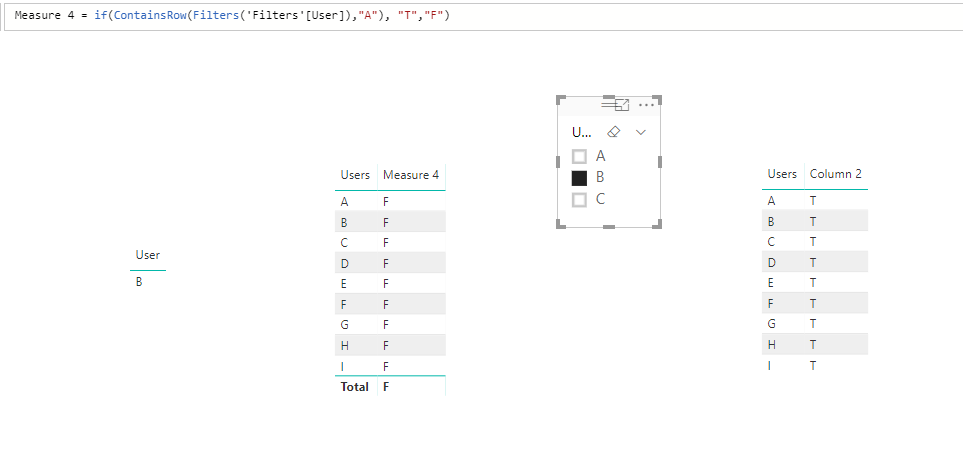
Try measure instead of using calculated column.


3.PNG4.PNG


FILTERS() in measure will return dynamic result, however it will always return the entire column values in a calculated column.


Thanks,
Xi Jin.


View solution in original post

3 REPLIES 3
v-xjiin-msft
Solution Sage
Solution Sage

Hi @Anonymous,


Yes. Brand A is selected to filter the data.


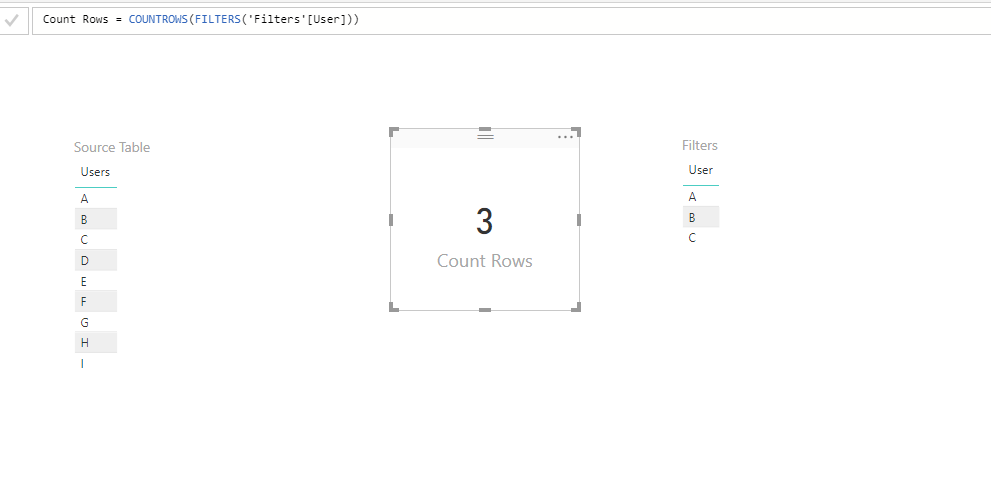
FILTERS() function returns the values that are directly applied as filters to columnName. Please refer to following simple sample:


As you can see the Source Table contains 9 rows as A to I. And the Filters table only contains 3 rows A to C. Then create a measure for Source Table with expression like:


Count Rows = COUNTROWS(FILTERS('Filters'[User]))

The result will show as 3 since the Source Table has been filtered by Filters table.


3.PNG


Thanks,
Xi Jin.

Anonymous
Not applicable

Hi @v-xjiin-msft


Thanks...and here's what I'd tried and got confused:


when I select the brand(s)(A,B, or C) from the Filter Brand, I always can see row# = CounterRows(Filters(Product[Brand]) changes with what I selected, e.g, if I select A, row# = 1; if I select A and B, Row# = 2; if I select A, B and C, row# =3.


at the same time, I created column Flag = if(ContainsRow(Filters(Product[Brand],"A"), "T","F") to test if A is selected as filter value (I tried B and C also). No matter A is seleted or not, always the Flag  = "T", which means Filters(Product[Brand]) always contains all A, B and C as its values, but CounterRows() tells me another story that Filters() only contains what I select.


what I want to achieve is checking if "A" is selected and applied as filter on the dashboard. I would like to know if containsRow() or IN functions can work with FILTERS() to get things done. Or any other ADX function can do it.


Thanks!


Hi @Anonymous,


Try measure instead of using calculated column.


3.PNG4.PNG


FILTERS() in measure will return dynamic result, however it will always return the entire column values in a calculated column.


Thanks,
Xi Jin.


Helpful resources

Announcements
Power BI DataViz World Championships

Power BI Dataviz World Championships

The Power BI Data Visualization World Championships is back! Get ahead of the game and start preparing now!

December 2025 Power BI Update Carousel

Power BI Monthly Update - December 2025

Check out the December 2025 Power BI Holiday Recap!

FabCon Atlanta 2026 carousel

FabCon Atlanta 2026

Join us at FabCon Atlanta, March 16-20, for the ultimate Fabric, Power BI, AI and SQL community-led event. Save $200 with code FABCOMM.