FabCon is coming to Atlanta
Join us at FabCon Atlanta from March 16 - 20, 2026, for the ultimate Fabric, Power BI, AI and SQL community-led event. Save $200 with code FABCOMM.
Register now!- Power BI forums
- Get Help with Power BI
- Desktop
- Service
- Report Server
- Power Query
- Mobile Apps
- Developer
- DAX Commands and Tips
- Custom Visuals Development Discussion
- Health and Life Sciences
- Power BI Spanish forums
- Translated Spanish Desktop
- Training and Consulting
- Instructor Led Training
- Dashboard in a Day for Women, by Women
- Galleries
- Data Stories Gallery
- Themes Gallery
- Contests Gallery
- QuickViz Gallery
- Quick Measures Gallery
- Visual Calculations Gallery
- Notebook Gallery
- Translytical Task Flow Gallery
- TMDL Gallery
- R Script Showcase
- Webinars and Video Gallery
- Ideas
- Custom Visuals Ideas (read-only)
- Issues
- Issues
- Events
- Upcoming Events
The Power BI Data Visualization World Championships is back! Get ahead of the game and start preparing now! Learn more
- Power BI forums
- Forums
- Get Help with Power BI
- Desktop
- Re: How do i save "Show data point as table" chang...
- Subscribe to RSS Feed
- Mark Topic as New
- Mark Topic as Read
- Float this Topic for Current User
- Bookmark
- Subscribe
- Printer Friendly Page


- Mark as New
- Bookmark
- Subscribe
- Mute
- Subscribe to RSS Feed
- Permalink
- Report Inappropriate Content
How do i save "Show data point as table" changes?
It would be nice to save a determined "preset" of the data people get when they right click and "Show data point as table" Why? I'd love to offer that information in a ready-to-use report.
Currently, it gives me a bunch of information i might not be needing. So, I re-arrange (add/move/remove) columns in the way I'd like to and export. After that, if i click on the same value and try to get into that data again, its all messed up like before.
If this can't be done, how do i default the information that is shown? can i add more columns in there by adding it on filters or something like that?
Thank you for your help!
Solved! Go to Solution.


- Mark as New
- Bookmark
- Subscribe
- Mute
- Subscribe to RSS Feed
- Permalink
- Report Inappropriate Content
Hi @ElioAngarita ,
Generally speaking:
If the Value is a column in the visual, 'Show Data point as a table' is available. You can just right click on the data element in the visual and will see the option as the picture you haved posted.(Multiple column fields are also satisfied)
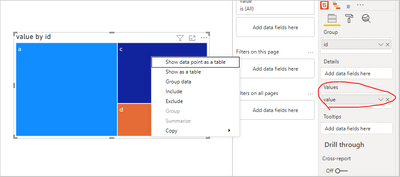
If the Value is a measure in the visual, 'Show Data point as a table' is not available.
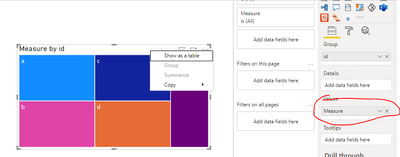
related solution link: Show Data point as a table not working in Power BI... - Microsoft Power BI Community
If the problem is still not resolved, can you further describe your information, provide the corresponding data (delete sensitive information) and screenshots of the expected results, so that I can do accurate tests as soon as possible.
Best Regards,
Henry
If this post helps, then please consider Accept it as the solution to help the other members find it more quickly.
- Mark as New
- Bookmark
- Subscribe
- Mute
- Subscribe to RSS Feed
- Permalink
- Report Inappropriate Content
Did anyone solve this?
When I select "show data point as table", I want to be able to dictate both the selection and order of the collumns that my user sees.

- Mark as New
- Bookmark
- Subscribe
- Mute
- Subscribe to RSS Feed
- Permalink
- Report Inappropriate Content
I noticed this thread about saving changes to the columns shown by Show data point as a table is a couple of years old, AND there was never an actual solution. I've been having the same issue ever since I started using Power BI and I can't believe it hasn't been addressed and fixed in two years.
In PBI desktop, if I right-click on a visual and select "Show data point as a table" I get a grid with several columns. Those columns are listed in the Build Visual section and I can add or remove them from there, or re-order them, but these changes never seem to get saved. If I click "Back to report" which returns me to the visual, and then right-click again and select "Show data point as table" the columns have reverted to what they originally were, and none of the changes I made have been saved.
How do I save these changes. There must be a way.
- Mark as New
- Bookmark
- Subscribe
- Mute
- Subscribe to RSS Feed
- Permalink
- Report Inappropriate Content
Have you found a solution? I'm experiencing the same problem. Please let me know! Thank you.
- Mark as New
- Bookmark
- Subscribe
- Mute
- Subscribe to RSS Feed
- Permalink
- Report Inappropriate Content
Any luck with a solution? I have the same problem... still... haha
- Mark as New
- Bookmark
- Subscribe
- Mute
- Subscribe to RSS Feed
- Permalink
- Report Inappropriate Content
Hi @ElioAngarita ,
Generally speaking:
If the Value is a column in the visual, 'Show Data point as a table' is available. You can just right click on the data element in the visual and will see the option as the picture you haved posted.(Multiple column fields are also satisfied)
If the Value is a measure in the visual, 'Show Data point as a table' is not available.
related solution link: Show Data point as a table not working in Power BI... - Microsoft Power BI Community
If the problem is still not resolved, can you further describe your information, provide the corresponding data (delete sensitive information) and screenshots of the expected results, so that I can do accurate tests as soon as possible.
Best Regards,
Henry
If this post helps, then please consider Accept it as the solution to help the other members find it more quickly.
- Mark as New
- Bookmark
- Subscribe
- Mute
- Subscribe to RSS Feed
- Permalink
- Report Inappropriate Content
Hi Henry! Thank you for your answer.
I don't have any issue with "show data point as a table" as i already have it avaliable when i click on my visual.
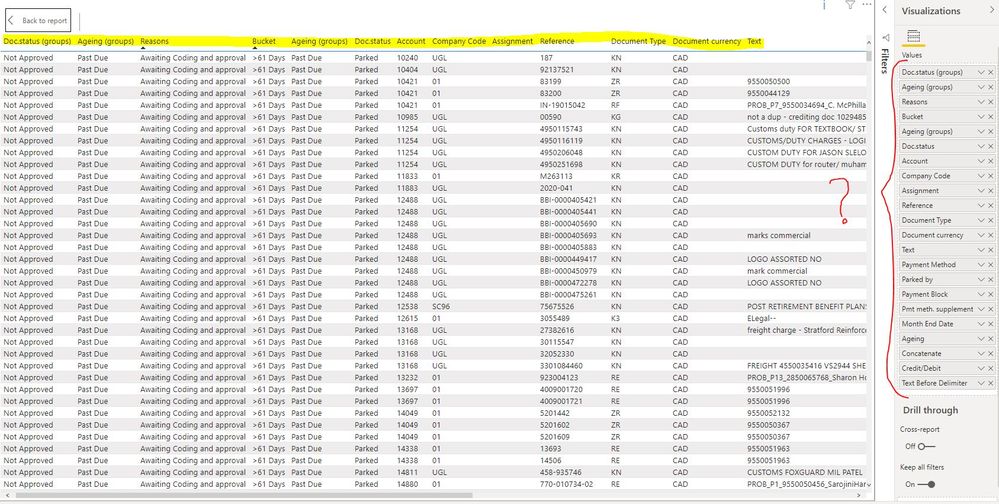
The thing is that I do have an issue with the information that i get from there. I know that i can move the fields around (columns) and even ADD more that were not avaliable. But, i haven't been able to SAVE the changes i do to this (re-ordering, new values, erase values). The whole idea is letting users export this data into a CSV file and work, and i would love it to be all organized already but i can't.. as soon as do my changes and then click "Back to report" everything gets back to how it was.
How do i change this? i want to have a report ready from the visual.


- Mark as New
- Bookmark
- Subscribe
- Mute
- Subscribe to RSS Feed
- Permalink
- Report Inappropriate Content
@ElioAngarita, @v-henryk-mstf ,
Elio, I am facing the exact same issue you describe here in this thread.
Did you ever find a solution to this issue?
Thanks and kind regards,
- Mark as New
- Bookmark
- Subscribe
- Mute
- Subscribe to RSS Feed
- Permalink
- Report Inappropriate Content
- Mark as New
- Bookmark
- Subscribe
- Mute
- Subscribe to RSS Feed
- Permalink
- Report Inappropriate Content
In order to remove fields from this view, you need to 'Hide' them in Power BI Desktop.

Helpful resources

Power BI Dataviz World Championships
The Power BI Data Visualization World Championships is back! Get ahead of the game and start preparing now!

Power BI Monthly Update - December 2025
Check out the December 2025 Power BI Holiday Recap!

FabCon Atlanta 2026
Join us at FabCon Atlanta, March 16-20, for the ultimate Fabric, Power BI, AI and SQL community-led event. Save $200 with code FABCOMM.

| User | Count |
|---|---|
| 39 | |
| 37 | |
| 33 | |
| 32 | |
| 29 |


| User | Count |
|---|---|
| 133 | |
| 88 | |
| 85 | |
| 68 | |
| 64 |


