cancel
Showing results for 
Search instead for 
Did you mean: 

The Power BI Data Visualization World Championships is back! Get ahead of the game and start preparing now! Learn more

Reply
Anonymous
Not applicable

How do I have multiple date formats on an X axis?


Hi,


I'm attempting to mimic a graph I modeled in Excel by using a column that had multiple date formats. Some dates were in "Mmm YYYY" format and others were in MM/DD/YYYY format. This purpose was to show weekly data, and then as the months passed it would convert the weekly data to show as monthly (see snapshot of graph below for clarification).


Capture.PNG


I assumed that if the field was set to "text" it would automatically read the column for its values like the above Excel graph does, but instead PBI immediately converted al data in this column to MM/DD/YYYY.


My question is this: How can I have multiple date formats on my x axis? OR how do I get PBI to read the values of the column without converting it to a date format like Excel does?


Thanks for your help!


4 REPLIES 4
Anonymous
Not applicable

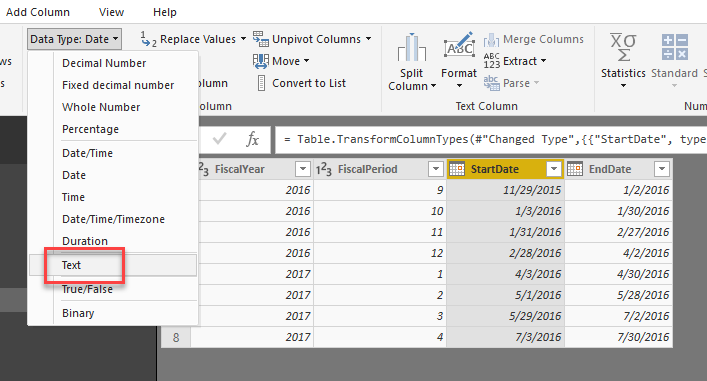
You can open Power Query Editor, find the column and then change the type to Text.

2018-11-22_15-23-15.png


v-yulgu-msft
Microsoft Employee
Microsoft Employee

Hi @Anonymous,


It is not possible to show dates in multiple date formats on X-axis. To show dates like above image, you could set the data type of date field to "Text" after importing into desktop.


Regards,

Yuliana Gu

Community Support Team _ Yuliana Gu
If this post helps, then please consider Accept it as the solution to help the other members find it more quickly.
affan
Solution Sage
Solution Sage

Hi @Anonymous


Can you share some sample data?

Ashish_Mathur
Super User
Super User

Hi,


You cannot have multiple date formats on the X-axis.


Regards,
Ashish Mathur
http://www.ashishmathur.com
https://www.linkedin.com/in/excelenthusiasts/

Helpful resources

Announcements
November Power BI Update Carousel

Power BI Monthly Update - November 2025

Check out the November 2025 Power BI update to learn about new features.

Fabric Data Days Carousel

Fabric Data Days

Advance your Data & AI career with 50 days of live learning, contests, hands-on challenges, study groups & certifications and more!

FabCon Atlanta 2026 carousel

FabCon Atlanta 2026

Join us at FabCon Atlanta, March 16-20, for the ultimate Fabric, Power BI, AI and SQL community-led event. Save $200 with code FABCOMM.

Top Solution Authors
Top Kudoed Authors