Join us at FabCon Atlanta from March 16 - 20, 2026, for the ultimate Fabric, Power BI, AI and SQL community-led event. Save $200 with code FABCOMM.
Register now!Get Fabric Certified for FREE during Fabric Data Days. Don't miss your chance! Request now
It looks like << ctrl F >> does not work in power bi. I need to search a specific column heading and need to find it quicker then scrolling thru over 100 columns. Is there an easy way to do this?
Solved! Go to Solution.
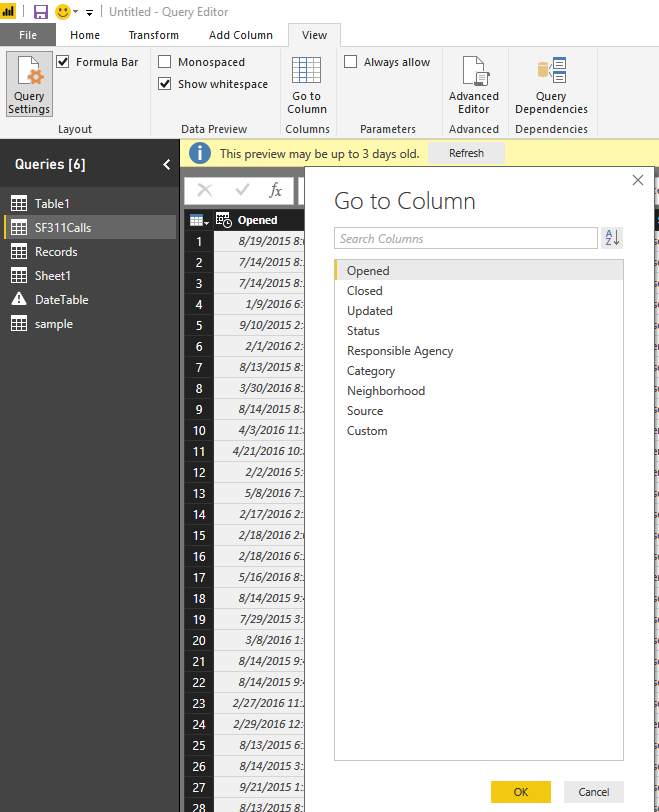
@lareine Where do you need this functionality? In the main report page and the data section there is a search right at the top of Fields and will search and filter all your objects to only those that match. I assume you must mean in the Query Editor? In that section, you can go to "View" in the header and select the "Go to Column" to navigate to the column you want.
HI @lareine,
As Eno1978 said, current power bi not contain function to locate a column based on column name, you can only do it in power query with go to column feature.
Regards,
Xiaoxin Sheng
HI @lareine,
As Eno1978 said, current power bi not contain function to locate a column based on column name, you can only do it in power query with go to column feature.
Regards,
Xiaoxin Sheng
@lareine Where do you need this functionality? In the main report page and the data section there is a search right at the top of Fields and will search and filter all your objects to only those that match. I assume you must mean in the Query Editor? In that section, you can go to "View" in the header and select the "Go to Column" to navigate to the column you want.
Hi Seth, Is it possible to search for a value to identify the column or dataset name? I have access to a massive data set and I'm unsure which one contains the data I want.
Appreciate your support on this!
Check out the November 2025 Power BI update to learn about new features.
Advance your Data & AI career with 50 days of live learning, contests, hands-on challenges, study groups & certifications and more!