Join us at FabCon Atlanta from March 16 - 20, 2026, for the ultimate Fabric, Power BI, AI and SQL community-led event. Save $200 with code FABCOMM.
Register now!The Power BI Data Visualization World Championships is back! Get ahead of the game and start preparing now! Learn more
Hi,
I have the following data - each ID spends some time on different states that can reoccur over time. I need to calculate the time overall time spent on each state by each ID. Any suggestions will be much appreciated. Thank you.
1 - time spent on V, time spent on C,
2 - time spent on V, time spent on C
| ID | Timestamp | State |
| 1 | 8/10/2020 | V |
| 2 | 8/11/2020 | C |
| 1 | 8/12/2020 | C |
| 2 | 8/13/2020 | D |
| 1 | 8/14/2020 | C |
| 2 | 8/15/2020 | V |
| 1 | 8/16/2020 | C |
| 1 | 8/17/2020 | C |
| 2 | 8/18/2020 | V |
| 2 | 8/19/2020 | V |
Hi @Anonymous
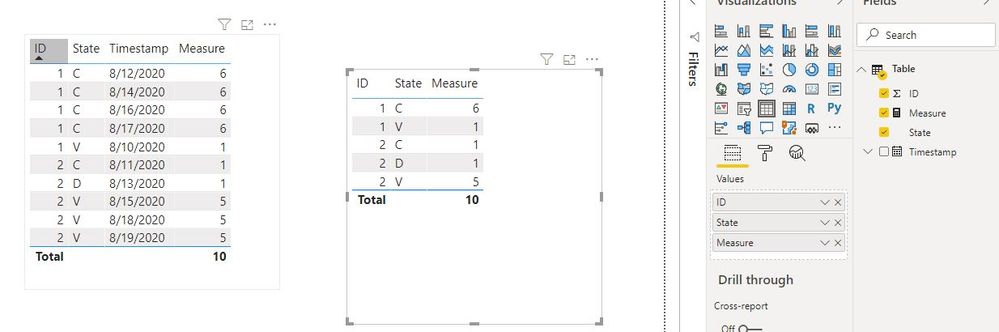
Create a measure
Measure =
VAR mind =
CALCULATE (
MIN ( 'Table'[Timestamp] ),
ALLEXCEPT ( 'Table', 'Table'[ID], 'Table'[State] )
)
VAR maxd =
CALCULATE (
MAX ( 'Table'[Timestamp] ),
ALLEXCEPT ( 'Table', 'Table'[ID], 'Table'[State] )
)
RETURN
DATEDIFF ( mind, maxd, DAY ) + 1
Best Regards
Maggie
Community Support Team _ Maggie Li
If this post helps, then please consider Accept it as the solution to help the other members find it more quickly.
@Anonymous , You can have diff between two rows as a new column
datediff(maxx(filter(Table, [Timestamp] <[Timestamp] ),[Timestamp]),[Timestamp],Minute)
You can use that for more calculations
The Power BI Data Visualization World Championships is back! Get ahead of the game and start preparing now!
Check out the November 2025 Power BI update to learn about new features.
| User | Count |
|---|---|
| 59 | |
| 46 | |
| 42 | |
| 23 | |
| 18 |
| User | Count |
|---|---|
| 193 | |
| 123 | |
| 99 | |
| 67 | |
| 49 |