cancel
Showing results for 
Search instead for 
Did you mean: 

The Power BI Data Visualization World Championships is back! Get ahead of the game and start preparing now! Learn more

Reply
Anonymous
Not applicable

How can I make the percentage of column total show up in a bar chart?

I'd like to show percentages instead of counts on the bar chart, like this. 


Annotation 2020-05-18 184527.jpg


I tried this formula, but it's not calculating per quarter

% opp count per FQ =
DIVIDE(
COUNT(Sheet1[Opportunity Count]),
CALCULATE(COUNT(Sheet1[Opportunity Count]),ALLEXCEPT(Sheet1,Sheet1[Deal Size bucket]))
)
 
Also, I need this to work with filters. Is that possible? 

Here's a dummy .pbix 
https://drive.google.com/file/d/1jVgq4evyqQOz1xFo18kAwfWCnUn1-oxi/view?usp=sharing
1 ACCEPTED SOLUTION
Anonymous
Not applicable

I got someone to help me. The answer was 

% opp count per FQ =
DIVIDE(
CALCULATE(SUM(Sheet1[Opportunity Count]),
     ALLEXCEPT(Sheet1,Sheet1[Deal Type],Sheet1[Quarter],Sheet1[Deal Size bucket]))
,

CALCULATE(sum(Sheet1[Opportunity Count]),
     ALLEXCEPT(Sheet1,Sheet1[Deal Type],Sheet1[Quarter]))
)

View solution in original post

3 REPLIES 3
VasTg
Memorable Member
Memorable Member

@Anonymous 

I moved the % mesuare to "Value" and the report shows % per quarter.

image.png


Do you want to keep the count as value but just display the % as labels? Your ask is not clear, please elaborate.


If it helps, mark it as a solution

Kudos are nice too.

Connect on LinkedIn
Anonymous
Not applicable

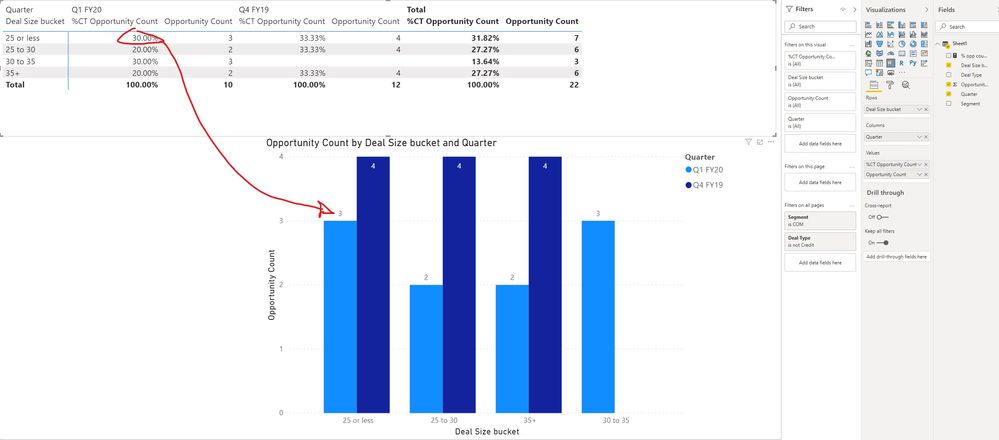
@VasTg Sorry it was unclear. The column "% of opp count per FQ" is the formula I made and it's incorrect. The correct percentage for the first column should be 30%. There are four light blue columns, and a total of 10 units for Q1 FY20. The first coumn is 3, so it's 3/10, or 30% odf that quarter. Like this


Annotation 2020-05-19 103452.jpg


Anonymous
Not applicable

I got someone to help me. The answer was 

% opp count per FQ =
DIVIDE(
CALCULATE(SUM(Sheet1[Opportunity Count]),
     ALLEXCEPT(Sheet1,Sheet1[Deal Type],Sheet1[Quarter],Sheet1[Deal Size bucket]))
,

CALCULATE(sum(Sheet1[Opportunity Count]),
     ALLEXCEPT(Sheet1,Sheet1[Deal Type],Sheet1[Quarter]))
)

Helpful resources

Announcements
Power BI DataViz World Championships

Power BI Dataviz World Championships

The Power BI Data Visualization World Championships is back! Get ahead of the game and start preparing now!

December 2025 Power BI Update Carousel

Power BI Monthly Update - December 2025

Check out the December 2025 Power BI Holiday Recap!

FabCon Atlanta 2026 carousel

FabCon Atlanta 2026

Join us at FabCon Atlanta, March 16-20, for the ultimate Fabric, Power BI, AI and SQL community-led event. Save $200 with code FABCOMM.