cancel
Showing results for 
Search instead for 
Did you mean: 

The Power BI Data Visualization World Championships is back! Get ahead of the game and start preparing now! Learn more

Reply
Maha1
Helper II
Helper II

How can I get blank values if no filter was applied?

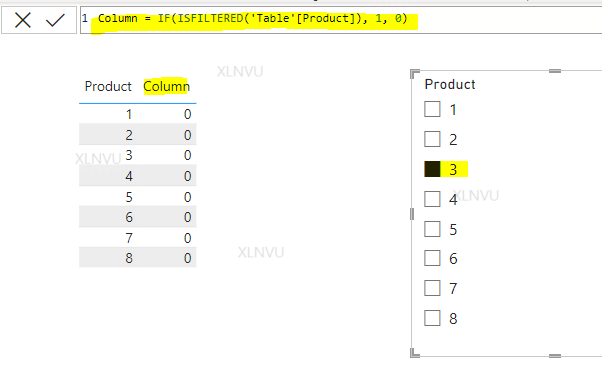
I want my table to show blank if no selection was applied. I tried ISFILTERED and HASONEVALUE but they all keep giving the same results:


Capture.PNG

1 ACCEPTED SOLUTION
Anonymous
Not applicable

Hi @Maha1 ,

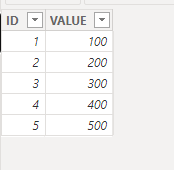
I can give you an example, here is my sample data:

vjunyantmsft_0-1710730206384.png

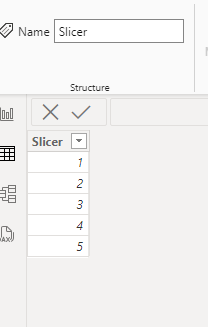
You need to build another table for slicer:

vjunyantmsft_1-1710730230840.png

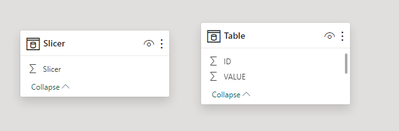
There is no relationship between tables:

vjunyantmsft_3-1710730289496.png

Use this DAX to create a measure:


Measure = 
IF(
    ISFILTERED(Slicer[Slicer]),
    IF(
        MAX('Table'[ID]) IN VALUES(Slicer[Slicer]),
        1,
        0
    ),
    0
)


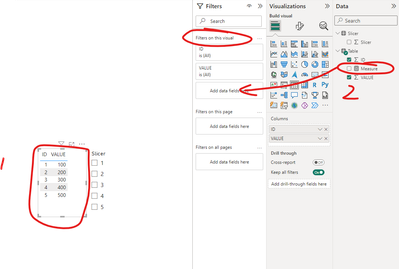
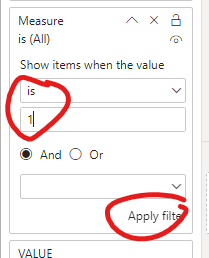
Please follow the screenshot below to set up:

vjunyantmsft_4-1710730368913.png

vjunyantmsft_5-1710730387528.png

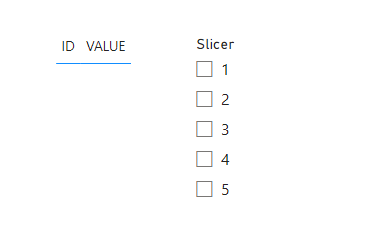
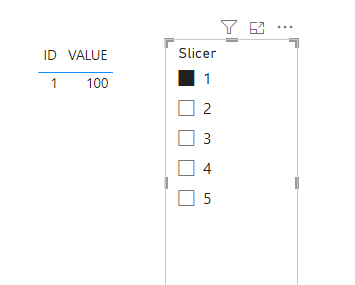
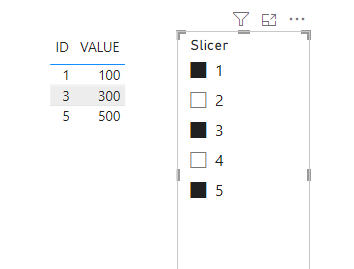
The final output is as below:

vjunyantmsft_6-1710730414342.png
vjunyantmsft_7-1710730421058.png

vjunyantmsft_8-1710730428075.png


Best Regards,
Dino Tao
If this post helps, then please consider Accept it as the solution to help the other members find it more quickly.

View solution in original post

5 REPLIES 5
Wilson_
Super User
Super User

Hi Maha1,


Try BLANK() instead of 0.


----------------------------------
If this post helps, please consider accepting it as the solution to help other members find it quickly. Also, don't forget to hit that thumbs up and subscribe! (Oh, uh, wrong platform?)


Did I answer your question? Mark my post as a solution!

Proud to be a Super User!


the same thing, all results with blank

I'm confused, I thought you said you wanted blanks.


Did I answer your question? Mark my post as a solution!

Proud to be a Super User!


I want the whole table to be empty if no selection was applied

Anonymous
Not applicable

Hi @Maha1 ,

I can give you an example, here is my sample data:

vjunyantmsft_0-1710730206384.png

You need to build another table for slicer:

vjunyantmsft_1-1710730230840.png

There is no relationship between tables:

vjunyantmsft_3-1710730289496.png

Use this DAX to create a measure:


Measure = 
IF(
    ISFILTERED(Slicer[Slicer]),
    IF(
        MAX('Table'[ID]) IN VALUES(Slicer[Slicer]),
        1,
        0
    ),
    0
)


Please follow the screenshot below to set up:

vjunyantmsft_4-1710730368913.png

vjunyantmsft_5-1710730387528.png

The final output is as below:

vjunyantmsft_6-1710730414342.png
vjunyantmsft_7-1710730421058.png

vjunyantmsft_8-1710730428075.png


Best Regards,
Dino Tao
If this post helps, then please consider Accept it as the solution to help the other members find it more quickly.

Helpful resources

Announcements
Power BI DataViz World Championships

Power BI Dataviz World Championships

The Power BI Data Visualization World Championships is back! Get ahead of the game and start preparing now!

December 2025 Power BI Update Carousel

Power BI Monthly Update - December 2025

Check out the December 2025 Power BI Holiday Recap!

FabCon Atlanta 2026 carousel

FabCon Atlanta 2026

Join us at FabCon Atlanta, March 16-20, for the ultimate Fabric, Power BI, AI and SQL community-led event. Save $200 with code FABCOMM.