cancel
Showing results for 
Search instead for 
Did you mean: 

The Power BI Data Visualization World Championships is back! Get ahead of the game and start preparing now! Learn more

Reply
Jaxidian
Frequent Visitor

How can I do a Top N by Date in a Table?

Let's say I have a few visualizations of accounts (sales, profits, etc.) but I also want to have a Table visualization that shows the Top 10 accounts with contracts expiring soon (let's say the AccountExpirationDate is actually on the Account table in the database to keep this easy). How do I tell it to show only the top 10 accounts that are expiring within this table?


Every time I drag the date into the Top N "By value" filter box, it wants to count the dates rather than using that exact date value as the "by value" field.

1 ACCEPTED SOLUTION

@Jaxidian


Please made a double check of this:


1. Do you have the latest version of PBI Desktop? If No, Please download the latest version of Power BI Desktop. January Update.

2. Your column Expiration Date is Date Type.?


Lima - Peru

View solution in original post

4 REPLIES 4
Vvelarde
Community Champion
Community Champion

hi @Jaxidian


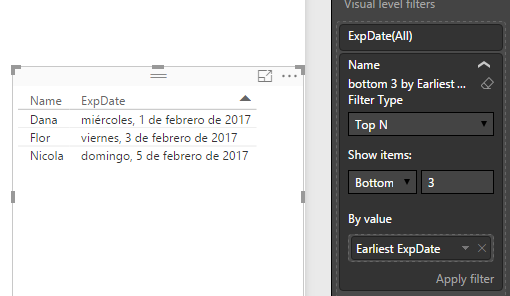
Try with this TopN (Bottom)


TopN.png


Lima - Peru

Hi @Vvelarde,


Thank you for that suggestion. I've tried that but the problem is that I cannot select "Earliest xxx" or "Latest xxx" (I assume that's the other option) because it's trying to aggregate my dates by counting them. You're somehow accomplishing something that I'm missing to get to your screenshot with "Earliest" as an option for the Dates.


pbitop.png

@Jaxidian


Please made a double check of this:


1. Do you have the latest version of PBI Desktop? If No, Please download the latest version of Power BI Desktop. January Update.

2. Your column Expiration Date is Date Type.?


Lima - Peru

@Vvelarde,


The data type is datetime but the update was the problem. I was still on the Nov release. Just installed the Jan release and the problem has been solved!


Thank you for the help!! 🙂


-Shane

Helpful resources

Announcements
Power BI DataViz World Championships

Power BI Dataviz World Championships

The Power BI Data Visualization World Championships is back! Get ahead of the game and start preparing now!

December 2025 Power BI Update Carousel

Power BI Monthly Update - December 2025

Check out the December 2025 Power BI Holiday Recap!

FabCon Atlanta 2026 carousel

FabCon Atlanta 2026

Join us at FabCon Atlanta, March 16-20, for the ultimate Fabric, Power BI, AI and SQL community-led event. Save $200 with code FABCOMM.