Join us at FabCon Atlanta from March 16 - 20, 2026, for the ultimate Fabric, Power BI, AI and SQL community-led event. Save $200 with code FABCOMM.
Register now!The Power BI Data Visualization World Championships is back! Get ahead of the game and start preparing now! Learn more
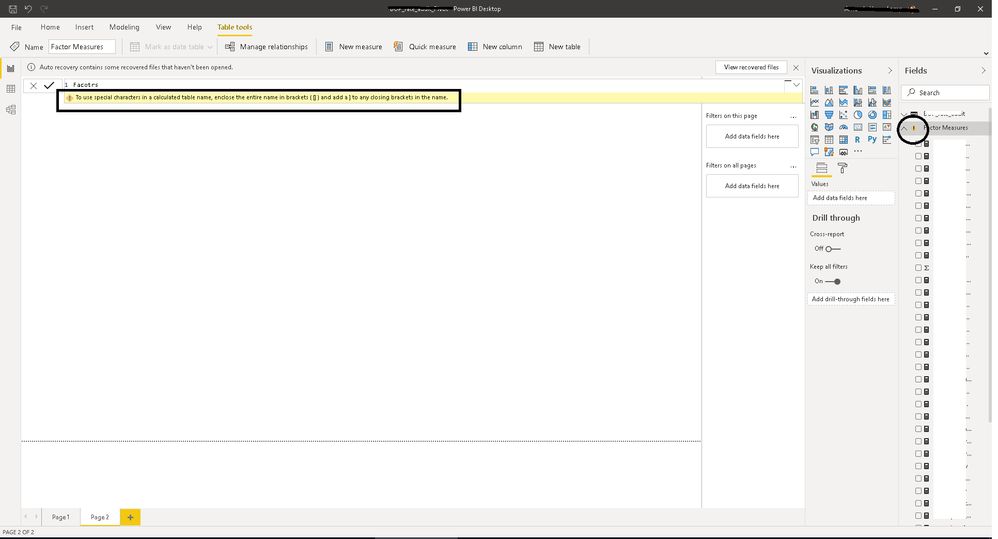
I am getting an error for the name of my table. The specific error is "to use special characters in a calculated table name, enclose the entire name in brackets and add a ] to any closing brackets in the name."
I have attempted to change the name to add brackets, attempted changing the name, etc. You will see that the calculated measures to the right are all in working order with no issues. It appears to be that it doesn't like my table name, but I cannot figure out why.
Solved! Go to Solution.
Hi Akon,
Adding an "=" sign after your table name should fix this. like:
facotrs =
Regards,
Tim
Proud to be a Super User!
Hi Akon,
Adding an "=" sign after your table name should fix this. like:
facotrs =
Regards,
Tim
Proud to be a Super User!
Thank you!
The Power BI Data Visualization World Championships is back! Get ahead of the game and start preparing now!
| User | Count |
|---|---|
| 39 | |
| 38 | |
| 38 | |
| 28 | |
| 27 |
| User | Count |
|---|---|
| 124 | |
| 88 | |
| 73 | |
| 66 | |
| 65 |