
cancel
Showing results for 
Search instead for 
Did you mean: 

Get Fabric Certified for FREE during Fabric Data Days. Don't miss your chance! Request now

Reply
lawrencema0829
Regular Visitor

Hover value doesn't show the value with 1,000 separator

Hello,


After building up a chart in PBI desktop, Mouse hover the chart and the value doesn't show the value with 1,000 separator. For example: It shows 123456789, but I want it to show 123,456,789.


How to do it?


Thank you for your concern.


Lawrence

1 ACCEPTED SOLUTION
Sean
Community Champion
Community Champion

@lawrencema0829


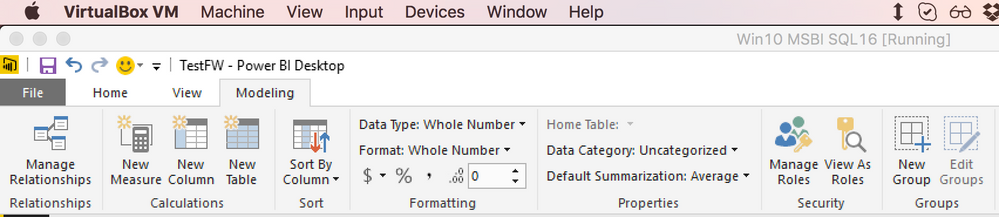
Go to the Modeling Tab => its under Formatting options


Thousand Separator.png


This should do it!

View solution in original post

2 REPLIES 2
BetterCallFrank
Resolver IV
Resolver IV

Hi @lawrencema0829


select your measure/column and go to number formating, enable "thousand separator"


Screenshot at Jan. 07 17-24-14.png


And there you go 🙂


HTH,

Frank

Sean
Community Champion
Community Champion

@lawrencema0829


Go to the Modeling Tab => its under Formatting options


Thousand Separator.png


This should do it!

Helpful resources

Announcements
November Power BI Update Carousel

Power BI Monthly Update - November 2025

Check out the November 2025 Power BI update to learn about new features.

Fabric Data Days Carousel

Fabric Data Days

Advance your Data & AI career with 50 days of live learning, contests, hands-on challenges, study groups & certifications and more!

FabCon Atlanta 2026 carousel

FabCon Atlanta 2026

Join us at FabCon Atlanta, March 16-20, for the ultimate Fabric, Power BI, AI and SQL community-led event. Save $200 with code FABCOMM.

Top Solution Authors
Top Kudoed Authors