cancel
Showing results for 
Search instead for 
Did you mean: 

Learn from the best! Meet the four finalists headed to the FINALS of the Power BI Dataviz World Championships! Register now

Reply
PXJ99
Frequent Visitor

Hover showing two years as visual


Hi all,


I really need your help please.

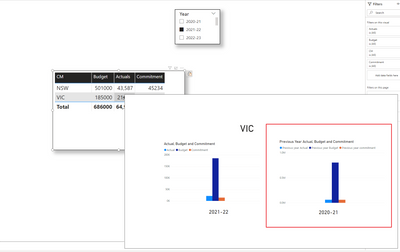
I have a table visual which has data in columns from 3 data sets, which is connected to year slicer.


I have been asked to add a hover with bar chart visual showing 2 years. I was able to create a bar chart with current year but I am unable to do one with previous year.


Could you please help, I've added my files to the below link. Would greatly appreacite your help. Thanks.


https://www.dropbox.com/t/DbPbX8SqNJgtDcKC

5 REPLIES 5
PXJ
Frequent Visitor

Both the solutions provided by Allison and WangBT are brilliant and I have learned interesting DAX measures. Thank you both very much. I'd like to accept both your responses as solutions. 

Walter_W2022
Resolver II
Resolver II

@PXJ99 , I may provide another solution, not sure whether it is what you want. 😀


20230331-Test power bi.pbix


wangbt89_0-1680251460624.png


Thank you very much.

AllisonKennedy
Community Champion
Community Champion

@PXJ99 


This is much easier with a proper date table. I have converted your Month and Year columns into a start of month column. Would rather do this in data source or Power Query, but used DAX so I didn't need to connect to your excel files.


I then added my date table: https://excelwithallison.blogspot.com/2020/04/dimdate-what-why-and-how.html 


Finally, created a measure for Prior Year:


Actuals Prior Year =
CALCULATE(SUM(Actuals[Actuals]), DATEADD(Dates_DIM[Date], -1, YEAR))


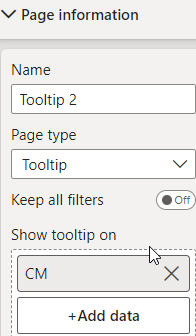
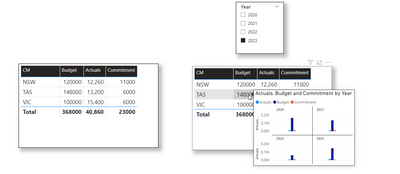
Other option is to turn off the 'Keep all filters' on your tooltip page and then you can still access all the years. I put 'Year' in the 'small multiples' for Tooltip 2 page:
AllisonKennedy_1-1680232800151.png


AllisonKennedy_0-1680232682331.png


Please @mention me in your reply if you want a response.

Copying DAX from this post? Click here for a hack to quickly replace it with your own table names

Has this post solved your problem? Please Accept as Solution so that others can find it quickly and to let the community know your problem has been solved.
If you found this post helpful, please give Kudos C

I work as a Microsoft trainer and consultant, specialising in Power BI and Power Query.
www.excelwithallison.com

Thank you very much.


Helpful resources

Announcements
Join our Fabric User Panel

Join our Fabric User Panel

Share feedback directly with Fabric product managers, participate in targeted research studies and influence the Fabric roadmap.

February Power BI Update Carousel

Power BI Monthly Update - February 2026

Check out the February 2026 Power BI update to learn about new features.

FabCon Atlanta 2026 carousel

FabCon Atlanta 2026

Join us at FabCon Atlanta, March 16-20, for the ultimate Fabric, Power BI, AI and SQL community-led event. Save $200 with code FABCOMM.