Join us at FabCon Atlanta from March 16 - 20, 2026, for the ultimate Fabric, Power BI, AI and SQL community-led event. Save $200 with code FABCOMM.
Register now!The Power BI Data Visualization World Championships is back! Get ahead of the game and start preparing now! Learn more
Guys,
I need to find a text from one table to another table's first colum and return TRUE if matches and FALSE if not.
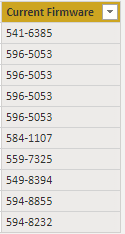
Below is the Text to compare:
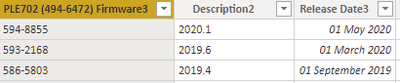
with base data :
I need to Hlookup first data with the 1st row of the base data. Please help !!!!
Thanks
Solved! Go to Solution.
Hi @rajend12 ,
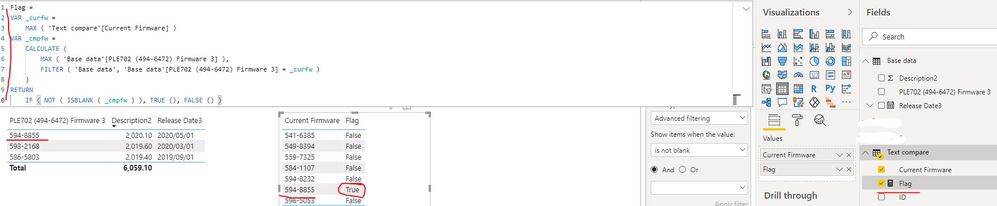
You can create a measure as below:
Flag =
VAR _curfw =
MAX ( 'Text compare'[Current Firmware] )
VAR _cmpfw =
CALCULATE (
MAX ( 'Base data'[PLE702 (494-6472) Firmware 3] ),
FILTER ( 'Base data', 'Base data'[PLE702 (494-6472) Firmware 3] = _curfw )
)
RETURN
IF ( NOT ( ISBLANK ( _cmpfw ) ), TRUE (), FALSE () )
Best Regards
Rena
Community Support Team _ Rena Ruan
If this post helps, then please consider Accept it as the solution to help the other members find it more.
Hi @rajend12 ,
You can create a measure as below:
Flag =
VAR _curfw =
MAX ( 'Text compare'[Current Firmware] )
VAR _cmpfw =
CALCULATE (
MAX ( 'Base data'[PLE702 (494-6472) Firmware 3] ),
FILTER ( 'Base data', 'Base data'[PLE702 (494-6472) Firmware 3] = _curfw )
)
RETURN
IF ( NOT ( ISBLANK ( _cmpfw ) ), TRUE (), FALSE () )
Best Regards
Rena
Community Support Team _ Rena Ruan
If this post helps, then please consider Accept it as the solution to help the other members find it more.
You may find this link intriguing: https://data-mozart.com/powerbi/use-aggregate-functions-on-rows-in-power-bi/
Or do it in Power Query.
The Power BI Data Visualization World Championships is back! Get ahead of the game and start preparing now!
| User | Count |
|---|---|
| 41 | |
| 38 | |
| 36 | |
| 31 | |
| 28 |
| User | Count |
|---|---|
| 129 | |
| 88 | |
| 79 | |
| 68 | |
| 63 |